
Best Call Blocker Apps for Android (2026)
Few things sour your morning like three spam calls before your coffee is even ready. The good news is that a solid call blocker can hand you back your peace and quiet, filtering robocalls, scammers, and those relentless warranty reminders. We spent weeks living with the apps below on real Android phones, and these are the ones we kept coming back to. For more ways to tame your phone, browse our full communication apps hub, and if you also want to record the calls you do answer, see the best call recorder apps for Android.
1. Truecaller
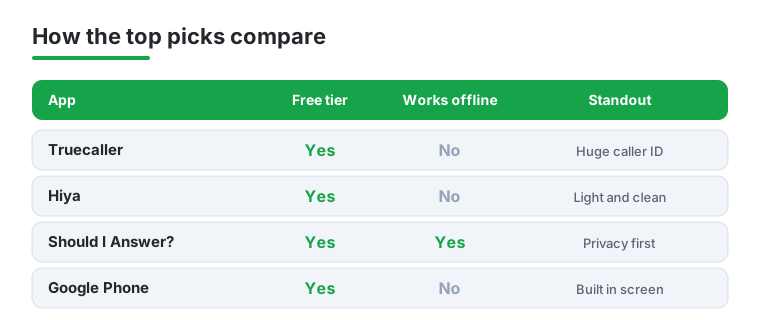
Truecaller is the heavyweight here, and for good reason. Its community reported database is enormous, so an unknown number usually arrives with a name and a spam score before you answer. We found the caller ID genuinely accurate in testing, flagging warranty scams instantly. The free tier handles blocking well, while Premium adds ghost call protection and ad removal for a yearly fee.
2. Hiya
Hiya feels lighter and cleaner than Truecaller, which is exactly why some people prefer it. It quietly blocks known spam and fraud numbers without nagging you for permissions every five minutes. We liked how unobtrusive it was day to day, just silently catching the junk. The free version covers the essentials, and Hiya Premium adds a personal block list and more aggressive auto blocking for a modest monthly cost.
3. Should I Answer?
This is the privacy lover's pick. Should I Answer? works largely offline using a local database, so it does not upload your contacts or constantly phone home. In our testing it reliably flagged nuisance numbers and let us block entire ranges. It is completely free with no real paywall, which is rare. If you distrust apps that hoover up data, this one earns a permanent spot on your phone.
4. Call Control
Call Control leans on a community blacklist and smart reverse number lookup to stop spam before your phone even buzzes. We appreciated the personal blacklist and the option to block by area code, handy when one region keeps spamming you. It also screens spam texts. The free version is generous, and the paid upgrade unlocks reverse lookups and a cleaner, ad free experience for power users.
5. RoboKiller
RoboKiller is the one that fights back. Beyond blocking, it deploys hilarious Answer Bots that keep telemarketers talking to a recording while you get on with your life. During testing the spam catch rate was impressive, and listening to the bot waste a scammer's time is oddly satisfying. There is no free ride here, it is subscription only, but for relentless robocall victims the monthly fee feels fair.
6. Google Phone
Do not overlook the dialer already on many Pixel and Android One devices. Google Phone has built in Call Screen and a spam filter that quietly sends suspected robocalls to voicemail. On a Pixel, the assistant can even answer and ask who is calling for you. It is free, deeply integrated, and needs zero setup. For a lot of people, this is genuinely all the call blocking they need.
7. Calls Blacklist
Calls Blacklist keeps things refreshingly simple. There is no giant cloud database, just a tidy app that lets you blacklist specific numbers, private callers, or anything not in your contacts. We found it perfect for blocking one persistent ex coworker or a single annoying number. It blocks texts too, runs light on resources, and the free tier covers almost everything. A small premium removes ads.
8. Mr. Number
From the makers of Hiya, Mr. Number focuses on letting you block whole groups of numbers at once, like every caller from a certain area code or country. That made it a lifesaver when one prefix kept spamming us repeatedly. It identifies unknown callers and reports spam to a shared community. The core app is free, with optional extras, and the interface stays clean and beginner friendly.
9. Nomorobo
Nomorobo built its name catching robocalls before they ring, and the Android app brings that reputation to your dialer. Setup is quick and the blocking is dependable, especially against the automated dialers that plague mobiles. It runs on a low monthly subscription with a free trial so you can test it first. We found it a no fuss option for people who just want the spam to stop.
10. TrapCall
TrapCall does something the others do not, it unmasks blocked and private numbers so you can finally see who keeps hiding behind No Caller ID. For anyone dealing with harassment, that is a genuine relief, and it can blacklist those numbers afterward. It also records calls and transcribes voicemail. This is a paid subscription service, but the unmasking feature is worth it if anonymous callers are the real problem.
11. Showcaller
Showcaller blends caller ID with straightforward call blocking in one tidy package. It identifies incoming spam, lets you build a personal block list, and even shows business numbers with logos so you know who is calling. We liked the clean layout and how lightweight it felt on older phones. The free version is fully usable, and a cheap premium tier strips ads and unlocks unlimited lookups.
Picking a call blocker is less about chasing the app with the longest feature list and more about matching one tool to how you actually get bothered. Before you install anything, it helps to understand what these apps really do under the hood, what they ask for in return, and whether you even need a separate app at all.
How call blocking actually works
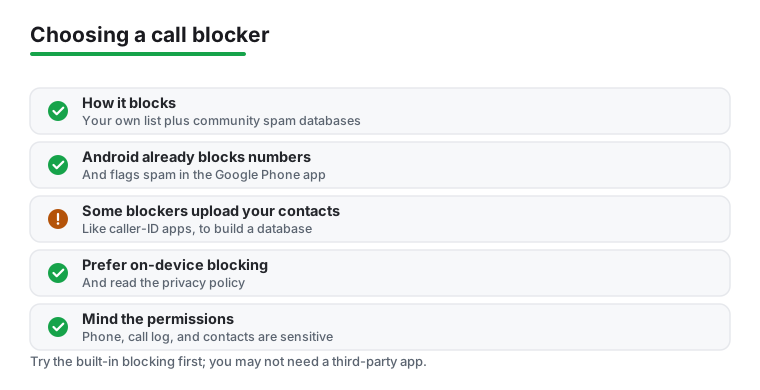
Almost every call blocker combines two simple ideas. The first is your own block list, a private list of numbers you have personally chosen to silence. When one of those numbers calls, the app intercepts it and either rejects it outright or sends it straight to voicemail. This part works entirely on your phone and needs no internet connection. It is reliable, predictable, and completely under your control.
The second idea is the community spam database. Apps like Truecaller, Hiya, and Call Control collect reports from millions of users. When enough people mark a number as a telemarketer or a scam, it gets a bad reputation in that shared database. The next time that number calls anyone using the app, it is flagged or blocked automatically, even though you never added it yourself. This is what catches the robocalls you have never seen before.
The trade off is straightforward. A personal block list is precise but reactive, since you only block a number after it has already bothered you once. A community database is proactive and catches far more, but it depends on the app phoning home to check reputations, and it is only as current as the reports flowing into it. Scammers rotate through fresh numbers constantly, so no database is ever complete. The better apps blend both approaches.
What gets blocked, and what slips through
Known spam numbers, repeat robocallers, and anything on your personal list are the easy wins. The harder cases are spoofed numbers, where a scammer fakes a local prefix to look like a neighbor, and brand new numbers that no one has reported yet. Some apps let you block whole ranges or anyone not in your contacts, which is a blunt but effective tool if the junk keeps coming from one area code. Just remember that blocking everyone outside your contacts can also silence a delivery driver, a clinic, or a returning call you were waiting for.
The permissions involved
Call blockers need real access to do their job, and it is worth knowing why before you tap accept. Expect to grant some or all of the following.
- Phone and call management. The app has to see incoming calls and act on them, so it needs permission to read call state and, on modern Android, to register as a call screening or spam service. Without this it simply cannot intercept anything.
- Call log. Many apps read your recent calls so they can show who rang, let you block a number after the fact, and learn your patterns. This is convenient but also revealing, since your call history says a lot about who you talk to.
- Contacts. This one deserves a pause. Apps request contacts so they can recognize people you know and avoid blocking them, and so caller ID can name an unknown number. The catch is that some apps also upload your address book to enrich their shared database, which means your friends' numbers can end up in a cloud you do not control.
A reasonable rule is to grant only what an app clearly needs for the feature you want. If you only care about a personal block list, an app that demands your full contact book and call history is asking for more than the task requires.
You may not need a third party app at all
This is the part most lists skip. Android already includes solid blocking tools, and for a lot of people they are enough. In the Google Phone app that ships on Pixel and many other devices, you can long press any number in your recent calls and choose to block and report it. There is also a built in Caller ID and spam protection setting that quietly identifies suspected spam and can filter the worst robocalls into a silent bucket so your phone never even rings.
If you mostly want to silence a handful of specific numbers, or you just want known robocalls filtered out, try the built in tools first. They cost nothing, add no extra app to maintain, and do not introduce a new company into your call data. Reach for a dedicated blocker only when you need something the built in tools do not offer, such as a much larger spam database, blocking entire number ranges, or richer caller ID. Treat the third party app as an upgrade you choose on purpose, not a default you install reflexively.
A quick word on battery
You will see apps promise to save battery by managing calls. Be honest with yourself here, the blocking itself uses almost no power. A lightweight app that checks numbers on your device barely registers. Apps that constantly sync with a cloud database use a little more, but on any modern phone the difference is too small to notice. Battery saving as a selling point is mostly placebo, so choose your blocker on how well it blocks, not on power claims.
A privacy note worth reading twice
The uncomfortable truth behind the biggest spam databases is that they are partly built from users' contacts. Just like many caller ID apps, some call blockers ask to upload your address book, and that is how they learn to put a name on an unknown number. The benefit is better identification. The cost is that you are handing over other people's phone numbers, names, and sometimes more, often without those people ever agreeing to it.
If that bothers you, and it reasonably might, prefer on device blocking. Apps that work from a local database or that only manage a personal block list keep your data on the phone and ask for far less. Should I Answer and Calls Blacklist are examples of the lighter, more private style, and the built in Google Phone tools keep most of the work on Google's existing services rather than a new third party. Whatever you pick, take two minutes to read the privacy policy and check what the app says it collects and uploads. If an app insists on your contacts before it will block a single number, that is a fair reason to walk away.
How a few of our picks compare
Not sure which to start with? Here is how our four favorites stack up on the things that matter most when you are choosing a call blocker.
Frequently asked questions
Do call blocker apps actually stop spam calls?
Yes, the good ones make a real difference. Apps that tap into large shared databases, like Truecaller and Hiya, catch the vast majority of known spam and robocalls automatically. No app blocks one hundred percent, since scammers spin up new numbers daily, but in our testing a decent blocker cut the noise dramatically within the first week.
Are free call blocker apps good enough?
For most people, absolutely. Free tiers from Should I Answer?, Calls Blacklist, and even the built in Google Phone dialer handle everyday blocking without costing a penny. You generally only need a paid plan if you want extras like reverse number lookups, answer bots that waste scammers' time, or the ability to unmask private callers.
Will a call blocker drain my battery or slow my phone?
Not noticeably with the well built ones. Lightweight apps such as Calls Blacklist and Should I Answer? barely register on battery use because they check numbers locally. Heavier apps with constant cloud syncing use a little more, but on any modern Android phone the impact during our testing was small enough that we never thought about it.
Can I block calls without giving an app my contacts?
You can. Should I Answer? works mostly offline and does not upload your address book, and simple tools like Calls Blacklist only need access to the dialer to function. If privacy matters to you, look for apps with a clear policy and avoid anything that insists on uploading contacts before it will block a single number.
Is the blocking done on my phone or in the cloud?
It depends on the app. A personal block list always lives on your phone and works offline. Community spam detection, on the other hand, checks a number against an online database, so it needs a connection and shares some data with the app maker. Privacy focused apps lean on local databases to keep more of that work on device.
Why does a call blocker want access to my contacts?
Usually for two reasons. First, so it can recognize people you know and avoid blocking them by accident. Second, and more sensitive, some apps upload your contacts to help build their shared caller ID database. The first reason is reasonable, the second is the one to scrutinize. If you are not comfortable sharing other people's numbers, choose an app that does not require contact access.