
Best Fitness Apps for Android (2026)
Finding a fitness app you actually open on day 30, not just day one, is harder than it sounds. We loaded these onto a couple of Android phones and a Wear OS watch and used them through real runs, gym sessions, and lazy weeks too. Below are the apps that earned a permanent spot on our home screens, with honest notes on what each one is great at and where the free version stops.
1. Strava
If you run or ride, Strava is still the one to beat. It maps your route, tracks pace and elevation, and drops you into segment leaderboards that make a Tuesday jog weirdly competitive. On Android it pairs cleanly with most watches and chest straps, and the live activity feed keeps you accountable to friends. The free tier covers core tracking; the subscription unlocks route planning and deeper training analysis.
2. Nike Training Club
Nike Training Club is what we recommend to anyone who wants guided workouts without a gym. There are hundreds of bodyweight and dumbbell sessions, each with a clear video trainer you follow on screen while you sweat on the mat. It suits total beginners and busy people who just want to be told what to do. The best part is that the whole library is genuinely free.
3. Strong
For lifters who track every set, Strong is a joy. Logging is fast, the rest timer fires automatically, and it remembers your last weights so you are not guessing in the squat rack. In our testing it felt built by people who actually train, with clean charts for progressive overload. The free version caps you at a few routines, and Strong Pro lifts that limit.
4. Adidas Running (Runtastic)
Adidas Running, the app many of us still call Runtastic, is a polished alternative to Strava for everyday runners and walkers. The GPS tracking is reliable, the voice coach cheers your splits through your headphones, and the story map of each route looks great on an Android screen. It works well for casual fitness, not just racing. Free covers tracking, while the premium plan adds training plans and detailed stats.
5. MyFitnessPal
Fitness is half movement and half what you eat, and MyFitnessPal still owns the food side. Its barcode scanner pulls up nutrition for almost anything in your kitchen, and logging a meal takes seconds once it learns your habits. It suits anyone counting calories or macros alongside training. The free tier handles basic logging, though moving the barcode scanner behind a paywall annoyed many Android users.
6. Fitbod
Fitbod is the gym buddy who plans your session for you. Tell it your available equipment and which muscles are still sore, and it builds a balanced strength workout on the spot. We found it brilliant for breaking out of a rut, since it quietly rotates exercises so nothing goes stale. You get a handful of free workouts to try, then a subscription keeps the tailored plans coming.
7. Google Fit
Google Fit is the quiet default that just works on Android. It counts steps and Heart Points in the background using only your phone, so there is nothing to set up and nothing to pay. It suits anyone who wants a gentle nudge to move more without committing to hardcore tracking. Pair it with a Wear OS watch and your heart rate and workouts flow in automatically. Completely free.
8. Centr
Centr, the app fronted by Chris Hemsworth, bundles workouts, meal plans, and guided meditation into one slick package. The classes feel like a boutique studio, with real trainers walking you through HIIT, boxing, and strength on screen. It suits people who want structure across the whole day. There is no meaningful free tier, so it is a subscription play, but the production quality is a clear step up.
9. JEFIT
JEFIT is a favorite among serious gym goers who want a huge exercise database without paying upfront. Every movement comes with an animation showing proper form, and the planner lets you build splits in detail. We liked how deep the logging goes for the free price, and the community routines are a goldmine when you need a fresh program. A paid tier removes ads and adds analytics.
10. Down Dog
Down Dog generates a fresh yoga class every single time, so you never replay the same video twice. You pick the length, pace, focus, and even the instructor voice, and it builds a flowing sequence to match. It suits anyone who wants yoga, HIIT, or barre that bends around their mood. It stays generous on Android, with a low cost subscription unlocking the full set of options.
11. Peloton
You do not need the bike to get a lot out of the Peloton app on Android. The strength, running, and yoga classes are genuinely motivating, led by instructors who make you want one more rep. It suits people who thrive on a coach's energy rather than a silent timer. There is no free tier anymore, since Peloton dropped it in 2024, so new users get a seven day free trial and then a paid App membership that opens the full library.
How to choose a fitness app for Android
The right app is the one that matches how you actually move, not the one with the longest feature list. Before you install anything, it helps to be honest about what you want from it. Are you trying to run more, lift heavier, eat better, or just close a few rings on a watch? A running app and a strength app solve very different problems, and trying to make one tool do everything is the fastest way to abandon it by February. It is also worth being realistic about how much friction you will tolerate. The best app on paper is useless if logging a single set takes six taps, so a quick trial during the free period tells you more than any feature list.
Match the app to your activity
Start with the core job. If you run, ride, or walk outdoors, you want reliable GPS tracking, clear pace and distance, and a route map you can look back on. If you train in a gym, you want fast set and rep logging, a rest timer, and a history that shows whether your numbers are creeping up over time. If you work out at home with little or no equipment, look for guided video workouts you can follow on screen. Most people only need one or two of these well, rather than all of them done poorly.
Plans, structure, and coaching
Some apps simply record what you did. Others tell you what to do next. A few things worth weighing:
- Tracking only: good if you already know your routine and just want a log and some charts.
- Guided workouts: useful when you want a trainer on screen and do not want to plan anything yourself.
- Adaptive plans: handy if you want the app to build sessions around your equipment, your schedule, and how recovered you feel.
There is no single best answer here. A beginner often does better with structure, while an experienced lifter may want nothing more than a clean place to write down weights.
Integrations and your other gear
Think about what else you own. On Android, most serious fitness apps connect to a Wear OS watch, a Bluetooth heart rate strap, or a separate tracker. The glue that ties them together is Health Connect, the Android system that lets apps share workouts, steps, heart rate, and sleep with each other in one place. If you want your running app to hand data to your nutrition app, check that both support Health Connect before you commit. It saves a lot of manual entry later. The same goes for whether the app exports your history. If you ever switch apps, being able to download your runs or logged sessions means years of effort do not vanish, so it is a quiet feature worth checking for.
Data and accuracy: read this before you install
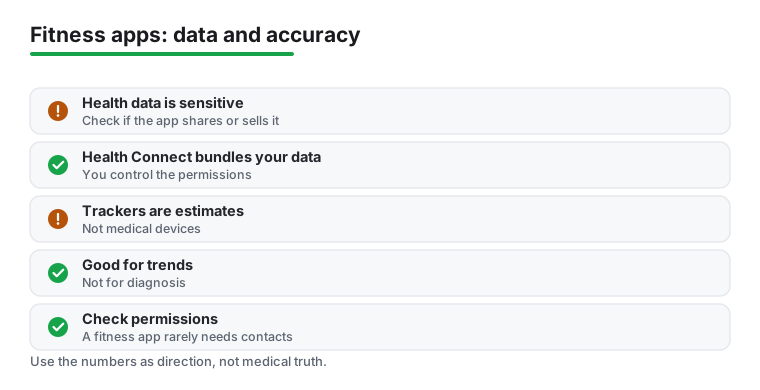
Health and fitness data is some of the most sensitive information you can put on a phone. It can reveal where you run each morning, how much you weigh, your resting heart rate, and even patterns that hint at your health. That does not mean you should avoid these apps. It means a few minutes of care up front is worth it.
Check what an app does with your data
Before you install, open the app's listing in the Play Store and read the Data safety section. Google requires developers to declare what they collect and whether they share or sell it to third parties. This is the quickest honest snapshot you will get of how an app treats your information. If a free app collects a lot and shares it broadly, that is a fair trade to know about before you sign up, not after.
A few sensible habits:
- Read the Data safety section in the Play Store before installing.
- When the app opens, review the permissions it asks for and grant only what makes sense.
- In Health Connect, you control exactly which data each app can read and write, and you can revoke any of it at any time.
- Turn off location or activity sharing in social features unless you actively want it.
One practical note on permissions. A fitness app usually does not need access to your contacts. It may ask so it can help you find friends, but that is a convenience, not a requirement, and you can decline it and still use the app fully. Be similarly cautious with always on location and microphone access if the core feature does not obviously need them.
Treat the numbers as estimates, not diagnoses
It is easy to trust a number just because a screen shows it to two decimal places. Consumer fitness trackers are not medical devices. The steps, calories, and heart rate they report are estimates produced by sensors and software making their best guess. Step counts drift, calorie burn is modeled rather than measured, and optical heart rate at the wrist can lag during quick changes in effort.
That does not make the data useless. It is genuinely good for spotting trends over weeks and months, for nudging you to move more, and for comparing one of your own workouts to another. It is not the right tool for diagnosing a condition or for any decision where precision really matters. If a reading worries you, or you have a medical concern, talk to a clinician rather than your app. Used as a motivator and a trend line, these apps earn their place. Used as a doctor, they will let you down.
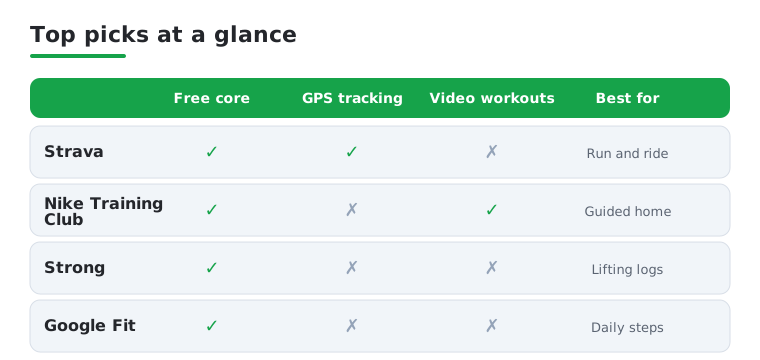
Quick comparison
Not sure which to install first? This quick comparison stacks four of our favorites against the things people ask us about most: whether the core app is free, whether it tracks your route with GPS, whether it offers guided video workouts, and what each one is genuinely best at.
Frequently asked questions
What is the best free fitness app for Android?
For pure value, Nike Training Club is hard to beat because its entire workout library is free with no paywall. If you mainly walk or run, Google Fit and Strava both offer strong free tracking. JEFIT is the pick for lifters who want a deep exercise database without paying upfront.
Do I need a smartwatch to use these apps?
No. Every app here works with just your phone, using its GPS and motion sensors to track activity. A Wear OS watch or a chest strap improves heart rate accuracy and lets you leave your phone behind on a run, but it is a nice extra rather than a requirement. For recovery you might pair one with a sleep tracker app, and golfers can lean on the same phone GPS with the best golf GPS apps.
Which app is best for tracking weightlifting?
Strong is our top pick for fast, no nonsense set logging, with an automatic rest timer and clean progress charts. Fitbod is better if you want the app to plan the session for you based on your equipment and recovery. JEFIT sits in between, offering deep tracking and form animations for free. Browse more options in our Health and Fitness hub.
Are these fitness apps safe with my health data?
The big names here use encrypted accounts and let you control what syncs to Google Fit or Health Connect. Still, it is worth reading each app's privacy settings, since some share aggregated data or push hard on paid upsells. Stick to apps from the Play Store, keep the app updated, and disable any location sharing you do not actively use.
How do I check whether a fitness app shares my data?
Open the app's page in the Google Play Store and look at the Data safety section before you install. It shows what the developer says they collect and whether any of it is shared with third parties. After installing, use Health Connect to see and control exactly which data each app can read or write, and revoke anything you are not comfortable with.
Are the calorie and heart rate numbers accurate?
Treat them as estimates rather than exact figures. Consumer trackers are not medical devices, so step counts, calorie burn, and wrist heart rate are modeled best guesses that can drift. They are useful for spotting trends over time and staying motivated, but not for diagnosis. If a reading concerns you, speak with a clinician instead of relying on the app.