
Updated September 2026 · the three recorders that replace RMC now carry their own dated listing figures, two claims about Cube ACR were corrected by its listing, and RMC's absence from Google Play was re-checked
RMC, short for Record My Call, used to be the recorder many people reached for when they wanted something that just filed every call neatly and stayed out of the way. We need to open with an honest correction, though, because the situation changed and you deserve the current picture rather than an old one. RMC: Android Call Recorder was unpublished from the Google Play Store in January 2024, and its last real update was back in 2019. You cannot install it from Play anymore, and an app that has sat untouched for that long is not something we would trust with a private conversation in 2026. So this page does two jobs. First, we explain what RMC was and why it is gone. Second, and more useful to you, we walk through how to record calls on Android legally today, with apps and built-in tools that still exist and still get updates.
Let us clear this up before anything else, because there is a lot of stale advice floating around that still tells you to install RMC. The app, made by a developer called Coconatech, was a free recorder that logged incoming and outgoing calls, let you trigger a manual recording, and saved audio in formats like MP3, AMR, MP4, 3GP and WAV. It was popular rather than polished, and its listing can no longer be read at all: a Google Play search on 5 September 2026 under both RMC Call Recorder and Record My Call returns no listing for it. It did the job for a lot of people for a long time.
Then two things caught up with it. The first was Android itself. Starting with Android 9 and tightening further in Android 10 and later, Google began closing off the path that third party apps used to capture the audio coming from the other side of a call. RMC, like every recorder that relied on that path, started returning recordings where you could hear yourself perfectly and the other person barely or not at all. Its own help notes admitted as much, advising people to switch on the loudspeaker so the microphone could pick up both voices in the room. That is a workaround, not a fix, and it is awkward to use in public.
The second thing was simple neglect. The last update landed in 2019. An app that has not been touched in years cannot keep pace with new Android versions, new permission models, or new security expectations, and Google eventually removed it from the store in early 2024. So if you still have an old APK sitting around, or you find RMC on a sideloading site, our plain advice is to leave it alone. Installing an abandoned recorder from a third party site means handing microphone, call log and storage access to code nobody has reviewed in half a decade. The point of recording a call is usually to protect yourself, and an unmaintained app does the opposite. Everything below is about what to use instead.
Before we talk tools, talk law, because this is the part that gives the page its name and it is the part people skip at their peril. Whether you are allowed to record a call comes down to where you and the other person are sitting, and the rules genuinely vary a lot. Some places follow a one party rule, which means as long as one person on the call agrees, and that person can be you, the recording is fine. Others require all party consent, where everyone on the line has to know and agree before you start. Cross a state or national border in the middle of a call and the question gets murkier still, because two different rules can apply at once.
Because of that patchwork, the habit we recommend is dead simple: say it out loud at the start of the call. A quick "just so you know, I am recording this" covers you almost everywhere, removes any argument later, and matches what the built-in recorders now do automatically. If a recording might ever be used formally, in a dispute, a complaint, or anything official, a clear verbal yes from the other person is the standard to aim for. Get the agreement on the recording itself, right at the top, so the consent and the conversation live in the same file.
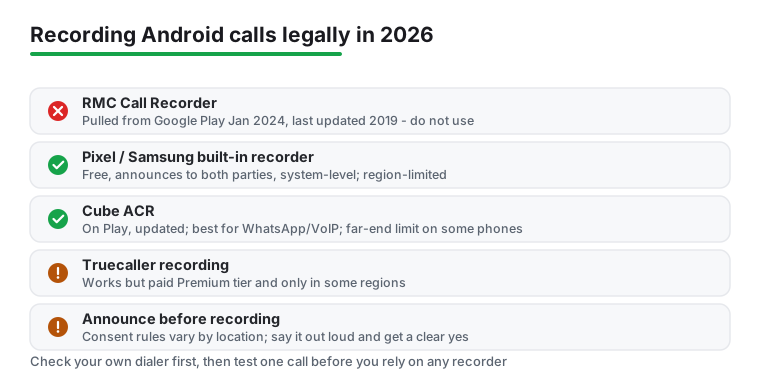
Here is the honest hierarchy for 2026, starting with the option most people should try first. If you own a Pixel 6 or newer running Android 14 or later, the recorder built into Google's own Phone app is the cleanest route, and it is free: its listing, read 5 September 2026, carries no Contains ads label and sells no in-app purchases, and Google's own description adds that call recording is available only on some devices that have Phone pre-installed. It announces "this call is being recorded" to both parties when you start, and announces again when you stop, which neatly settles the consent question for you. Samsung has also added native call recording in the United States through recent One UI updates, covering the Galaxy S25, S24 and S23 lines, the Z Fold and Flip 5 and 6, and several A-series phones. Check your dialer for a record button before you install anything, because the feature may already be sitting on your phone. One caveat worth stating: the Google and Samsung recorders are only available in certain countries, so the option can simply be missing depending on where you are.
If your phone has no built-in recorder, the third party app we point people to is Cube Call Recorder, usually written as Cube ACR. It is still on Google Play, last updated on the store on 2 January 2026 according to its listing read 5 September 2026, and it needs Android 6.0 or higher. Its real strength is internet calls: its own listing names WhatsApp, Google Meet, Line, IMO, Viber, Facebook and WeChat, which ordinary recorders miss entirely. For WhatsApp it can work automatically, popping up a small widget the moment a call starts. Be realistic about the limits, though. On many modern phones Cube still only captures regular phone calls through the microphone because of the same Android restriction that sank RMC, and the internet call recording depends on an accessibility-style connection that can break when an app like WhatsApp updates. Treat it as something to test on your specific handset, not a guarantee.
There is a third route if you came to call recording as a bonus on top of spam screening. Truecaller has its own recorder, but read the small print: as of 2026 the call recording feature is part of Truecaller's paid Premium tier, which its own listing read 5 September 2026 confirms by filing Call Recording under Truecaller Premium, it is rolled out region by region rather than everywhere, and like the others it only works where recording is legal. So it is a reasonable pick if you already pay for Truecaller and want one fewer app to manage, but it is not the free catch-all it is sometimes described as. Whichever of these you land on, the single most useful thing you can do is make one test call to a friend and play it back. That two-minute check tells you immediately whether both voices come through on your phone, and it saves you from finding out the hard way during a conversation that actually mattered.
Check this first: free, and it announces the recording
4.4 stars from 50,808,234 reviews · 5,000,000,000+ installs · free · no in-app purchases · updated on the store 3 September 2026 · by Google LLC · Contains ads: No · checked 5 September 2026
Google Play listing · 4.4 (50,808,234) · read 5 September 2026
The recorder to look for before installing anything. Free, no in-app purchases and no Contains ads label on a listing read 5 September 2026, at 4.4 stars from 50,808,234 reviews on 5,000,000,000+ installs, and updated on the store on 3 September 2026. The blunt con is availability: Google's own description says call recording is available only on some devices that have Phone pre-installed, and the feature is missing in many countries, so the button may simply not be on your phone.
Google's own listing, read 5 September 2026, describes the feature in one sentence: "Everyone hears a disclosure when the recording starts so they’re aware, and recordings are saved on your phone." Its footnote adds that it is available only on some devices that have Phone pre-installed.
Internet calls, and phones with no built-in recorder
4.1 stars from 907,724 reviews · 50,000,000+ installs · free to install · in-app purchases $1.99 to $25.99 per item · listed as Call Recorder - Cube ACR · needs Android 6.0 or higher · last updated on the store 2 January 2026 · by Cube Apps Ltd · Contains ads: Yes · checked 5 September 2026
Google Play listing · 4.1 (907,724) · read 5 September 2026
The third-party pick, and the only app on this page whose listing names internet calls: WhatsApp, Google Meet, Line, IMO, Viber, Facebook and WeChat. Free to install on a listing read 5 September 2026 that carries the Contains ads label and sells in-app purchases of $1.99 to $25.99 per item, at 4.1 stars from 907,724 reviews, the lowest rating here. Two blunt cons come from the listing itself: it was last updated on the store on 2 January 2026, and its data safety card says data may be shared with third parties and cannot be deleted.
The developer's own listing, read 5 September 2026, states the Android limit in its own words: "If it doesn't work on your device or you hear only yourself on playback, try changing the recording source in the Settings, or use auto-on speaker mode." The same text asks users to "Always notify the callee/caller that your conversation will be recorded and ask for their permission."
Only if you already pay for Premium
4.4 stars from 29,360,243 reviews · 1,000,000,000+ installs · free to install · in-app purchases $0.99 to $449.00 per item · listed as Truecaller: Spam Call Blocker · updated on the store 31 August 2026 · by Truecaller · Contains ads: Yes · checked 5 September 2026
Google Play listing · 4.4 (29,360,243) · read 5 September 2026
Reasonable only if you already pay for it. Its listing, read 5 September 2026, files Call Recording under Truecaller Premium, sold as in-app purchases of $0.99 to $449.00 per item on a listing that carries the Contains ads label, at 4.4 stars from 29,360,243 reviews on 1,000,000,000+ installs, updated on the store on 31 August 2026. The blunt con: the free app is a spam blocker and caller ID first, and the recorder is a paid, region-limited extra rather than a reason to install it.
The developer's own listing, read 5 September 2026, describes the feature under its Call Recorder heading as "Record incoming and outgoing calls" and repeats "Call Recording" in its Truecaller Premium feature list, beside a data safety card that declares an independent security review.
Any call recorder, built-in or third party, needs real access to work, and it is worth being clear-eyed about that. A recorder reaches the microphone, the call log so it knows when a call starts and ends, and storage so it has somewhere to save the file. That is a fair amount of reach for any single app. With the built-in Google and Samsung recorders the access stays inside the system, which is part of why we suggest them first. With a third party app like Cube ACR you are extending that trust to an outside developer, so it is worth reviewing those permissions in Android settings now and then and revoking anything that looks off.
The bigger limitation, as we have said, is not any one app's fault. The Android restriction on capturing the far end of a phone call is system-level, so even a well-made recorder may only get your microphone on certain phones, with Pixels and other locked-down models being the strictest. No third party app can fully undo a restriction the operating system imposes, and any product that promises perfect two-sided recording on every device is overselling. There are cost notes too. Cube is free to install, but its listing, read 5 September 2026, carries the Contains ads label and sells in-app purchases of $1.99 to $25.99 per item, while Truecaller's recorder sits behind Premium, sold as in-app purchases of $0.99 to $449.00 per item on a listing that also carries the Contains ads label. And there is a privacy angle: a recording is a permanent copy of someone's voice and words, so think about where it is stored, whether it syncs to a cloud you control, and how long you actually need to keep it. Recording responsibly is as much about deleting old files as capturing new ones.
So the short version is this. RMC Call Recorder is gone from Google Play and should stay off your phone; chasing it down on a sideloading site is not worth the security risk for an app nobody has maintained since 2019. The good news is that you have better options in 2026 than you did when RMC was current. Start by checking whether your own dialer already records, because if you have a recent Pixel or Samsung the cleanest, consent-announcing tool is built right in and costs nothing. If not, Cube ACR is the third party app to look at first, especially if you need to capture WhatsApp or other internet calls, with the honest caveat that the far-end-of-the-call limit still bites on some phones. Truecaller's recorder is a sensible add-on if you already pay for Premium. Across all of them the rules do not change: tell the other person, get a clear yes when it counts, and run one test call before you rely on any of it.
A wider comparison lives in our roundup of the best call recorder apps for Android, which we update as Android's rules and these apps shift. If you care about your broader communication privacy, our guide to privacy-conscious SMS apps is a good next stop, and you can browse the full lineup on our Communication apps hub.
No. RMC: Android Call Recorder was unpublished from the Google Play Store in January 2024, and its last update was back in 2019. A Play search on 5 September 2026 under both RMC Call Recorder and Record My Call still returns no listing, so you cannot install it from Play anymore. We would not recommend hunting for an old APK either, because handing microphone and call log access to an app nobody has maintained in years is a security risk. Use a built-in recorder or a current app like Cube ACR instead.
It depends on where you and the other person are. Some places only need one person on the call to agree, which can be you, while others require everyone to consent first, and a call that crosses borders can fall under two rules at once. The safe habit is to say at the start of the call that you are recording. That simple line keeps you covered almost everywhere, and the built-in Google and Samsung recorders announce it for you automatically.
This is Android's doing, not the app's. Since Android 9 the system has restricted third party access to the call audio stream, so on many phones, especially Pixels and other locked-down models, a recorder only captures your microphone. The built-in recorders in recent Pixel and Samsung dialers avoid this because they work at the system level. If you use a third party app, make a quick test call and play it back to confirm both voices come through before you rely on it.
Check your own dialer first. If you have a Pixel 6 or newer on Android 14 or later, or a recent Samsung Galaxy in a supported country, the built-in recorder is free and announces recording to both parties. If your phone has no built-in option, Cube ACR is the third party app to look at first, and it is the one to use for WhatsApp and other internet calls. Truecaller also records, but that feature is part of its paid Premium tier and only in some regions.
Cube ACR is free to install, but its Google Play listing, read 5 September 2026, carries the Contains ads label and sells in-app purchases of $1.99 to $25.99 per item. The listing shows 4.1 stars from 907,724 reviews on 50,000,000+ installs, a last store update on 2 January 2026, a minimum of Android 6.0, and a data safety card that says data may be shared with third parties and cannot be deleted.
No. Truecaller’s Google Play listing, read 5 September 2026, files Call Recording under its Truecaller Premium feature list, and the listing sells in-app purchases of $0.99 to $449.00 per item. The free app itself carries the Contains ads label. Its rating is 4.4 stars from 29,360,243 reviews on 1,000,000,000+ installs, and its data safety card declares an independent security review.
Checked 5 September 2026: the page named four recorders and linked none, quoted no listing figure, and had no table and no dated line. A Play search on 5 September 2026 under both RMC Call Recorder and Record My Call returned no listing, so RMC stays on the page as a warning only; the exact removal day and the peak figures this page used to give for it, around 11 million downloads and a rating near 3.3 out of 5, came from no listing that can be re-read today and are withdrawn. Cube ACR's listing corrected the page twice: it needs Android 6.0 or higher, not 5.0, and its internet-call list is WhatsApp, Google Meet, Line, IMO, Viber, Facebook and WeChat, without Skype; the listing also carries the Contains ads label and sells in-app purchases of $1.99 to $25.99 per item, neither of which the page said, and its last store update was 2 January 2026 rather than a regular cadence. Truecaller's listing confirms Call Recording as a Truecaller Premium feature, with in-app purchases of $0.99 to $449.00 per item. Two lines that spoke for our own habits are withdrawn: the recorder a lot of us reached for when we wanted something, and the sentence about keeping a wider comparison going in our roundup. One FAQ question moves to the second person, and two FAQ answers were added from the listings.
 Free Multitrack Recording on Android: BandLab and the Top Free PicksMusic & Audio