
Signal: The Free Private SMS App We Trust on Android
If you want your texts to stay between you and the person you are writing to, Signal is the app we keep coming back to on Android. It is free, it is open source, and in our testing it handled everyday messaging without the ad clutter or data harvesting you find in a lot of so called free apps. Here is how we set it up, what we loved, and the few things worth knowing before you make it your daily texter.
How messaging privacy actually works on Android in 2026
How messaging privacy actually works on Android in 2026
Before picking an app, it helps to understand what is and is not protected when you send a text. The short version is that the channel you use matters more than the app icon on your screen, so it is worth walking through the three layers most Android phones touch every day.
Plain SMS and MMS are not private
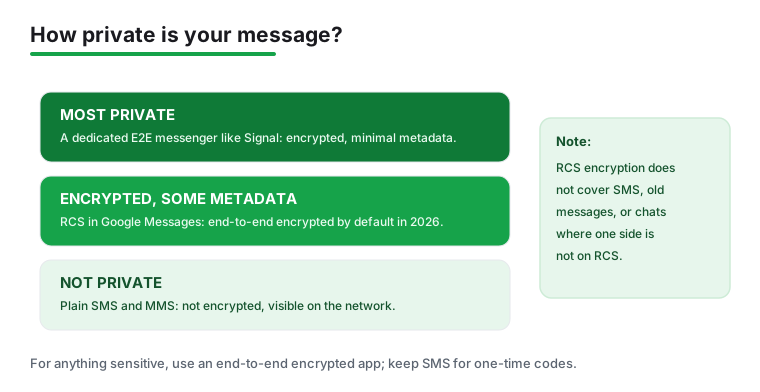
Plain SMS and MMS are not encrypted. The carrier and others on the network path can see them, which means they are not private. This is not a flaw in any one app, it is simply how the old text messaging standards were built decades ago. A message you send as a normal text travels in a form that the network can read, so treat anything sent that way as visible to more than just the recipient. That is fine for a grocery list and a poor fit for anything sensitive.
What changed with RCS in 2026
It helps to separate two things here. Android to Android RCS chats in Google Messages have actually been end to end encrypted (E2E) since 2021, so that part is not new. What is new in 2026 is that this encryption is extending to chats between Android and iPhone, based on the GSMA RCS Universal Profile 3.0 using the MLS protocol, and you can read the announcement from Google for the details. As of mid 2026, that cross platform encryption is rolling out gradually and is still in beta, so it is not yet a finished, on by default reality for everyone. Whether a given Android to iPhone chat is actually encrypted depends on both people being on RCS with up to date apps (and, for an iPhone, a recent iOS version) and on supported carriers. There are also limits worth stating plainly. E2E does not apply to SMS or MMS, it does not cover old messages, and a chat drops back to unencrypted SMS if one side is not on RCS. So an encrypted RCS chat can quietly become an unencrypted one without much fanfare, depending on who you are talking to and what their phone supports.
Encryption is not the whole story
Even with encrypted RCS, metadata, meaning who you talk to and when, can still be collected. Encryption hides the contents of a message, not always the fact that the conversation happened. For that reason a dedicated app like Signal remains the more private choice for sensitive conversations, because it is built from the ground up to minimise what is gathered around your messages, not just inside them. The independent digital rights group EFF welcomed the move to encrypted RCS while making a similar point about its boundaries.
A word on so called private SMS apps
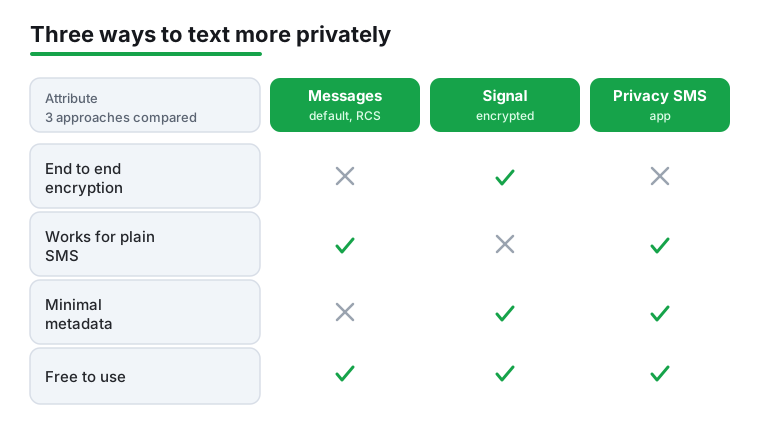
Many private SMS apps mainly add a lock or a hidden vault, not encryption. A vault can stop someone glancing at your phone from reading a thread, which is useful, but it does nothing about the carrier or the network path. For real privacy, use an end to end encrypted messenger and keep SMS for one time codes and non sensitive texts. It also pays to be cautious about permissions. SMS access is a sensitive permission that normally only a default SMS app needs, so an app that requests it without a clear reason deserves a second look.
What to use for what
What to use for what
Once the layers are clear, the practical choices fall into place. You do not need to pick a single app for everything. The calmer approach is to match the channel to the task, and that is exactly how we run our own phones.
Sensitive conversations: a dedicated encrypted messenger
For anything you would not want a stranger on the network to read, use an end to end encrypted messenger. Signal is the one we keep coming back to because the encryption is on by default, the code is open for anyone to inspect, and the nonprofit behind it does not run on advertising. When we send a message to another Signal user, it is end to end encrypted, which means not even Signal can read it. Crucially, it is also designed to collect as little metadata as possible, which is the part RCS does not fully solve. If you want a few quick comparisons across the category, our roundup of the best messaging apps for Android is a good place to start.
Everyday chats with most people: RCS in Google Messages
For day to day texting with friends and family, the built in Google Messages app with RCS is a reasonable default in 2026. Android to Android RCS chats have been encrypted since 2021, while the encryption for Android to iPhone chats is still rolling out gradually and in beta through 2026, so do not assume it is on for every cross platform conversation yet. Just remember the caveats above. If the other person is not on RCS, the chat falls back to plain SMS, so do not assume every message in that app is protected. You can check encryption status per conversation, and the Google Messages Help pages explain what the lock icon means.
One time codes and non sensitive texts: plain SMS is fine
Plain SMS still has a job. One time login codes, appointment reminders, and quick notes to people who do not use a messenger are all reasonable over SMS. The point is not to abolish texting, it is to stop treating it as private. Reserve it for things you would not mind a third party seeing, and route the rest through an encrypted app.
A practical setup
A practical setup
Here is the calm, pedantic version of how we set a phone up for private messaging. None of it is difficult, and most of it is a one time task.
Setting up Signal on your Android phone
Getting started took us under five minutes. Open the Play Store, search for Signal, and tap Install. When you first launch it, the app asks for your phone number and sends a verification code by text to confirm it is really you. Pop that code in and you are nearly done. Next it offers to set a PIN. We strongly suggest doing this. The PIN protects your account and helps you recover your profile and settings if you switch phones later. You can also add a profile name and photo, though neither is required. The last step is letting Signal find which of your contacts already use it, which it does in a privacy preserving way rather than uploading your whole address book in plain form.
Check your RCS and encryption settings
In Google Messages, confirm that RCS chat features are turned on, and look for the lock icon that marks an end to end encrypted conversation. If a thread shows no lock, treat it as plain SMS. There is nothing wrong with sending a normal text, you just want to know which kind you are sending. When in doubt, the lock is your signal that the contents are protected on that hop.
Review permissions, especially SMS access
Take a minute to review which apps hold the SMS permission. Because SMS access is sensitive and normally only a default SMS app needs it, any other app holding that permission is worth questioning. Many private SMS tools that advertise a vault are really just adding a lock screen over messages that remain unencrypted on the network, so do not let a padlock icon in the app lull you into thinking the carrier cannot see the text.
Decide what goes where
Finish by deciding, once, what each channel is for. Sensitive conversations go to Signal. Everyday chats can ride on RCS where both sides support it. One time codes and throwaway notes can stay on plain SMS. To weigh more contenders side by side, our guide to the top free messaging apps for Android breaks down who each one suits, and the wider communication apps hub covers calling, caller ID, and recording tools if you want to round out your setup.
The features we actually use every day
Day to day, Signal feels like any modern messenger, just calmer. Texts, photos, voice notes, group chats, and high quality voice and video calls all work the way you expect, and every one of them is encrypted. The feature we lean on most is disappearing messages. You can set a timer on any conversation so messages delete themselves after a set time, from a few seconds to four weeks, which is handy for anything sensitive you would rather not leave sitting on the screen.
We also like the small touches. View once photos vanish after the recipient opens them. You can edit a message shortly after sending to fix a typo. Stickers and reactions keep group chats fun without feeling bloated. And the notification privacy settings let you hide message content from your lock screen, so a glance at your phone on a desk does not reveal who said what.
If personalising your chats matters to you, it is worth seeing how Signal stacks up against the more playful options in our look at customizable messaging apps.
Permissions and what Signal asks for
This is where Signal earns its reputation. The permissions it requests all map to features you would expect. It asks for Contacts so it can show you which friends are reachable. It asks for Camera and Microphone for photos, voice notes, and calls. It asks for Notifications so messages actually reach you. That is roughly it, and you can decline any of them and still send text messages.
What we appreciate is what is missing. There is no constant location tracking, no advertising identifier harvesting, and no quiet syncing of your data to third parties. The app collects almost nothing about you. The one piece of metadata Signal needs to create your account is your phone number, which is the main trade off and the thing privacy purists grumble about most.
The downsides worth knowing
No app is perfect, and Signal has a couple of honest limits. The biggest is the network effect. Signal only protects a conversation when both people use it, so if your family still texts over standard SMS, those messages are not encrypted and you may end up nudging people to install yet another app. For some circles that is an easy sell, for others it is friction.
The phone number requirement is the other sticking point. You need a real number to sign up, so it is not the tool for fully anonymous contact. There is a usernames feature that lets you chat without handing out your number, which softens this, but the account itself is still tied to a number. Finally, because so much is encrypted and stored only on your device, losing your phone without a backup or PIN can mean losing message history. Set that PIN, enable backups, and you sidestep the worst of it.
Alternatives if Signal is not your fit
If you cannot get your contacts to switch, you have a few sensible options. WhatsApp uses the same underlying encryption protocol as Signal and almost everyone already has it, though it is owned by Meta and collects more metadata. For a number free, decentralised approach, Session and similar apps drop the phone requirement entirely, at the cost of a smaller user base.
You can also keep your phone's built in messaging app for plain SMS and reserve Signal for the conversations that matter, which is exactly how we run things. To weigh more contenders side by side, our guide to the top free messaging apps for Android breaks down who each one suits, and the wider communication apps hub covers calling, caller ID, and recording tools if you want to round out your setup.
Frequently asked questions
Can Signal send regular SMS texts on Android?
Not anymore. Signal removed built in SMS support, so it now sends only its own encrypted messages over the internet. For plain carrier texts to people without the app, keep your phone's default messaging app and use Signal for private conversations.
Is Signal really free?
Yes, completely. Signal is run by a nonprofit and funded by donations, so there are no ads, no subscriptions, and no premium tier. Every feature, including encrypted calls and disappearing messages, is available to everyone at no cost.
Do I need to give Signal my phone number?
Yes, a working phone number is required to create an account and verify it with a code. You can, however, use the usernames feature to start chats without sharing that number with new contacts.
Are my Signal messages safe if I lose my phone?
They can be, as long as you set up a PIN and enable backups beforehand. Because messages are stored on your device rather than a server, those two steps are what let you restore your account and history on a new phone.
Is RCS in Google Messages now end to end encrypted?
It depends on who you are texting. Android to Android RCS chats in Google Messages have been end to end encrypted since 2021. What is new is that this encryption is extending to chats between Android and iPhone, based on the GSMA RCS Universal Profile 3.0 using the MLS protocol, but as of mid 2026 that cross platform encryption is rolling out gradually and is still in beta, not on by default for everyone. Whether a chat is actually encrypted depends on both people being on RCS with up to date apps (and, for an iPhone, a recent iOS version) and on supported carriers. The protection does not apply to SMS or MMS, does not cover old messages, and a chat drops back to unencrypted SMS if one side is not on RCS. Look for the lock icon to confirm a conversation is encrypted.
Do private SMS apps with a vault actually encrypt my texts?
Usually not. Many private SMS apps mainly add a lock or a hidden vault rather than encryption, so the message still travels as plain SMS that the carrier and others on the network path can see. For real privacy, use an end to end encrypted messenger and keep plain SMS for one time codes and non sensitive texts.