
Best Movie Streaming Apps for Android (2026)
Finding a movie app that actually works well on your phone is half the battle. Some chew through battery, others bury good films under clunky menus, and a few free ones are genuinely brilliant once you know where to look. We spent weeks watching on everything from a budget Moto to a Pixel, and these are the apps we kept coming back to. For more picks across this space, our entertainment apps hub is a good next stop.
Below you will find a mix of paid heavyweights and free, legal options, with honest notes on how each one feels to use on Android day to day. If you grew up on the old grey-market streamers, our roundup of safe Showbox alternatives covers where those fans land now.
1. Netflix
Still the one most people open first, and for good reason. The Android app is fast, remembers where you left off across devices, and downloads are reliable for flights or the commute. In our testing the AV1 video looked noticeably cleaner on mid-range phones. It is paid only now, with ad-supported tiers cheaper, but no free trial. Tip: turn on smart downloads so finished films delete themselves automatically.
2. Disney Plus
If your household leans toward Marvel, Pixar, or Star Wars, this is the obvious pick. The Android interface is clean and the GroupWatch feature lets you sync a movie with friends remotely, which actually works without much fuss. Picture quality tops out at 4K HDR on supported phones. It is subscription based, and bundling it with Hulu usually saves a few dollars if you want a deeper film catalogue too.
3. Tubi
The free option we recommend most often. Tubi has a genuinely huge library of films, free with ads, and no account needed to start watching. On Android it loads quickly and the ad breaks are shorter than most rivals. The catalogue leans toward older titles and cult favourites rather than fresh releases, but for a lazy Sunday it is hard to beat. Casting to a TV worked smoothly too.
4. Plex
Plex does two jobs well. It streams your own movie collection from a home server to your phone, and it bundles a solid free ad-supported library on top. Setup takes a little patience if you self-host, but once running it is the most flexible app here. Great for anyone with a hard drive full of films. The Android player handles subtitles and odd file formats better than you would expect.
5. Amazon Prime Video
Worth it if you already pay for Prime, since the films come included. The Android app has improved a lot, though the home screen still nudges you toward rentals you have not bought. X-Ray, which shows cast and trivia mid-scene, is a genuinely fun touch when you tap the screen. Downloads for offline viewing work well. Just watch out for titles that look free but are actually paid add-ons.
6. Max
The home of Warner Bros films and a deep back catalogue of classics and HBO originals. On Android the app feels polished, and the 4K streams look superb on a good display. It is a paid subscription, with a cheaper ad-supported tier if you do not mind interruptions. We liked that profiles keep recommendations sensible. For cinema-grade releases landing early, this is a top pick.
7. Pluto TV
Pluto is free and built around live channels, including dozens dedicated to movies by genre. Flip to the horror channel and a film is already playing, which is oddly relaxing when you cannot decide. There is an on-demand section too. The Android app is light and runs fine on older phones. Ads are the trade-off, but you pay nothing and never need to sign up to dip in.
8. Apple TV
No longer iPhone only, the Apple TV app on Android gives you Apple Originals plus a tidy store for renting or buying films. The interface is calm and uncluttered, and playback quality is excellent on capable handsets. The original film slate is smaller than rivals but well made. You pay per subscription or per rental. Handy if you have an Apple household and want everything in one library across devices.
9. Crackle
A free, ad-supported service that quietly holds a decent stack of movies, especially action and thrillers. Crackle will not wow you with new releases, but the Android app is simple to navigate. We found it a reliable backup when nothing on the paid services appealed, and for the gaps between films our best Android games roundup is worth a look. Think of it as a no-cost movie night safety net.
10. The Roku Channel
You do not need a Roku device to use the Roku Channel app on Android. It pulls together a large free, ad-supported film library alongside live channels. The selection rotates often, so it pays to check back. On a phone it is straightforward and quick to load. Watching is free with no subscription, though you can add premium channels if you want. A solid, underrated option for casual film fans.
11. Hulu
Better known for TV, but Hulu also carries a respectable rotating film library that suits anyone wanting variety. The ad-supported tier keeps the price down, and if box sets are more your thing our best TV streaming apps guide digs deeper. It is US-focused, so availability depends on your region. Bundle it with Disney Plus for a surprisingly broad combined catalogue.
12. Kanopy
The hidden gem for film lovers. Kanopy is free if your local library or university supports it, and the catalogue is full of indie, classic, and arthouse cinema you will not find elsewhere. The Android app is clean and there are zero ads. You get a set number of credits per month. With a library card, this is the most rewarding free movie app here.
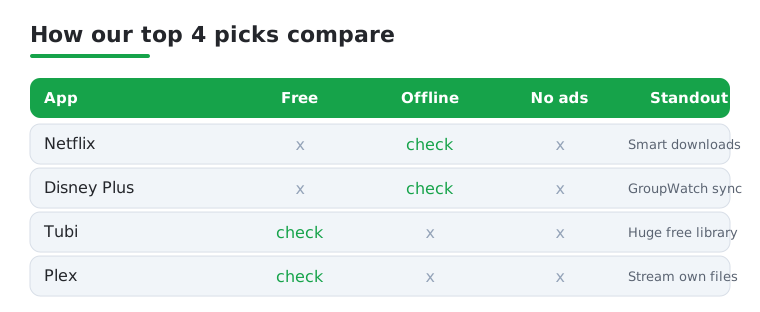
Not sure where to start? This quick comparison lines up our top four picks across the things that matter most on a phone: cost, offline downloads, and whether you can skip the ads.
How to choose a movie streaming app for Android
The right app is rarely the one with the biggest marketing budget. It is the one that has the films you actually want, at a price you are comfortable with, in a form your phone handles well. Below is a calm, practical way to narrow the field instead of installing ten apps and hoping.
Start with the catalogue, not the brand
Before anything else, think about what you genuinely watch. If you rewatch the same studios, a single subscription that owns those films will feel better value than a sprawling service you barely use. If you are a wide, omnivorous viewer who is happy to take what is on offer, a large free ad-supported library may cover most evenings. A few honest questions help:
- Do you chase new releases, or are you content with a deep back catalogue? New films almost always sit behind a paid subscription or a per-title rental.
- Are there specific franchises or studios you cannot do without? Those tend to live on one home service rather than being spread around.
- Do you watch a lot, or a little? Light viewers often get more from free services than from a subscription that quietly renews each month.
It is also worth checking how titles rotate. Films come and go from every service on a schedule the app rarely advertises, so a movie you saw last month may not be there tonight.
Ad-supported versus ad-free tiers
Most services now offer a cheaper tier that shows ads and a more expensive one that does not. Neither is automatically the right answer. If you watch in short sittings, the ad breaks can be a minor annoyance you barely notice. If you settle in for a full film and want it uninterrupted, the ad-free tier earns its higher price. Free services such as Tubi, Pluto TV, Crackle, and the Roku Channel pay for their libraries with ads, which is the trade you accept for not paying anything. Kanopy is the unusual free option with no ads, because it is funded through participating libraries rather than advertising.
Check regional availability before you commit
Catalogues differ from country to country, and some apps are simply not offered in every region. A film featured in one country may be missing in another, and a service that looks perfect in a review may not be available where you live at all. If a particular movie or studio is the reason you are subscribing, confirm it is listed in your own region first. This is one of the most common reasons a new subscription disappoints, and it is easy to avoid with a quick search inside the app before you pay.
Downloads for offline viewing
If you watch on flights, trains, or anywhere with patchy signal, offline downloads matter more than almost any other feature. As a rule, the paid subscriptions let you download films to watch later, while free ad-supported apps tend to stream only and need a live connection. Downloads also save a surprising amount of mobile data, since you can grab a film on home Wi-Fi and watch it later without touching your data allowance. Check the storage settings too, as high quality downloads can fill a phone quickly.
Casting to a TV
Watching on a phone is fine for a commute, but most people eventually want a film on the big screen. Look for built-in casting support, which on Android usually means the ability to send video to a nearby TV or streaming stick with a tap. Most of the major apps handle this well, though the experience can vary between devices, so it is worth a quick test before movie night rather than during it. If casting is unreliable, a simple cable from phone to television is a dependable fallback on many handsets.
A note on safety and free movie apps
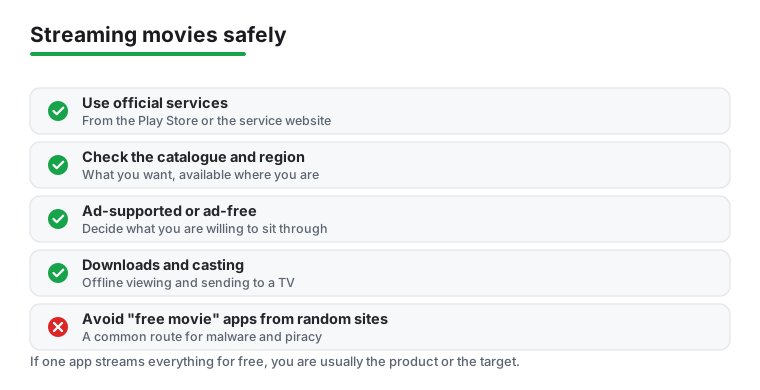
This is the part worth slowing down for. Alongside the legitimate free services in this list, there is a whole category of apps that promise free streaming of brand new releases, often shared as downloadable files outside the official Play Store or the known services. These are a common route for two real problems.
- Malware and unwanted software. Apps installed from outside trusted stores skip the review and update checks that legitimate apps go through. Some carry hidden code that shows aggressive ads, harvests data, or quietly does things you did not agree to.
- Pirated content. Many of these apps stream films without permission from the people who made them. Beyond the legal questions, these services appear and vanish without warning, break often, and have no support when something goes wrong.
The practical takeaway is simple and not preachy: if a free app is offering current cinema releases that every paid service charges for, that is a strong signal to be cautious. Sticking to services available on the official Play Store, whether paid or free and ad-supported, gives you regular security updates, working playback, and an app that will still be there next week. The legitimate free options above genuinely cover a lot of viewing at no cost, so you rarely need to take the risk.
Putting it together
For most people the sensible setup is one paid subscription matched to the films you watch most, plus a free ad-supported app or two for everything else. Add a library card for Kanopy if you can, since it costs nothing and opens up a corner of cinema the big services tend to skip. Keep your apps updated, watch your download storage, and you will have a film ready for almost any evening without overpaying or taking chances on something sketchy.
If you are not sure a subscription is worth it, most can be started and cancelled in a minute from the app or your account settings, so there is no harm in trying one for a month and seeing how often you actually open it. A subscription you reach for two or three times a week clearly earns its place, while one you forget about is an easy thing to drop. The free services lose nothing by sitting installed in the background, ready for the nights when you just want something on without thinking about it.
Frequently asked questions
Which free movie app for Android is actually the best?
For most people Tubi wins on sheer volume of films at no cost. If you have a library card, Kanopy is the better pick for indie and classic cinema with no ads at all. We often keep both installed and switch depending on the mood.
Can I download movies to watch offline on my phone?
Yes, on the paid services. Netflix, Disney Plus, Prime Video, and Max all let you download films for offline viewing, which is ideal for flights or patchy signal. Most free, ad-supported apps stream only, so you need a connection to watch.
Are free streaming apps like Tubi and Pluto TV legal and safe?
Yes. Tubi, Pluto TV, Crackle, and Kanopy are all fully legal and supported by ads or library funding rather than piracy. They are available on the Play Store, get regular updates, and are safe to install. Avoid sideloaded apps that promise free new releases.
Do these apps use a lot of mobile data?
Streaming film in high definition can use roughly 1 to 3 GB an hour, and 4K far more. Every app here lets you cap streaming quality in the settings, so drop it to standard definition on mobile data and save the high quality for Wi-Fi.
Do I need a separate app for each service, or is there one app that has everything?
No single app holds every film, because studios license their movies to different services and those deals change over time. Most people end up with two or three apps: one paid subscription for the films they care about most, and a free ad-supported app for variety. A few apps, such as Plex, can pull together your own collection and a free library in one place, but they will not include current paid releases from other services.
What is the difference between a subscription and a rental inside these apps?
A subscription gives you access to a rotating catalogue for a recurring monthly fee, and titles can be added or removed at any time. A rental, or a purchase, is paid per film: a rental usually gives you a limited window to watch, while a purchase keeps the film in your library. Some apps mix both, so a movie that looks included may actually be a paid rental. It is worth checking the price label before you tap play.