
Best Games Apps for Android (2026)
The Play Store is stuffed with games, and most of them want your money before they want your attention. We wanted the opposite, so we spent a few months playing on everything from a battered budget phone to a Pixel, hunting for games that respect your time and run smoothly without a top tier chipset. The list below mixes free gems with paid favourites, across puzzles, role playing, strategy, and quick pick up and play sessions.
Each pick comes with honest notes on how it actually feels to play, plus whether you will hit a paywall. To keep browsing, our entertainment apps hub gathers everything fun in one place, and anyone who plays with friends should also see our best multiplayer Android games guide.
1. Genshin Impact
A gorgeous open world adventure that still sets the bar for free console quality visuals on a phone. You explore, fight, and solve light puzzles across a huge map that keeps growing. On a mid range device you will want to drop the graphics a notch to stay cool, but it looks stunning regardless. Free to play, with a gacha system you can happily ignore and still enjoy hundreds of hours.
2. Monument Valley 3
The most beautiful puzzle series on Android returns, and it suits a touchscreen perfectly. You twist impossible architecture to guide a small figure home, and every level feels like a tiny piece of art. Sessions are short and calming, ideal for winding down before bed. It is a paid game with no ads or nagging, which is exactly why we keep it installed.
3. Balatro
The poker roguelike that quietly ate everyone's evenings, now brilliant on mobile. You build hands, stack bizarre joker cards, and chase score multipliers that spiral wonderfully out of control. The portrait friendly layout means one handed play works on a bus or in a queue. It is a paid game with no in app purchases, and the just one more run pull is genuinely hard to resist.
4. Stardew Valley
The cosy farming life sim that feels made for quiet evenings. You plant crops, befriend townsfolk, fish, and explore mines at your own pace with zero pressure. The Android version is a complete one time purchase with no ads, and the touch controls now feel natural. In our testing it ran flawlessly on a five year old phone. A genuine comfort game you will return to for months.
5. Call of Duty Mobile
If you want fast, competitive shooting on the go, this is a polished option. It bundles classic multiplayer maps and a battle royale mode, with controls that feel surprisingly precise once tuned. Free to play, with cosmetics behind the paywall but nothing that buys an unfair edge. We recommend a phone with a high refresh screen here, as the extra smoothness really helps in gunfights.
6. Vampire Survivors
Deceptively simple and absurdly moreish. You move a character around the screen while weapons fire automatically, surviving waves of monsters that swell into glorious chaos. It costs very little up front, runs on practically any Android phone, and a single run lasts about thirty minutes. The constant unlocks keep you hooked far longer than you plan. It is excellent value for the small price.
7. Marvel Snap
A fast, clever card battler where matches last around three minutes, which makes it perfect for phones. You play cards across three locations and try to out think your opponent rather than out spend them. It is free, and while there is a collection to build, skill matters far more than your wallet. The snappy pace and big name art make it easy to fire up anywhere.
8. Clash Royale
The real time strategy duel that defined competitive mobile gaming and still holds up. You deploy troops in fast lane battles that reward quick thinking and clever card timing. Free to play, though serious climbing eventually nudges you toward spending. We love it for the three minute matches that fit any gap in the day. The clan side adds a friendly, social community on top.
9. Dead Cells
A razor sharp action platformer that translates shockingly well to touchscreens. You slash through a shifting castle, dying often, learning, and coming back stronger each run. The Android port includes auto hit options that keep combat smooth without a controller, though pairing one is even better. It is a paid game with no ads. Demanding but fair, it is the pick for real depth and reflex based thrills.
10. Pokemon GO
The game that gets you off the sofa. You walk real streets to find, catch, and battle creatures, and the social events still draw genuine crowds in most cities. It is free, with optional items to speed things up, and it sips less battery than it used to thanks to a power saving mode. A lovely excuse to explore your neighbourhood and stretch your legs.
11. Alto's Odyssey
An endless sandboarding game with a soundtrack and art style so serene it borders on meditative. You glide across dunes, chain tricks, and chase a gentle sense of flow. One tap controls mean anyone can pick it up in seconds, and the zen mode strips away scores entirely. It is a small one time purchase, fully offline, and free of ads. Our go to for unwinding.
12. Slay the Spire
The deck building roguelike that countless others copy, and the original is still the deepest. You climb a spire, building a card deck on the fly and agonising over every choice. The Android version is a full paid port, no ads, and the touch interface handles the cards beautifully. Runs last an hour or so and no two feel alike. It rewards careful planning over each card choice.
13. Brawl Stars
A bright, fast top down brawler built for quick three on three matches with friends or strangers. Each round lasts a couple of minutes, the controls are dead simple, and the variety of characters keeps it fresh for ages. Free to play with optional cosmetics, and progress feels fair without spending. A brilliant pick for casual sessions and great fun in a group.
14. Florence
A short, interactive story about a relationship, told through gentle mini games and wordless comic panels. It lasts under an hour but lingers far longer in memory. There is nothing to win, just a quiet, moving experience you tap and swipe through, with no ads or interruptions. After a heavy gaming session it is the perfect palate cleanser. Save film nights for our best movie streaming apps.
How to choose a game for Android
The hard part is not finding a game. It is finding one that fits the time you actually have and the phone you actually own. Before you install anything, it helps to ask yourself a few plain questions. How long are your typical sessions? A three minute match on the bus is a very different need from a long evening with a story. Do you have a steady internet connection, or do you want something that works on a flight or with patchy signal? And how powerful is your phone? Many of the most enjoyable games run perfectly well on modest, older hardware, so a heavy graphical showcase is not the only path to a good time.
It is also worth thinking about how a game wants your attention. Some games are happy to be put down and picked up later. Others are built to pull you back with daily streaks, timers, and notifications. Neither is wrong, but it is good to know which kind you are choosing. On the Play Store listing itself, read the recent reviews rather than the star average, scroll through the screenshots, and look at the update history. A game that has been updated recently is usually one that is still being looked after.
Two more things are easy to overlook. The first is permissions. A simple puzzle game has no real reason to ask for your contacts or your precise location, so if a request looks out of place, it is fair to pause and consider why. The second is download size and storage. A large game can take up several gigabytes and can warm up an older phone, while many of the best smaller games install in moments and leave plenty of room to spare. Checking the size on the listing before you install saves a frustrating wait and a full storage bar later.
Match the game to your phone and your time
- Short sessions: quick card or brawler games suit gaps in the day and one handed play.
- Long sessions: role playing games and life sims reward a settled evening at home.
- Offline: single player titles keep working without a connection, which is handy for travel.
- Older phone: simpler 2D games run smoothly without a recent chip or a high refresh screen.
The honest part about cost
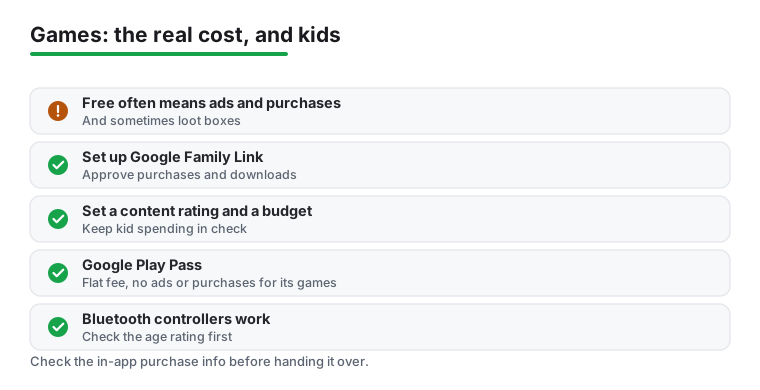
Free rarely means free. Most free games make money through in app purchases, advertising, and sometimes loot boxes, which are bundles of random items you pay for without knowing exactly what you will get. A game can be genuinely good and still be designed to encourage spending over time, so it is fair to expect some of that and to decide in advance how much, if anything, you are willing to put in.
Paid games work differently. You pay once, and in return you usually get the whole experience with no ads and no pressure to keep spending. For a game you expect to return to for months, a single up front price can work out simpler and calmer than a free game that keeps asking. If you play a lot, Google Play Pass is worth a look. It is a flat monthly fee, and for the games it includes it removes ads and in app purchases. It does not cover every game on the store, so check whether the titles you actually want are part of it before subscribing.
A few practical habits help keep costs honest. Turn off one tap buying on your account so a purchase always needs confirmation. Treat any in game currency as real money, because that is what it is. The packs are often priced to feel like a bargain, but the real amount you spend over weeks is what counts. And give yourself a moment before buying anything, since most of these prompts are timed to catch you in the heat of play.
It is also worth knowing where loot boxes sit. They are a paid gamble for random rewards, and some people find that uncomfortable, especially for younger players. If a game leans heavily on them, that is something to weigh before you settle in. None of this means free games are bad. Many on our list are free and a pleasure to play without spending a penny. The point is simply to go in with your eyes open, decide your limit early, and let the game earn any money you choose to give it.
Games and children
If a child will be playing, a little setup goes a long way and saves arguments later. The main tool on Android is Google Family Link, a free app that lets a parent manage a child's account from their own phone. With it you can require your approval for any app download and for any purchase, so nothing arrives or gets bought without you knowing. You can also set a content rating so only age appropriate games appear, and you can set a spending limit so surprises stay small.
Beyond the parental controls, the Play Store listing for each game tells you a lot before you hand the phone over. Check the age rating and read the in app purchase information shown on the listing. If a game aimed at younger players is full of paid bundles or loot boxes, that is useful to know in advance. It is also worth playing a new game together for the first few minutes, both to enjoy it and to see for yourself how often it asks for money or attention.
A quick checklist for family play
- Set up a child account and link it with Google Family Link.
- Turn on approval for downloads and purchases.
- Set a content rating and, if you like, a spending limit.
- Read the age rating and in app purchase note on each Play Store listing.
- Play the first session together so you both know what to expect.
Controllers and comfort
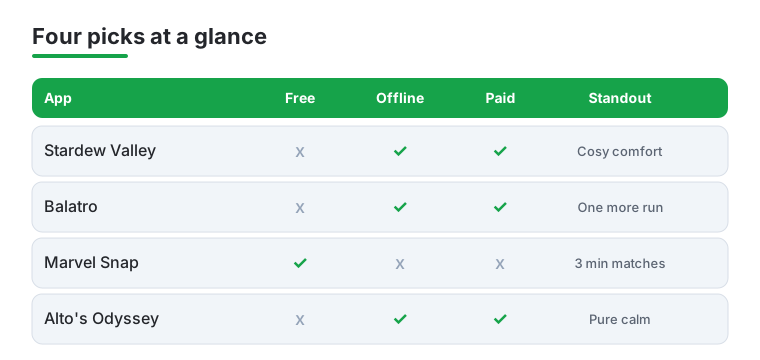
Touchscreens are fine for many games, but some play far better with a physical controller. Many Android games support Bluetooth controllers, including action games and platformers where precise input matters. Pairing one is usually as simple as connecting it like any other Bluetooth device, and a clip that holds your phone above the controller makes longer sessions much more comfortable. If your hands tire on glass, this is an easy and inexpensive upgrade. The four picks in the comparison below are a good place to start when you are weighing cost, offline play, and what each one does best.
Not sure where to start? This quick comparison lines up four favourites from the list against the things that matter most: cost, whether they play offline, whether they are paid up front, and the one thing each does best.
Frequently asked questions
What is the best free game for Android right now?
It depends on your taste, but Marvel Snap and Brawl Stars are our top free picks for quick, fair fun where skill beats spending. If you prefer something single player, Pokemon GO is free and gets you walking. All three are genuinely enjoyable without ever opening your wallet.
Which Android games work well without an internet connection?
Plenty of the best ones. Stardew Valley, Monument Valley 3, Balatro, Vampire Survivors, Alto's Odyssey, and Slay the Spire all play fully offline, so they are ideal for flights or patchy signal. The competitive multiplayer titles like Call of Duty Mobile and Clash Royale need a connection to play.
Do I need an expensive phone to play these games?
Not for most of them. Vampire Survivors, Stardew Valley, and Balatro run smoothly on modest, older hardware. Only the graphically heavy titles such as Genshin Impact and Call of Duty Mobile really benefit from a recent chip and a high refresh screen. We tested across budget and flagship phones for exactly this reason.
Are paid Android games worth it over free ones?
Often, yes. A small one time payment for something like Stardew Valley or Dead Cells buys you the complete game with no ads and no pressure to spend more. Free games can be excellent too, but if you want a clean, distraction free experience, the premium picks here are worth every penny.
How do I stop my child spending money in a game?
Set up the child's account with Google Family Link, then turn on approval so every download and every purchase needs your confirmation. You can also set a spending limit and a content rating. Before handing over a game, check its age rating and the in app purchase note on the Play Store listing.
What is Google Play Pass and is it worth it?
Google Play Pass is a flat monthly subscription. For the games it includes, it removes ads and in app purchases, so you can simply play. It does not cover every game on the store, so it is worth it mainly if several titles you already want are part of it. Check the included list before you subscribe.