
Updated September 2026 · three more listings read, so the notes apps and the recorder this page names now carry their own dated figures, and one Data Safety claim about Gboard is corrected
This page explains a feature first and then reads the listing of every app it names. Everything on it that carries no date is guidance about how Android behaves, which no store listing can confirm.
Two kinds of figure deserve a word. The install band is the bucket the store publishes, so it counts installs and not people, and a keyboard that ships on the phone collects installs whether or not anyone ever taps the microphone key. The Data Safety lines quoted in each section below are declarations the developer made to the store, which is why each one carries the word Declares: a may collect line describes what is permitted rather than what happened on any phone. Google Play prints the same caution above that section on the listing itself: "The developer provided this information and may update it over time."
Guidance, not a store fact. Nothing in this section comes from an app listing. It describes how two Android features differ, and telling them apart is most of the job.
The confusion behind a lot of searches in this category is that two unrelated features share a name.
Dictation converts speech into text as you speak, and the text is what gets saved. It lives in the keyboard, so it is available in any app with a text field.
Voice recording saves the audio itself, and transcription, where it is offered, happens afterwards. That lives in recorder apps, and it is what meetings, interviews and lectures need, because there the original audio is the point.
To catch a thought while walking, you want dictation. To keep a record of what someone else said, you want a recorder. This page is about the first one, and it reads the listing of every app it names: the keyboard the dictation key belongs to, the two notes apps the words land in, and the recorder for when the audio itself is the point.
The dictation key itself, in any app with a text field
4.5 stars from 18,812,675 reviews · 10,000,000,000+ installs, the store’s own count and not a count of people · free to install · no in-app purchase range on the listing · listing last updated 27 August 2026 · by Google LLC · Contains ads: No · checked 6 September 2026
Google Play listing · 4.5 stars (18,812,675 reviews) · read 6 September 2026
Gboard is where Android dictation actually lives: the microphone key belongs to the keyboard, so the words land in whatever app has focus and a notes app never has to supply the feature. Its listing, read 6 September 2026, is free to install with no in-app purchase range and no Contains ads label, at 4.5 stars from 18,812,675 reviews. The blunt part is that the score covers the whole keyboard, and nothing on the listing rates the dictation key on its own.
Google puts the feature in six words in its own description on the Google Play listing, Easily dictate text on the go
, read 6 September 2026. Nothing in that description, and nothing in the fields above, says how accurately speech is transcribed, and this read captured no minimum Android version either.
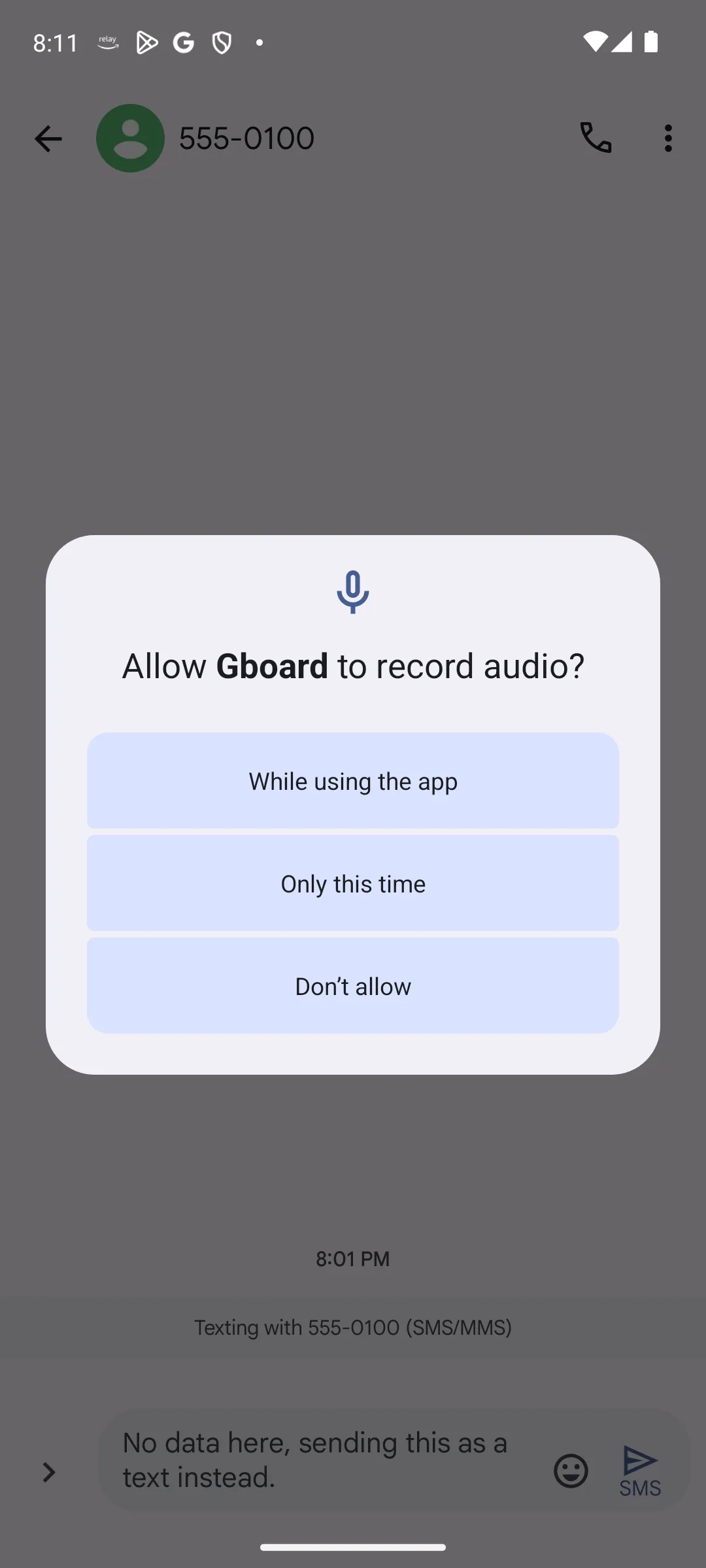
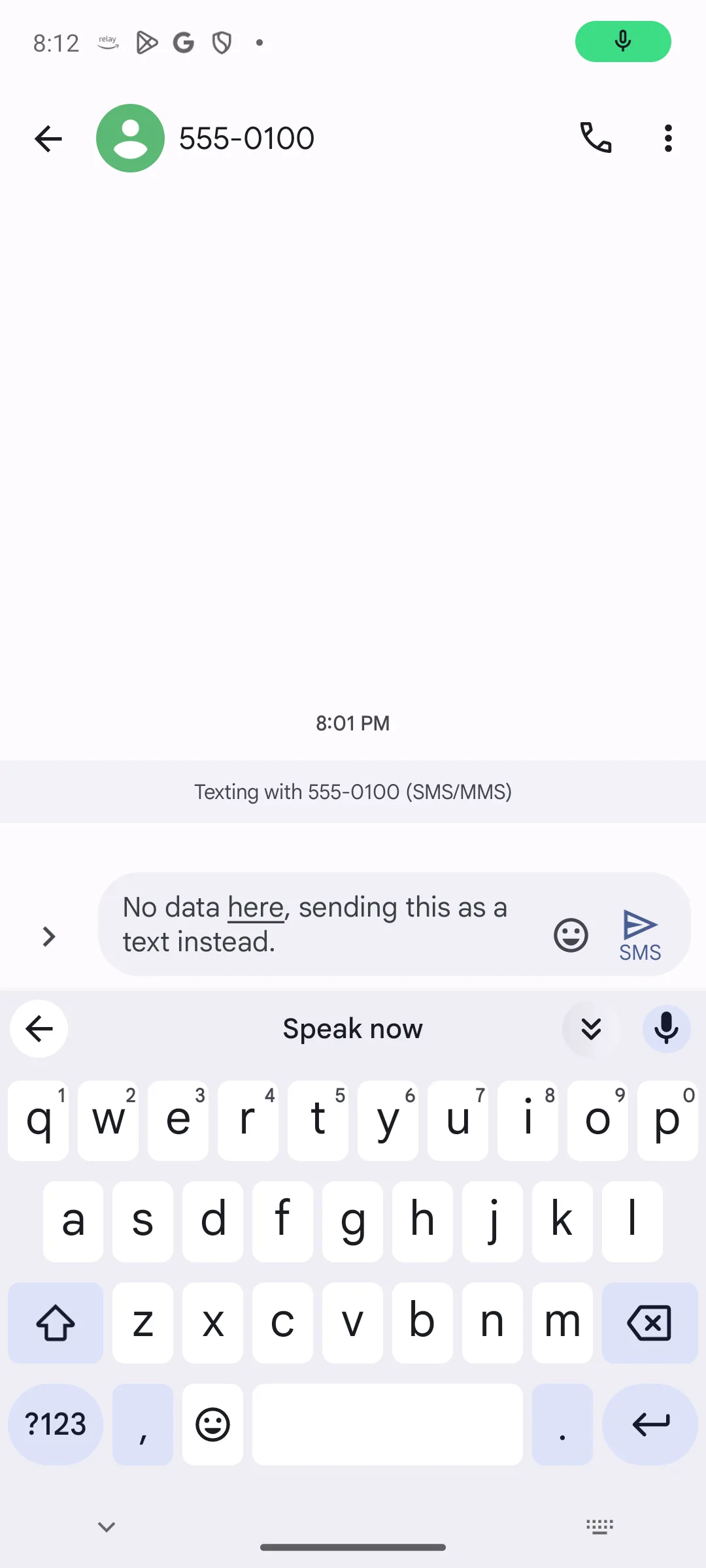
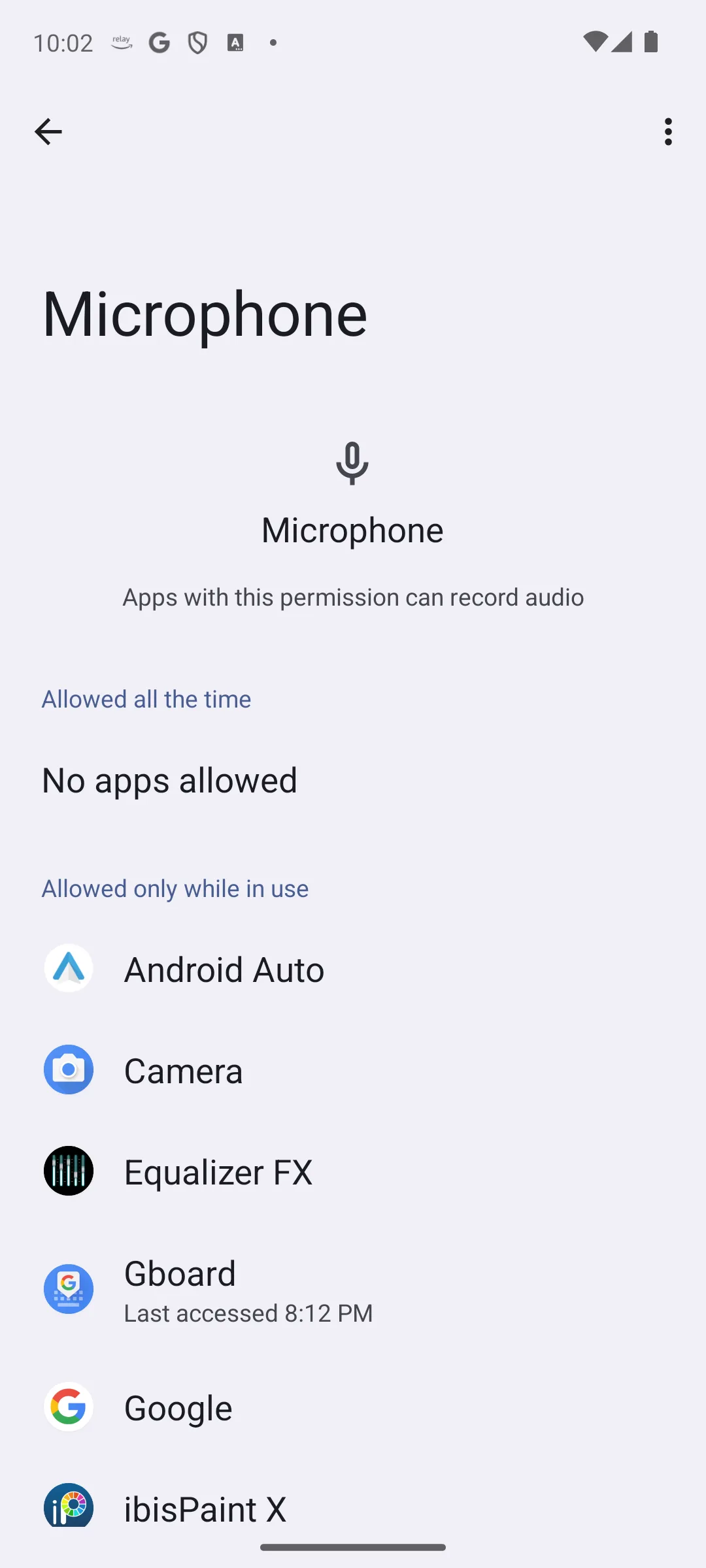
Guidance, not a store fact. None of this came off the listing above.
The other half of the setup is the notes app already on the phone: Google Keep on many Android phones, Samsung Notes on a Galaxy. The dictation key types into either of them exactly as it types into anything else. Both listings were read for this page on 6 September 2026, and each has its own section below.
If the microphone key is missing from the keyboard, it is usually switched off rather than absent. Open the keyboard settings, turn voice input on, and check that the keyboard still holds the microphone permission in Android app settings.
Catching a dictated note on a non-Samsung Android phone
4.7 stars from 2,555,950 reviews · 1,000,000,000+ installs · free to install · no in-app purchase range on the listing · listing last updated 31 August 2026 · by Google LLC · Contains ads: No · checked 6 September 2026
Google Play listing · 4.7 stars (2,555,950 reviews) · read 6 September 2026
Google Keep is the notes app the dictated words usually land in on a phone that is not a Galaxy. Its listing, read 6 September 2026, is free to install with no in-app purchase range and no Contains ads label, at 4.7 stars from 2,555,950 reviews on a 1,000,000,000+ install band. The blunt part is that Keep recognises nothing: the microphone key comes from the keyboard, so what Keep contributes is storage, search and sync rather than speech recognition.
The developer states the sync claim plainly in its own description on the Google Play listing, Everything syncs across all of your devices so your thoughts are always with you
, read 6 September 2026. That is the developer’s claim about the app rather than a finding of ours.
The same job on a Galaxy phone
4.8 stars from 14,956,286 reviews · 1,000,000,000+ installs · free to install · no in-app purchase range on the listing · listing last updated 23 September 2025 · by Samsung Electronics Co., Ltd. · Contains ads: No · checked 6 September 2026
Google Play listing · 4.8 stars (14,956,286 reviews) · read 6 September 2026
Samsung Notes is the same destination on a Galaxy, where it is usually already on the phone. Its listing, read 6 September 2026, is free to install with no in-app purchase range and no Contains ads label, at 4.8 stars from 14,956,286 reviews, the highest of the four listings read for this page. The blunt part is the date on the record: the listing was last updated on 23 September 2025, where the other three were updated in the closing days of August 2026.
Its description names the feature in the developer’s own words on the Google Play listing, By tapping the Voice Recording icon while writing a note, you can record sound and create a note with sound
, read 6 September 2026. That is a recording feature inside a notes app, which is a different thing from the keyboard dictation this page is about.
Guidance, not a store fact. Behaviour of Android and of the speech packs, not a listing field.
Speech recognition traditionally sent audio to a server. It no longer has to. Android supports downloadable offline language packs, and once the pack for your language is installed, recognition runs on the device.
Two things change at once. Dictation keeps working with no signal, which matters on trains, in basements and abroad, and it can be quicker, because nothing waits on a round trip to a server. Look for offline or on device speech recognition in the voice input section of your keyboard settings, and download the pack for the language you actually dictate in.
A frequent complaint about dictation is that it produces an unbroken wall of text. The fix is to speak the punctuation. None of the four lines below comes from a store listing.
Guidance, not a store fact, except where a listing is named and dated.
Reach for something else when the audio matters, when you need timestamps, or when the recording is long. Recorder apps that transcribe keep the audio alongside the text, so you can go back and check what was said. Google publishes exactly that kind of app, Recorder, and its listing was read for this page on 6 September 2026, so it has a section below. What the listing does not say is where the transcription runs, which is why nothing here claims it happens on the phone. Third party recorders offer similar features across devices, usually with a free tier limited by recording length or by monthly minutes.
The other case for a dedicated app is organisation. If voice capture is the front door to a real note system with tags, links and structure, a fuller notes app is a better home than a scratchpad.
Keeping the audio, with a transcript beside it
3.3 stars from 15,790 reviews · install band 1+ on the listing · free to install · no in-app purchase range on the listing · listing last updated 26 August 2026 · by Google LLC · Contains ads: No · checked 6 September 2026
Google Play listing · 3.3 stars (15,790 reviews) · read 6 September 2026
Recorder is the app for the other job on this page: keeping the audio, not only the text. Its listing, read 6 September 2026, is free to install with no in-app purchase range and no Contains ads label, and it is the weakest record of the four at 3.3 stars from 15,790 reviews. The blunt part is what the listing leaves out: it states that the app transcribes, and never states where the transcription runs, so nothing here claims it happens on the phone.
The transcription claim is the developer’s own, on the Google Play listing, Recorder automatically transcribes and labels what you record so that you can easily find the parts that matter to you
, read 6 September 2026. The same description names meetings, lectures and band practices, which is the case for a recorder rather than for the keyboard.
Guidance, not a store fact. Android permission behaviour, not a field on any listing.
Anything that dictates needs microphone access, which is unavoidable and reasonable. What is worth checking is the rest.
An app that dictates does not need your contacts or your location. If a voice notes app asks for either, that is a reason to look at a different one. Android shows an indicator in the status bar whenever the microphone is live, and the privacy dashboard in Settings lists which apps have used it recently. Where on device recognition is available and selected, dictation does not send the audio away to be recognised, which changes what happens to it in transit.
Gboard is free to install and its listing prints no in-app purchase range, both read on 6 September 2026. The three other listings this page reads say the same thing: Google Keep, Samsung Notes and Recorder are all free to install with no in-app purchase range printed, all read on 6 September 2026. The offline language packs are downloads inside the keyboard settings rather than products with a price, which is guidance rather than a listing field.
Money enters when you want long form transcription. Services that transcribe hours of audio, separate one speaker from another or export formatted transcripts generally charge by the minute or by subscription. That is a different product from dictating a shopping list, and worth paying for only if you do that work regularly.
No. Dictation is part of the keyboard, so it works in any app with a text field. Tap the microphone key on Gboard and speak into whatever notes app is already on the phone. A separate app is only worth it when the audio itself has to be kept. Checked 6 September 2026.
Four, all on Google Play and all read on 6 September 2026: Gboard, Google Keep, Samsung Notes and Recorder. Each one is the source for that app rating, review count, install band, price, in-app purchase range, ads label and Data Safety declarations, and for nothing else. Everything else here is guidance about how Android dictation works, which no store listing can confirm.
Yes, once the offline language pack for your language is downloaded. Look for offline or on device recognition in the voice input section of your keyboard settings. It keeps working with no signal, and it can be quicker, since nothing waits on a server. This one is guidance about Android rather than something a store listing states.
Say them. Speak comma, full stop and question mark where you want them, and new line or new paragraph to break up the text. Speaking in complete phrases rather than single words also helps, because recognition uses the surrounding context.
It is usually switched off rather than absent. Open your keyboard settings, turn voice input on, and check that the keyboard holds the microphone permission in Android app settings.
It needs microphone access, which is unavoidable. This one is guidance about Android rather than something a store listing states: where on device recognition is available and selected, the audio is not sent away to be recognised. Be wary of any voice notes app that also asks for contacts or location, since dictation needs neither. What each of the four listings declares is quoted in that app section above.
Dictation converts speech to text and saves the text. A recorder saves the audio, and transcribes it afterwards if it offers that. Use dictation to capture your own thoughts, and a recorder when you need a record of what someone else said.
Not to install. All three listings, read 6 September 2026, are free with no in-app purchase range printed and no Contains ads label. Google Keep sits at 4.7 stars from 2,555,950 reviews, Samsung Notes at 4.8 stars from 14,956,286 reviews, and Recorder at 3.3 stars from 15,790 reviews, the weakest record of the four.
Checked 6 September 2026: the page named four apps and read one listing. All four are read now, on the US storefront, and three of them have their own dated section for the first time: Google Keep at 4.7 stars from 2,555,950 reviews, Samsung Notes at 4.8 stars from 14,956,286 reviews, and Google’s Recorder at 3.3 stars from 15,790 reviews, the weakest record of the four. All four listings are free to install, print no in-app purchase range and carry no ads label. Gboard’s own figures moved: its review count from 18,772,155 to 18,812,675, and its listing update date from 14 August 2026 to 27 August 2026. One claim about Gboard is withdrawn because today’s listing contradicts it: the Data Safety section no longer shows an independent security review line, so the sentence that said it records an independent security review is gone, and Google Keep is the only one of the four whose card carries that line. Five statements that the page had read a single listing are withdrawn with it: The only Play listing this page reads, which is why it needed to read one listing and no more, No Play listing was read for either app for this page, No listing was read for any of the apps described here, and No listing was read for the notes app the words land in. The FAQ question How many app listings did this page read? is replaced by one that names the four, one question is moved into the second person, and a question about what the three other apps cost is added. Two dates that disagreed inside the Gboard section, one reading 16 August 2026 and the other 3 September 2026, are both replaced by the date of this read. Two claims the 16 August 2026 entry below withdrew are restored now that the listings behind them have been read: that Google Keep and Samsung Notes are free, and Keep’s sync claim, this time quoted as the developer’s own words with its listing linked in the same sentence. The decision table now records four listings rather than the fields of one, and the Our answer capsule sits directly below it. The H1 gains the count of listings the page reads; the address is unchanged. No app was removed from the page.
Checked 16 August 2026: the H1 and the page title promised a roundup, "Best Voice to Text Note Apps for Android", over a body that links one app and explains one feature. The title now says what the page is; the address is unchanged. Gboard's Google Play listing was read again on 16 August 2026: 4.5 from 18,772,155 reviews, an install band of 10,000,000,000+, free to install, no in-app purchase range, no Contains ads label, developer Google LLC, listing last updated 14 August 2026. The page carried no table, no verdict capsule and no dated verification box; it now carries one table recording that single listing's fields, a capsule, and a How we verify box that says in plain words that one listing was read and what that cannot cover. Claims about apps whose listings were not read for this page were withdrawn: that Google Keep "syncs across devices and opens fast enough" to catch a thought, and that Keep and Samsung Notes are free. Both apps are still named; what went is the pricing of them, including a line that priced the whole setup at nothing. The screenshot caption line "captured on an Android 14 device" was withdrawn as well, because nothing read for this page establishes a device, and the caption now states that the app behind two of the three screens is a messaging thread rather than a notes app. No app was removed from the page, and no testing claim was removed either: the stored body carried none.