
If you want a heads-up before you reach a fixed speed camera, a red-light camera, or a stretch where police tend to sit, your phone can do most of that job. The catch is that no single app does all of it well, and the rules about whether you can even run one depend on where you drive. This is a plain look at what each type of app covers, where the gaps are, and the legal line you need to know before you tap install. Treat all of this as a safety and awareness tool, not a way to speed and dodge a ticket.
Radarbot is our best overall pick because on 3 September 2026 its listing showed 4.1 from 651,565 ratings, free to install, with a Contains ads label and purchases of $1.99 to $99.99.
CamSam is our best free pick because on 3 September 2026 its listing showed 4.4 from 78,076 ratings, no ads label and no purchases.
Waze is our live-hazard pick because its 28 August 2026 listing was free, carried a Contains ads label and promised alerts for police and red light cameras.
Data checked: 3 September 2026.
There are two different things happening here, and most confusion comes from mixing them up.
The first is crowd-reported alerts. A navigation app like Waze relies on drivers tapping a button when they pass a police car, an accident, or a hazard. Every driver behind them gets the warning. That data is live and human, which makes it good for things that move, like a patrol car parked on a shoulder, and useless for things that do not.
The second is a fixed-camera database. Permanent speed cameras and red-light cameras do not move, so they are not worth crowd-reporting one at a time. Instead, dedicated apps carry a stored list of known camera positions and warn you as you approach. Some of these databases work offline once downloaded.
The practical takeaway: a nav app handles live human reports, a dedicated detector handles the permanent hardware. If you want both, you run both.
Live reports from other drivers
Waze is free to install, owned by Google, and built on reports from its driver community. Its Play listing carries a Contains ads label, checked 28 August 2026. When someone ahead of you flags police, a crash, an object in the road, or a slowdown, you hear about it. In 2026 the hazard alerts are more prominent on screen and in Android Auto, and Waze added advance warnings for speed bumps in the US along with sharper heads-up on tight bends pulled from road-curve data and years of reports.
A correction to something we got wrong in an earlier version of this page: Waze does cover fixed enforcement cameras these days, red light cameras included. Its own Play listing, read on 28 August 2026, sells the feature in these words: "Steer clear of tickets by knowing where police and red light and speed cameras are located". What that listing does not promise is brand new installations or average-speed zones, which is where a dedicated detector app still earns its keep.
If you already lean on Waze for routing, keep it. Just know what it does not cover. For a wider look at routing apps, our roundup of GPS navigation apps for Android covers how Waze stacks up against Google Maps and the rest.
↑ Back to the comparisonThe broadest camera database
Radarbot is the app most people mean when they say speed camera detector. On Google Play it is now titled Radarbot: Radar Detector, GPS, from Radarbot Company, checked 28 August 2026. It carries a database of fixed radars, average-speed (section) cameras, tunnel cameras, traffic-light cameras, and known mobile-camera spots, and the team updates that database daily, which its Play listing puts in its own words as "Our team of experts performs daily updates to ensure that the database is always up-to-date", read on 28 August 2026. It also pulls live alerts from a large driver community for the mobile stuff.
It runs in the background, so you can keep your usual map app on screen and let Radarbot speak the warnings over the top. The free version is ad-supported and covers the core alerts. Radarbot GOLD removes advertising and adds offline navigation and 3D maps, automatic Bluetooth start in the car, and visual overlay on top of other apps, all of it listed by the developer. The listing publishes no monthly or yearly figure: it prints one in-app purchase range, $1.99 to $99.99 per item, checked 28 August 2026, so read the price inside the app before you commit. There is also a RoadPro tier aimed at truck and commercial drivers with heavy-vehicle speed limits and alert distances.
If you only add one dedicated app, this is the one with the broadest, most actively maintained list.
↑ Back to the comparisonFree alerts, no ads label
CamSam from Eifrig Media GmbH is the other well-known name, and it is particularly solid across Germany and the rest of Europe. The base CamSam app is free to install, and its listing carries no Contains ads label and no in-app purchases, checked 28 August 2026. CamSam PLUS, a separate app sold for $4.99 as a one-time purchase on 28 August 2026 rather than a subscription, adds a widget mode, multi-window and landscape support, background operation, and Bluetooth HFP support so alerts come through your car audio.
It combines a stored database of fixed speed and red-light cameras across dozens of countries with live mobile-camera reports from its own community; the listing puts the figure at more than 60,000 fixed speed cameras worldwide from SCDB.info, and lists an online and offline mode on the free app as well as on PLUS. The offline mode leans on the local fixed-camera list, so you still get advance warnings where signal is patchy. Two things to weigh first. The free app's listing was last updated on 15 August 2025, twelve months before this check, while CamSam PLUS was updated on 12 March 2026. And the free app's Data Safety section says it may share data with third parties, may collect data, that data is not encrypted and that data cannot be deleted, where the PLUS listing declares no data collected and none shared. If most of your driving is in Europe, CamSam is worth a look alongside Radarbot.
↑ Back to the comparisonThe setup that actually works is two apps at once. Keep your main navigation running for directions, and let a dedicated detector run in the background to speak camera and radar warnings. Radarbot and CamSam PLUS are both built to do this, with overlay or background audio so you are not switching screens while driving.
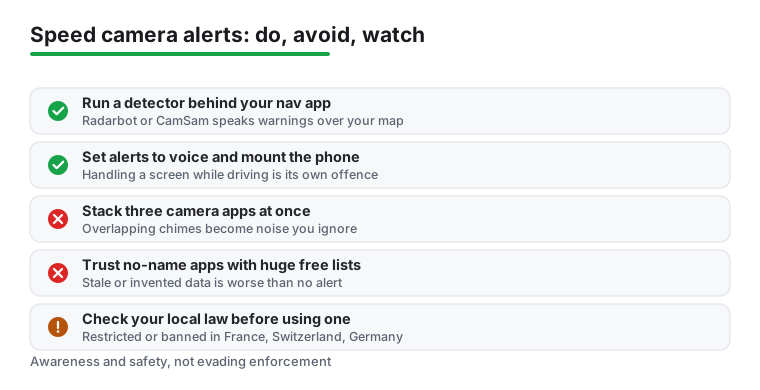
A few habits keep it sane. Set alerts to voice so you never reach for the phone, since handling a screen while driving is its own offence in places like the UK. Mount the phone properly. Download the offline database before a long trip so a dead signal does not leave you blind. And do not stack three camera apps at once, because overlapping chimes turn into noise you start ignoring.
If your goal is mostly knowing your own speed rather than camera positions, a lighter tool may suit you better. See our list of free speedometer apps for Android for that.
Every one of these apps has a free tier that delivers the basic alerts. With Radarbot, what you pay for is the polish: no advertising, offline navigation and 3D maps you can use without a signal, automatic start when the car connects over Bluetooth, and an overlay so warnings sit on top of your map app rather than hiding behind it. CamSam works differently. Its free listing carries no Contains ads label and already lists an offline mode, so the $4.99 CamSam PLUS buys interface modes instead: widget, multi-window, landscape, background operation and HFP Bluetooth. Both listings checked 28 August 2026.
The database itself is usually the same on free and paid for the well-known apps. The difference is convenience and the offline copy. If you drive the same routes daily and rarely lose signal, the free version may be all you need. If you take long trips through dead zones or want hands off operation in the car, the paid tier earns its keep. Avoid no-name apps promising a giant free camera list, since stale or invented data is worse than no alert at all.
This matters more than any feature. In the United States and the United Kingdom, speed-camera and radar-alert apps are legal. The UK has allowed detection of camera locations since 1998, fixed and mobile, as long as the device only receives or reads positions and does not jam or scramble police equipment, which is illegal. Just remember that handling your phone while driving is a separate UK offence, so set everything to voice and mount the phone.
Several countries restrict or ban these tools. In France, both hardware detectors and camera apps are banned, and being caught can mean a fine up to 1,500 euros with the device seized. In Switzerland, any device that warns of speed-measuring points is prohibited, with fines up to around 5,000 euros and confiscation. In Germany, the law covers apps too: you may carry the app, but you are not allowed to operate active camera alerts while driving, and ignoring that can cost 75 euros and a point in Flensburg.
Rules change and vary even within a country, so check your local law before you use one of these apps, and disable alerts where they are not permitted. Frame this as awareness and safety, not as a way to evade enforcement.
If you are in the US or UK and want the broadest coverage, run Waze for live police and hazard reports and add Radarbot in the background for fixed and red-light cameras. If you mainly drive in Europe, swap or pair Radarbot with CamSam. Start with the free tiers, and only pay once you know which app you actually keep open.
Cameras are one part of staying aware on the road. Many drivers pair an alert app with a recording device for incidents and disputes; our picks for the most reliable Android dash cam apps cover that side. For the full set of driving tools we track, see the navigation and auto hub.
Every rating, rating count, install band, price, in-app purchase range and ads label on this page was read on 28 August 2026 from that app's own Google Play listing, opened through the store link printed in its entry, with the rating taken from the structured data of the listing rather than from a screenshot. Every Data Safety section was read the same day, and where a listing contradicts what this page used to say, the listing wins and the correction is printed rather than smoothed away. Feature claims are quoted from the developer's own listing text and linked in the sentence that makes them. Nothing on this page rests on our own driving. Listings are re-checked quarterly, and traffic law is country specific, so confirm the rules where you drive.
Yes, it does now. Waze covers fixed cameras as well as live driver reports: its Google Play listing, read on 28 August 2026, lists knowing where police and red light and speed cameras are located. A dedicated detector like Radarbot or CamSam still earns its place for brand new installations and average-speed zones, which the Waze listing does not promise.
In the US and UK, yes, as long as the app only reads or receives camera positions and does not jam police equipment. They are restricted or banned in countries like France, Switzerland, and (for active alerts while driving) Germany, where fines and phone seizure are possible. Check your local law before using one.
The fixed-camera database can work offline once downloaded. Radarbot GOLD lists offline navigation and 3D maps, and both CamSam and CamSam PLUS list an online and offline mode, so the free CamSam is not the odd one out. Listings read on 28 August 2026. Live mobile-camera and police reports still need a data connection, since those come from other drivers in real time.
For many drivers, yes. The free tiers carry the same camera database and deliver the core alerts. Only Radarbot is ad-supported: its listing carried a Contains ads label on 28 August 2026 and the free CamSam listing carried none. Paying for Radarbot GOLD removes the advertising and adds offline navigation, automatic Bluetooth start and an overlay; paying $4.99 once for CamSam PLUS adds background operation, widget, landscape and HFP Bluetooth instead. If you take long trips through dead zones, the paid version is worth it.
Yes. Radarbot and CamSam PLUS are designed to run in the background and speak warnings over whatever map app you have on screen. Set the alerts to voice so you never touch the phone while moving, and keep the phone mounted.
That is the wrong way to think about them. They are awareness tools that remind you to check your speed near cameras and known enforcement spots. Treat them as a prompt to slow down and drive safely, not as a way to speed without consequences.
 How to Block Ads on Android Without Rooting (2026)Security & Privacy