
Rare Finds: 10 Android Apps You Have Never Heard Of
- Catima turns plastic loyalty cards into scannable barcodes on your phone.
- Organic Maps gives offline walking and trail directions when there is no signal.
- Olauncher strips your home screen to a short text list, which cuts the mindless tapping.
Most people install the same dozen apps, so the genuinely clever stuff stays buried where the Play Store charts never point. We spent a few weeks past the charts, sideloading some obscure picks and running them on our daily phones. Some we deleted after a day. The ten below are the ones we kept, plus how to set them up, what they ask for, and how to keep finding your own.
Why the best Android apps stay hidden
The Play Store rewards momentum. A solo developer with a sharp idea and 400 downloads almost never shows up next to an app with a marketing budget, even when the small app does your one job better. The ranking just counts installs and reviews; it has no idea which is which.
What we kept running into: the apps with the fewest reviews were often the ones doing a single job properly, with no ads, no upsell, no account. The catch is finding them at all, which is most of the work and the reason for the section at the end. For the wider view of where these tools live, our guide to the best app store apps for Android pairs well with this.
Our 10 rare finds, briefly
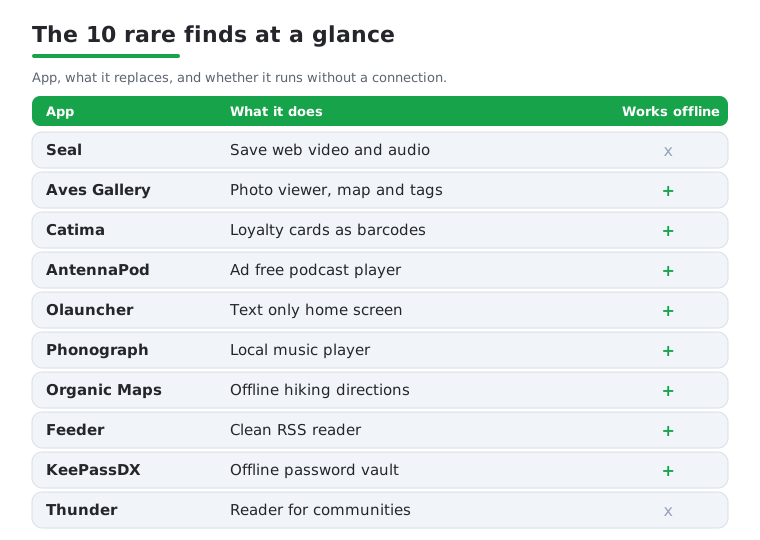
Here is the shortlist we kept coming back to.
- Catima stores loyalty and membership cards as scannable barcodes, so your wallet stops bulging.
- Organic Maps downloads whole regions for offline walking, hiking and cycling directions.
- Olauncher swaps your icon grid for a plain text list, dull on purpose and good for screen time.
- Aves Gallery is a fast photo viewer that sorts shots by location and tag (the F-Droid build is named Aves Libre).
- Phonograph Plus plays music files stored on your phone, no streaming account involved.
- KeePassDX keeps an offline password vault you fully control, now with passkeys and 2FA codes too.
- Feeder is a no account RSS reader for following sites directly instead of through an algorithm.
- Seal saves video and audio from the web without a browser detour.
- AntennaPod is a podcast manager with no ads and no recommendation feed pushing at you.
- Thunder is a client for Lemmy and PieFed, the Reddit style link aggregator forums in the fediverse.
None of these show up on a top charts list, which is the point. Each fixes a specific daily annoyance without asking for much back. Short on time? Start with the ones that replace a habit: Catima empties your wallet, Organic Maps saves you in a dead zone, and Olauncher takes an afternoon to change how often you reach for the phone. Add the rest one at a time as a need comes up.
Setting them up on Android
Most of these install straight from the Play Store, the usual tap and wait. The open source picks are also on F-Droid, a community catalog that builds and signs the apps itself, and that is where we get most of them. One naming quirk: on F-Droid, Aves is published as Aves Libre rather than Aves Gallery. Everything else keeps its name across both stores.
To use F-Droid, download the client from its official site, open the file, and approve the one time prompt that lets your browser install apps. After that it handles updates on its own. Catima, Organic Maps, Olauncher, Aves Libre, Phonograph Plus, KeePassDX, Feeder, Seal and AntennaPod are all in the main F-Droid catalog. Thunder is the exception; grab it from Google Play or its GitHub releases page.
When we set up a fresh batch we kept it boring: install one, open it, finish its first run, then move on, rather than installing ten at once and forgetting which is which. Set Olauncher as your default through the prompt on first launch and give it a day before deciding. For anything holding data you would hate to lose, like Catima or KeePassDX, export a backup to your cloud drive straight away so it never lives only on one device.
The features that won us over
A few earned a permanent spot within an hour. With Seal you paste a link and pull down the clip or just its audio; the queue is clean, no nag screens, though it leans on yt-dlp, so the occasional site stops working until the developers catch up. Aves opened a 12,000 photo library without choking and dropped the shots onto a world map using the location data already in the files, which made finding that one beach photo from 2022 actually possible.
Catima replaced a fistful of plastic. We scanned each card once and the supermarket scanner read the on screen barcode every time, with one catch: a couple of older terminals cannot read a screen at all, so we keep one physical card as backup. Organic Maps earned its keep on a weekend hike: we downloaded the region on wifi the night before, then navigated the trail in airplane mode with barely any battery drain.
On music, a note that matters. The original Phonograph stopped being developed after 2020 and its repo was archived in 2023, so skip that one. The app to install is Phonograph Plus, an independent fork by chr56 that is still actively maintained (version 1.12.1 landed in March 2026). It reads local files, has a sleep timer and playback speed, and does not nag you to subscribe to anything. KeePassDX has grown too: it is now listed as KeePassDX Passkey Vault, and alongside offline password storage it handles passkeys and TOTP two factor codes, so it can replace a separate authenticator app if you want.
Permissions and the honest downsides
Lesser known does not mean safe by default, so we checked what each app asked for. The open source picks here want very little. KeePassDX runs entirely offline and requests no network permission at all, which is exactly what you want from something holding your passwords and passkeys; nothing leaves the phone unless you export it. Organic Maps wants location only while you navigate. Catima needs the camera purely to scan cards.
The trade offs are real. Niche apps update in bursts, so a feature you want might sit untouched for months, and support is usually one developer answering messages between shifts at a day job. Seal in particular can break on a site overnight, since it depends on yt-dlp keeping up with the streaming platforms. Olauncher's text home screen is good for focus but jarring at first if you live by a grid of colored icons; we nearly switched back on day one and were glad we did not. And anything you sideload should come from the project's own page or F-Droid, never a random APK mirror. When unsure, read the permission list before installing and skip anything wanting access that has nothing to do with its job.
How to keep finding hidden gems
The useful skill is doing this discovery yourself, long after this list goes stale. A few habits that work for us: browse F-Droid by category rather than popularity, since it has no sponsored slots. On the Play Store, read the one and two star reviews, not just the glowing ones, because the complaints tell you an app's real limits faster than anything else. And lurk in a couple of Android communities where people trade finds, which is how half of these reached us.
Search sideways, too. Instead of the most popular option in a category, look for the open source one, or the app a power user dropped in a comment thread. If you like this kind of hunt, our roundups of Google's lesser known Android apps and the newest hidden gems on the Play Store are built for it. Set aside twenty minutes a month, try one unfamiliar app, and over a year your phone fills up with tools that fit you instead of tools that fit the charts.
Frequently asked questions
Are these rare Android apps safe to install?
All ten are either on the Play Store or in F-Droid, a community catalog that builds and signs its open source apps. We still read each app's permissions first, and most ask for almost nothing. The rule we stick to: download from the project's own source or F-Droid, and skip anything requesting access that has nothing to do with what it does.
Do I need to root my phone or sideload to use them?
No root for any of them. Most install normally from the Play Store. The open source picks are easiest through F-Droid, which involves one approval to let your browser install apps. That is sideloading in the gentle sense, and you can turn the permission back off in settings afterward. Thunder is the only one not on F-Droid; it comes from Google Play or GitHub.
Why are good apps so hard to find on the Play Store?
Rankings favor apps that already have installs and reviews, so smaller or newer projects rarely surface in search. Some of the most useful tools we run had only a few hundred installs when we found them. Browsing by category and reading the critical reviews is how you get past the popularity bias.
Will these apps keep getting updates?
Usually, though slower than big name apps. Many are run by one developer or a small community, so updates come in bursts rather than on a schedule. Phonograph Plus is a good reminder to check: the original Phonograph was abandoned years ago, and the active fork is the one to install. We keep backups of anything holding important data, just in case a project goes quiet.
Are any of these apps free, or do they have hidden costs?
Every pick here is free to install, and the open source ones carry no ads and no upsells. That is part of why we went looking for them. If a developer offers an optional tip or donation it is exactly that, optional, and it never locks the core features. Read the store listing anyway so you know what you are getting before you tap install.
Which of these should I try first?
Pick the one that fixes a daily friction point for you. Carry loyalty cards? Catima clears the wallet fast. Hike or travel through patchy coverage? Organic Maps pays off the first time you lose signal. Feel glued to the phone? Olauncher resets that in an afternoon. Install one, live with it for a day, then add the next rather than dumping all ten on at once.
How do I back up an app like Catima or KeePassDX before I switch phones?
Both export your data to a single file from their settings menu. We do this right after setup, save the file to a cloud drive, and repeat it whenever we add a batch of new entries. On a new phone, install the same app and import that file. Keeping a copy somewhere other than the phone means a lost or broken device never takes your cards or passwords with it.