
Updated August 2026
Verified against the Play Store listings on 21 August 2026 · every figure re read, one free app added, the decision table rebuilt on what each developer documents
Six Android apps that put a speed on the screen, compared on the three things a store rating cannot settle: what each one saves, whether its own description says the reading survives without a data connection, and whether it says the reading continues while another app is in front. Every figure below was read on the date printed beside it.
GPS Speedometer and Odometer is our best overall and best free pick because its listing, updated 2 August 2026, is free with no ads label and sells dashboard skins from 2.99 dollars.
Speedometer GPS is our free pick when reach matters because its listing, updated 3 June 2026, is free with a 10,000,000+ install band and an ads label.
Ulysse Speedometer Pro is our niche pick for exported trips because its listing, updated 20 August 2021, costs 1.99 dollars with no ads label.
Data checked: 3 September 2026.
GPS Speedometer and Odometer · our best overall pick, and our best free pick
4.7 stars from 10,269 reviews · 100,000+ installs · free, skins 2.99 to 9.99 dollars per item · by Morkam 88 · listing version 3.3.11, updated 2 August 2026 · Contains ads: No · Google Play listing · checked 2 September 2026
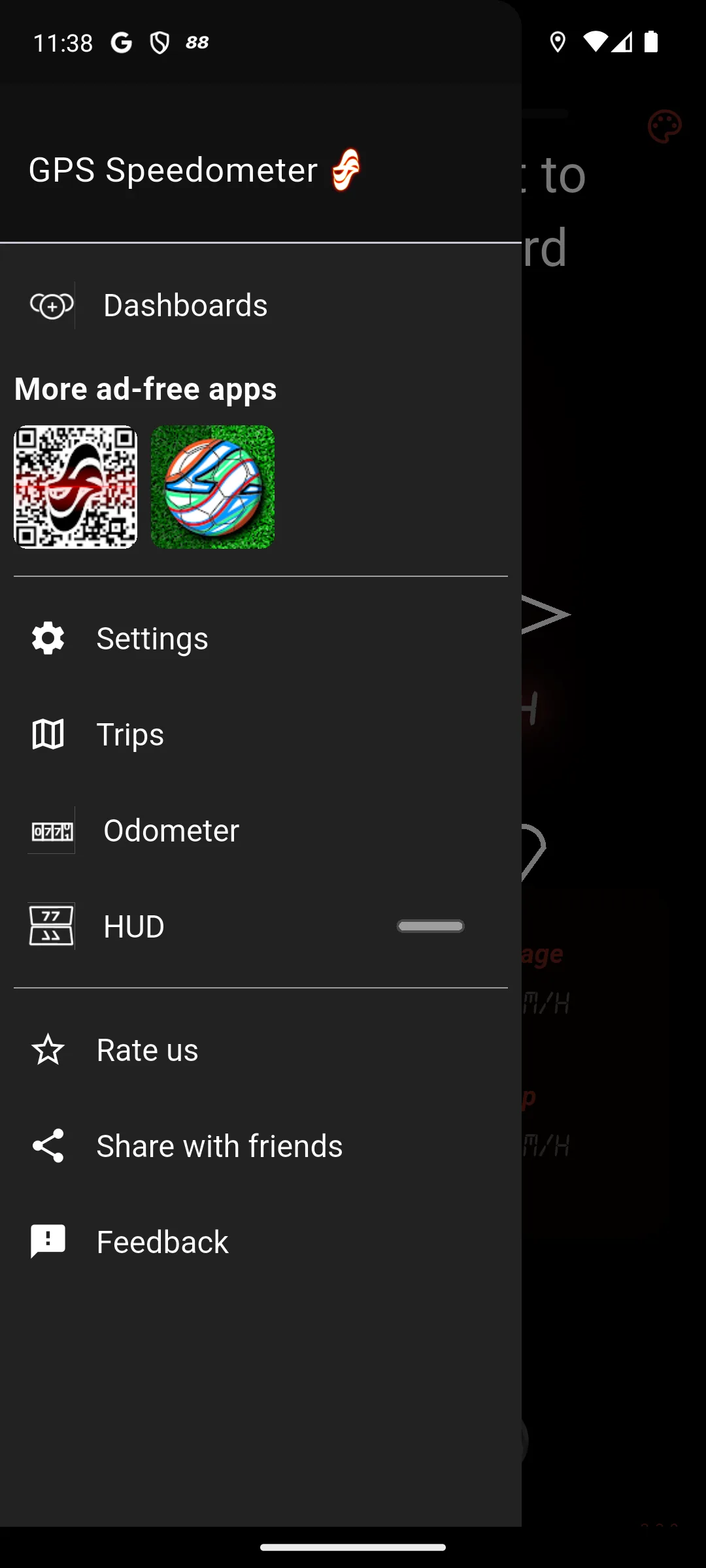
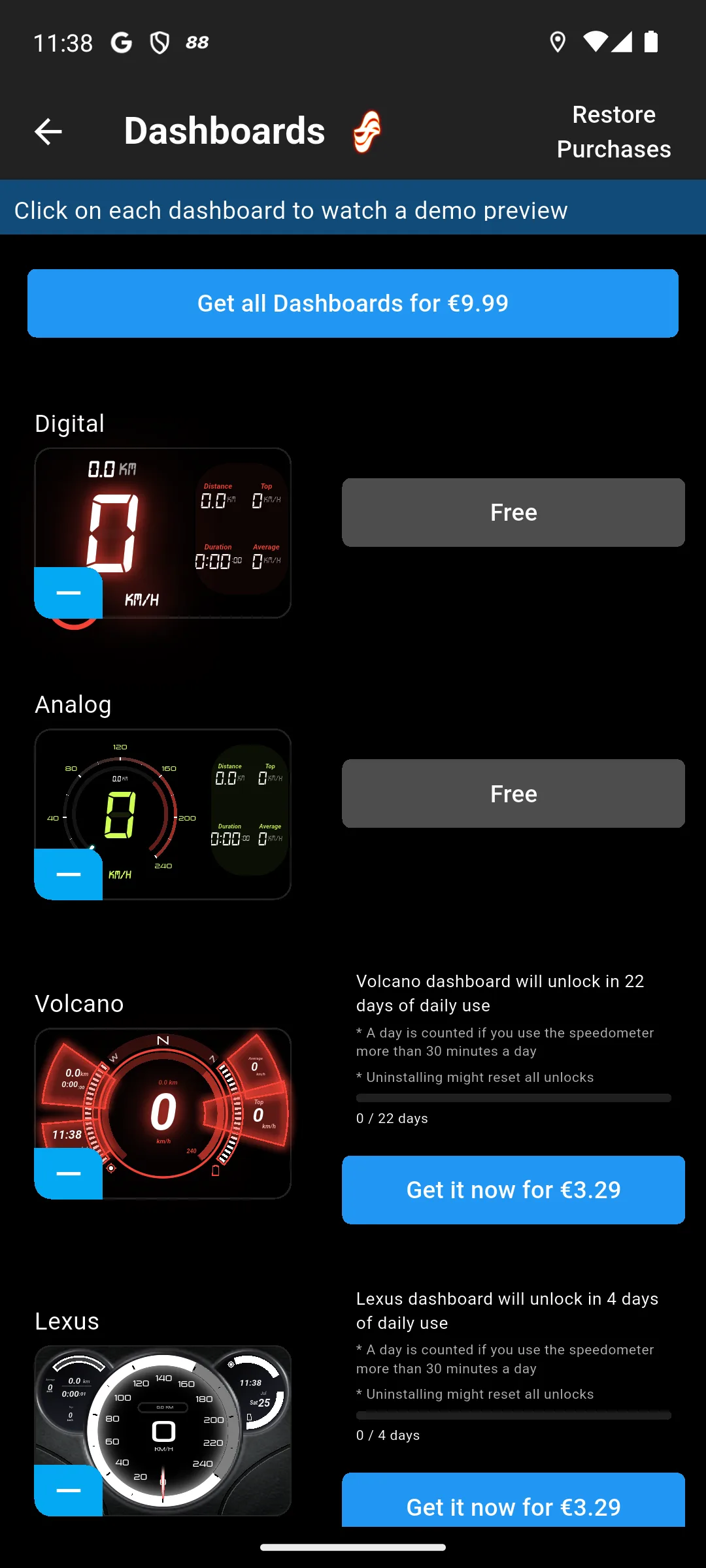
Our best overall pick and, being free to install, our best free pick too: its Play listing, read 21 August 2026, carries no ads label and its description is the only one here claiming offline speed. The blunt con is the dashboards screen: two dials are free and the rest are sold at 2.99 to 9.99 dollars per item or held behind a run of days of daily use.
The developer says so in its own words. Its own store description, read 21 August 2026, states: "The GPS speedometer works offline for speed and distance, so you can use it without mobile data or Wi-Fi when GPS is available." The same description hedges its own single answer to keeping a reading on screen while another app is in front, listing a Floating Speedometer that will "Show a small speedometer over other apps, including navigation and map apps, when supported by your device." Both sentences are the developer's, not ours.
Speedometer GPS · the free alternative with the largest install band of the dedicated apps here
4.3 stars from 37,052 reviews · 10,000,000+ installs · free, 1.99 dollars per item inside · by luozirui · listing updated 3 June 2026 · Contains ads: Yes · Google Play listing · checked 21 August 2026
The dedicated speedometer with the widest reach here, and it is on the page because the paid entry below links it in the first two lines of its own description. The blunt con is the trade: its Play listing, read 21 August 2026, is free with a 10,000,000+ install band but does carry a Contains ads label, which our top pick does not, and its description says nothing about working offline.
Speedometer GPS Pro · buy it only to drop the ads label off the entry above
3.8 stars from 3,978 reviews · 500,000+ installs · 0.99 dollars, nothing sold inside · by luozirui · listing updated 16 July 2024 · Contains ads: No · Google Play listing · checked 21 August 2026
Buy this one only if dropping the ads label off the entry above is worth 0.99 dollars to you. Its Play listing, read 21 August 2026, costs 0.99 dollars, carries no Contains ads label and sells nothing further inside. The blunt con is that its description lists the same recording features as the free edition by the same developer, while its own last update is dated 16 July 2024, 25 months before this page was checked.
Ulysse Speedometer Pro · the niche pick, for a trip you want to export
3.4 stars from 4,812 reviews · 100,000+ installs · 1.99 dollars, nothing sold inside · by binarytoys · listing updated 20 August 2021 · Contains ads: No · Google Play listing · checked 2 September 2026
Our niche pick, and for one reason only: the single description here that offers an exported track file rather than a number on a screen. Its Play listing, read 21 August 2026, costs 1.99 dollars and carries no Contains ads label. The blunt con is the date beside it: the listing has not been updated since 20 August 2021, 60 months before this page was checked.
Read this first. This listing has not been updated for 60 months, which is worth saying plainly rather than leaving the date to be noticed. The site the listing sends readers to for more, www.binary-toys.ch, answered 401 Authorization Required when it was requested on 21 August 2026, from three spellings of the address. Its privacy policy on a separate subdomain still answers. Treat everything below as a description of a listing that stopped moving in 2021.
Where this app claims accuracy, the claim is the developer's, and the developer qualifies it twice in the same store description, read 21 August 2026: it calls the app a "high-precision GPS* Speedometer" and then footnotes that asterisk with "*Dependent on phone hardware", and further down the same page it publishes its own limit, "Known limitation - trip distance may have 2-3% deviation from car's odometer data". Both are quoted here rather than repeated as findings of ours.
Waze · nothing extra to install if you already navigate with it
4.3 stars from 8,907,671 reviews · 500,000,000+ installs · free, nothing sold inside · by Waze · listing updated 1 September 2026 · Contains ads: Yes · Google Play listing · checked 3 September 2026
Pick this only if you already navigate with it, because there is nothing to install and nothing to pay. Its Play listing, read 21 August 2026, is free and does carry a Contains ads label. The blunt con is scope: its description offers a speed limit warning rather than a recording instrument, promising to "Stay informed of upcoming speed limit changes, and keep your speedometer in check", and it publishes nothing about saving a track, working offline or running in the background.
Google Maps · the speedometer already on the phone, with a caveat from its own maker
3.2 stars from 19,531,499 reviews · 10,000,000,000+ installs · free, nothing sold inside · by Google LLC · listing updated 2 September 2026 · Contains ads: Yes · Google Play listing · checked 3 September 2026
This is the one that needs no decision at all, because it is already installed on most Android phones. Its Play listing, read 21 August 2026, is free and carries a Contains ads label. The blunt con comes from Google itself: its Maps help page, read the same day, states "Speedometers shown in the Google Maps app are for informational use only."
The same help page, read 21 August 2026, gives the switch: open Google Maps, tap the profile picture or initial, then Settings, then Navigation, and under Driving options turn Speedometer on or off. It adds its own caveat under a Tip heading: "External factors may cause the Maps Speedometer to differ from your actual speed."
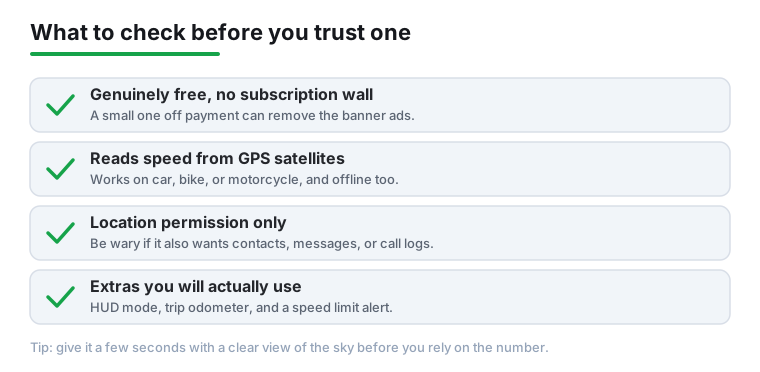
Every reading on this page comes from the same place, and it is not the car. Each of these six is described by its own maker as reading the phone's own satellite fix rather than anything in the vehicle. That is why one of them can claim to work with no mobile data at all, and it is also why every developer here that mentions accuracy qualifies it. Ulysse Speedometer Pro's own store description, read 21 August 2026, calls the app a "high-precision GPS* Speedometer" and then footnotes that asterisk "*Dependent on phone hardware", and the same page publishes its own limit on how far a measured trip distance may drift from a car's odometer, quoted in full in its section above. Google's Maps help page, read 21 August 2026, is blunter about the same thing: "Speedometers shown in the Google Maps app are for informational use only." Under a Tip heading on the same page it adds: "External factors may cause the Maps Speedometer to differ from your actual speed." Those are the makers' own words about their own products. This page repeats them and adds nothing to them.
Whether any of this keeps running behind another app is decided by Android, not by the app. Google's own background location limits documentation, read 21 August 2026, says that Android 8.0, API level 26, "limits how frequently an app can retrieve the user's current location while the app is running in the background" and that under those conditions "apps can receive location updates only a few times each hour". The same page says the limit applies on every device from that release onwards whatever release an app targets, that an app in the foreground is unaffected, and that one of the ways it lists to get frequent updates back is a foreground service, which "appears as an ongoing notification in the notification area". So a speedometer that holds its own live number while a map is in front is drawing over the top of that map or keeping a notification open, unless it is riding on the updates the map itself is already requesting, which the same page offers as a passive listener. Two descriptions here offer something in that shape and four say nothing at all, which is why that column reads Not stated so often.
The battery cost is the same documentation's warning, not ours. The same Google page states: "If your app retrieves near real-time location updates over a long period of time, the device's battery life becomes significantly shorter." That applies to every entry on this page equally, so it separates none of them, and it is the reason a long unplugged journey is the case worth planning for.
What this page will not tell you. It does not say that any of these is accurate enough to rely on instead of the instrument in the vehicle, because none of the documents read here says that and two of them say the opposite. It does not say what any road authority anywhere expects of a phone as a speed reference, or how a phone should be positioned in a vehicle, because no source read for this page publishes either. And it makes no claim about how any of these behaves on a specific phone: what is checked is what each maker publishes, on the date printed beside it.
If the goal is engine data rather than a speed on a screen, that is a different tool on a different port, covered in our guide to OBD2 apps that unlock hidden car features. For routing rather than a number, see the best GPS navigation apps for Android. For a recording of the road itself, the most reliable dash cam apps. For the screen a car shows while any of this runs, the Android car launchers compared. The wider navigation and auto hub holds the rest of the in-car categories.
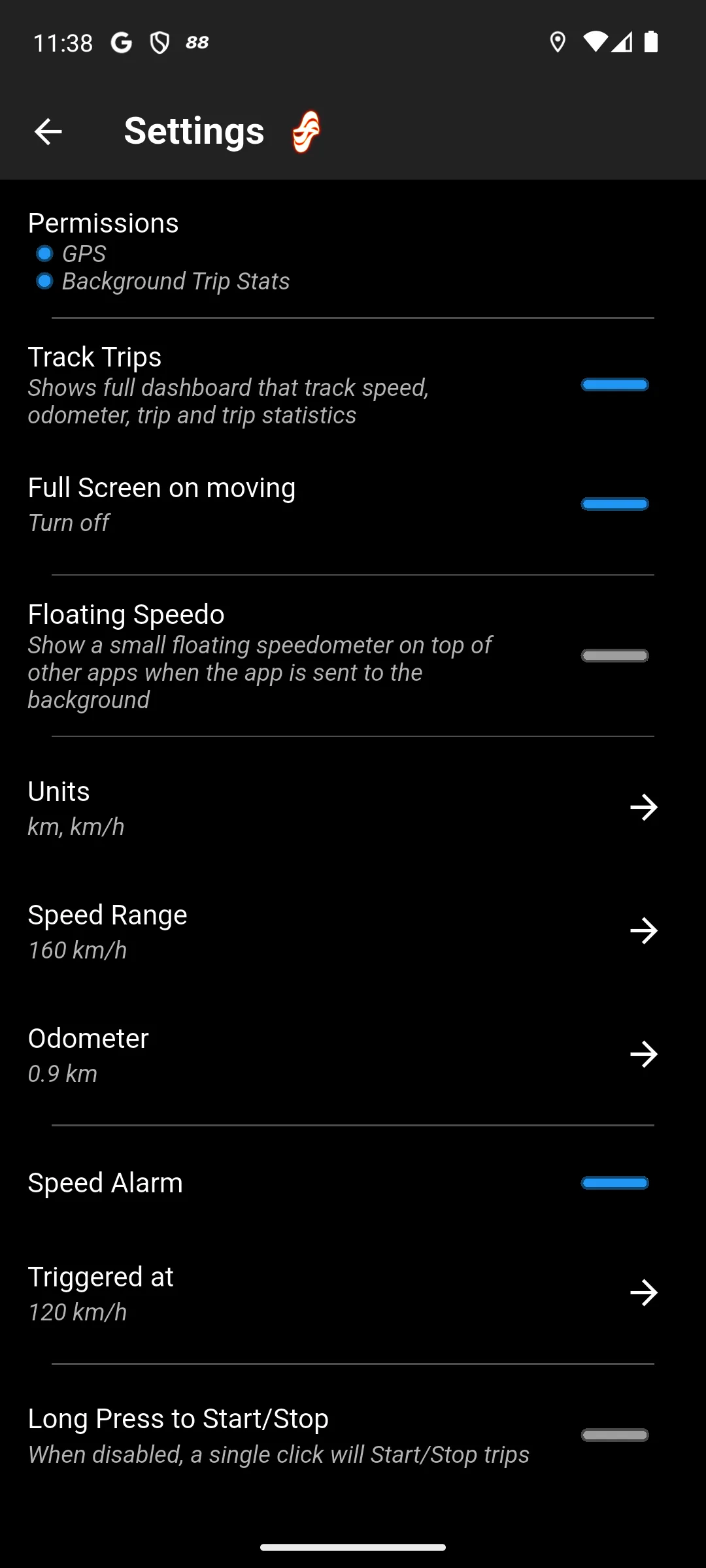
What the first launch asks for, and what to settle before setting off. Each dedicated app here asks for location permission, and that is the one thing it genuinely needs: location is how a GPS speedometer works at all. Precise location rather than approximate is what produces a usable speed. Be wary of any speed app that also asks for contacts, messages or call logs, none of which has anything to do with measuring speed. The location choice itself is a trade rather than a rule: while using the app is the narrower grant and is enough for a speedometer you are looking at, but it is not enough for a reading that stays on screen once something else is in front. Google's own background location limits documentation, read 21 August 2026, states that from Android 11, API level 30, an app starting a foreground service while in the background "cannot access location information unless the user has granted the ACCESS_BACKGROUND_LOCATION permission". So on our top pick the wider grant is what its Floating Speedo row and its Background Trip Stats permission are asking for, and the narrower one costs those two features rather than breaking the app. Waze's own location help page, read 21 August 2026, walks through both the phone level switch and the separate Improve Location Accuracy setting that the reading depends on.
The rest is settled while the vehicle is stationary. Choose the units, set the speed alert if the app has one, and turn on whatever keeps the display awake, so that nothing on the page needs a touch once moving. A satellite fix takes a few seconds in the open and may not arrive at all in a covered garage, which is normal for anything reading satellites.
Treat it as a second reading, not as a replacement for the instrument in the vehicle. That is what the makers themselves say. Google's Maps help page states that speedometers shown in the Google Maps app are for informational use only, and that external factors may cause the reading to differ from your actual speed. The developer of Ulysse Speedometer Pro publishes a known limitation that trip distance may deviate from a car's odometer data, and marks its own high precision claim as dependent on phone hardware. Checked 21 August 2026.
Only one of the six listings read for this page says so. The description for GPS Speedometer and Odometer states that the speedometer works offline for speed and distance, without mobile data or Wi-Fi, when GPS is available. The other five descriptions say nothing either way about offline speed, which is a statement about what those descriptions publish and not a finding that the apps fail without a connection. Checked 21 August 2026.
Expect it to. Google's own Android documentation on background location limits warns that if an app retrieves near real time location updates over a long period of time, the device's battery life becomes significantly shorter. That applies to every app on this page equally, so it is not a reason to choose one over another, and it is the reason a long journey away from a charger is the case worth planning for. Checked 21 August 2026.
The descriptions say so. GPS Speedometer and Odometer names cars, bikes, motorcycles, scooters, e-bikes and boats, and offers km/h, mph and knots. Speedometer GPS and its paid edition both offer a switch between a car speedometer and a bicycle odometer. Ulysse Speedometer Pro offers multiple profiles for a car, bike, walking or skiing. Each of those is the developer's own claim, read 21 August 2026.
Yes, and its own help page documents the switch. Open Google Maps, tap the profile picture or initial, then Settings, then Navigation, and under Driving options turn Speedometer on or off. Waze shows speed limit information during navigation as well. Google adds on the same page that the Maps speedometer is for informational use only. Checked 21 August 2026.
The two instruments measure different things. A phone app on this page derives speed from the phone's satellite fix, while the vehicle's own gauge is driven by the vehicle. No source read for this page publishes what any road authority permits either instrument to show, so this page does not say. What the makers do publish is that the phone reading can differ: Google warns that external factors may cause it to, and the Ulysse developer publishes a known limitation on trip distance against a car's odometer. A sudden jump in a phone reading usually means the satellite fix briefly weakened. Checked 21 August 2026.
Checked 21 August 2026: every figure on this page was re read today from six Google Play listings and, where one answered, each developer's own site. The review count printed for GPS Speedometer and Odometer moved from 9.67K to 10,037, and the last update dates for Waze and Google Maps moved to 18 and 21 August 2026. Speedometer GPS, package luo.speedometergps, was ADDED: it is free, it carries the largest install band of any dedicated speedometer here, and the paid entry this page already recommended links it in the first two lines of its own store description. No entry was removed. The free edition of Ulysse Speedometer stays out, and that earlier cut was re checked rather than inherited: both plausible package ids returned a real 404 twice today. Four claims are withdrawn. "the main screen has shown ads in the past" was carried with no source and is gone. A link in the body read "A Real Drive Test", which is both a testing claim and the dead former title of the page it points at; the address is unchanged and the text now matches that page. The FAQ said "Car speedometers are allowed to read slightly high", a statement about what a jurisdiction permits that this page cannot source, and it is replaced by what Google and the Ulysse developer each publish about their own readings. The gallery caption said the screens were "captured in-app on Android 14"; nothing here claims anyone ran the app, so the caption now says the screens are our own captures and adds that the dashboards screen is a euro storefront, whose prices are not the US listing figures quoted in the text. The checklist illustration is unchanged but has moved below the app sections, and its caption now scopes it: the graphic tells readers the category works offline, which is the one thing five of the six store descriptions on this page do not say either way. The decision table was rebuilt: the unsourced "Best for" column is replaced by three columns read from each developer's own description.