
Updated August 2026 · Checked 20 August 2026 against each app's own listing, named in its section. Every figure was re-read, and the maintenance question moved off the two catalogues onto each project's own releases page, which is the only source here that publishes a release date at all
An Android keyboard is an input method editor, and Android's own developer documentation, read on 20 August 2026, says a user selects one from system settings and then uses it across the entire system
, with only one enabled at a time. That is why this page keeps to what the two catalogues and the three projects actually publish about these four, and says where each source stops. It does not rank them on privacy: two of the four have a data handling declaration to read, and both are declarations rather than findings.
For the standing picks across the whole category, the keyboard roundup covers the wider field.
Gboard is our best overall and best free pick because its Play listing is free, carries no ads label, and was edited on 17 August 2026.
HeliBoard is our offline pick because its F-Droid entry, which has no price or ads field, lists read your contacts but no network permission for version 4.0, released 10 July 2026.
FlorisBoard is our caution because its newest stable release, 0.5.2, dates from 28 November 2025, and F-Droid publishes no price or ads field.
Data checked: 3 September 2026.
The monthly umbrella for this series is best new apps for Android, where every entry is dated by its own Play release field.
How to read the price and ads cell. Only the two Play rows use it. No ads label there means that listing carried none on 20 August 2026. Of the two catalogues read for this page, only Google Play has a Contains ads field at all, so the other two rows are not scored in that cell at all: a merged cell records fields a catalogue does not publish, not an app found to carry no advertising. F-Droid is not silent on advertising, though. Its documentation, read on 20 August 2026, lists Ads among the Anti-Feature labels it applies to apps it ships, and neither F-Droid entry here carries an Anti-Feature flag of any kind. That is the absence of a flag, which is weaker than a finding that anything is clean and stronger than no information at all.
The fullest record here: the longest data safety declaration and the largest ratings base
Google LLC · Rating 4.5 stars from 18,780,197 ratings · Install band 10,000,000,000+, the count Google Play prints and not a count of people · Free to install, with no in-app purchases shown and no Contains ads label on the listing · Bluntest con: its Data Safety section declares that the app may collect these data types and that data can’t be deleted · Play listing edited 17 August 2026, 3 days before this check, which is the day the listing was last changed and not a release date · No version number is published on the listing, and no release feed for it was found in anything read for this page · Contains ads: No · checked 20 August 2026
Google Play listing · 4.5 (18,780,197) · read 20 August 2026
Gboard is Google’s own keyboard, and its Play listing is the fullest record this page reads: 4.5 stars from 18,780,197 ratings, free to install, no in-app purchases shown, and no Contains ads label on the entry. The blunt part sits in the same listing. Its Data Safety section declares no data shared with third parties and, in the same breath, that the app may collect these data types.
That section, read on 20 August 2026, carries 5 lines: no data shared with third parties; this app may collect these data types; data is encrypted in transit; data can’t be deleted; independent security review. Each is a declaration made to Google by the developer rather than an audit result, and the word may belongs to the declaration. It is also the one entry of the four whose maintenance cannot be checked at the source that settles it for the other three: no source read for this page publishes a version number, a change list or a release date for it, only the day its listing was last edited. Skip it if a declaration that the app may collect these data types is a deal breaker: that line is on the listing, and nothing here qualifies it further. Choose Gboard over Unexpected Keyboard if the weight of a listing is what reassures you: its rating rests on a far larger number of ratings, and its data safety declaration is the longer of the two on this page.
The one entry read here from both catalogues, so the two kinds of field sit side by side
Juloo · Rating 4.3 stars from 3,514 ratings · Install band 500,000+ on Play, a count of installs and not of people · Free to install, with no in-app purchases shown and no Contains ads label on the listing · Bluntest con: the permissions its F-Droid entry lists for build 2.0.4 include full network access, and it is the one of the three F-Droid entries read here that asks for any network permission at all · Play listing edited 25 May 2026, which records a listing change and not a release · Also on F-Droid: version 2.0.4, added 1 July 2026, licence GPL-3.0-only, a New in version 2.0.4 block headed Bug fixes, and no Anti-Feature flag, which records what F-Droid has flagged and is not a finding about advertising (F-Droid entry, read 20 August 2026) · The project itself released 2.0.4 on 24 May 2026, and its repository was last written to 19 August 2026, 1 day before this check (the project's own releases page, read 20 August 2026) · Contains ads: No · checked 20 August 2026
Google Play listing · 4.3 (3,514) · read 20 August 2026
Unexpected Keyboard is the one entry this page reads from both catalogues, which makes it the plainest illustration of what each one publishes. Google Play gives it 4.3 stars from 3,514 ratings, a 500,000+ install band, free with no in-app purchases and no Contains ads label. What this page reads from its F-Droid entry is a version, the date that version was added, a licence, a summary, a description, a change list and a permissions list, and not one of those is a Play field. The blunt part: its Play Data Safety section declares no data collected, and a declaration is the developer’s word to Google rather than an audit.
Its F-Droid entry, read on 20 August 2026, summarises it as a lightweight and privacy-conscious virtual keyboard for Android, and its description there states that the application contains no ads and is open source. Both are the project speaking about its own work. Privacy-conscious is an aim rather than a finding, and the sentence about advertising is a developer statement, not a catalogue label: the label that can be checked is on the Play side, and that listing carries none. It is also the entry that settles what the other two dates are worth: the project published 2.0.4 on its own releases page on 24 May 2026, the Play listing was edited the next day, and F-Droid added the same version 38 days after the release. One version, three dates, spread over five weeks, and only the first of them records anything being shipped. Skip it if a rating built on a large number of ratings is what reassures you, because its own rests on far fewer than the other Play entry here. Choose Unexpected Keyboard over HeliBoard if you want an entry that carries store fields at all, since HeliBoard is on F-Droid only and has none.
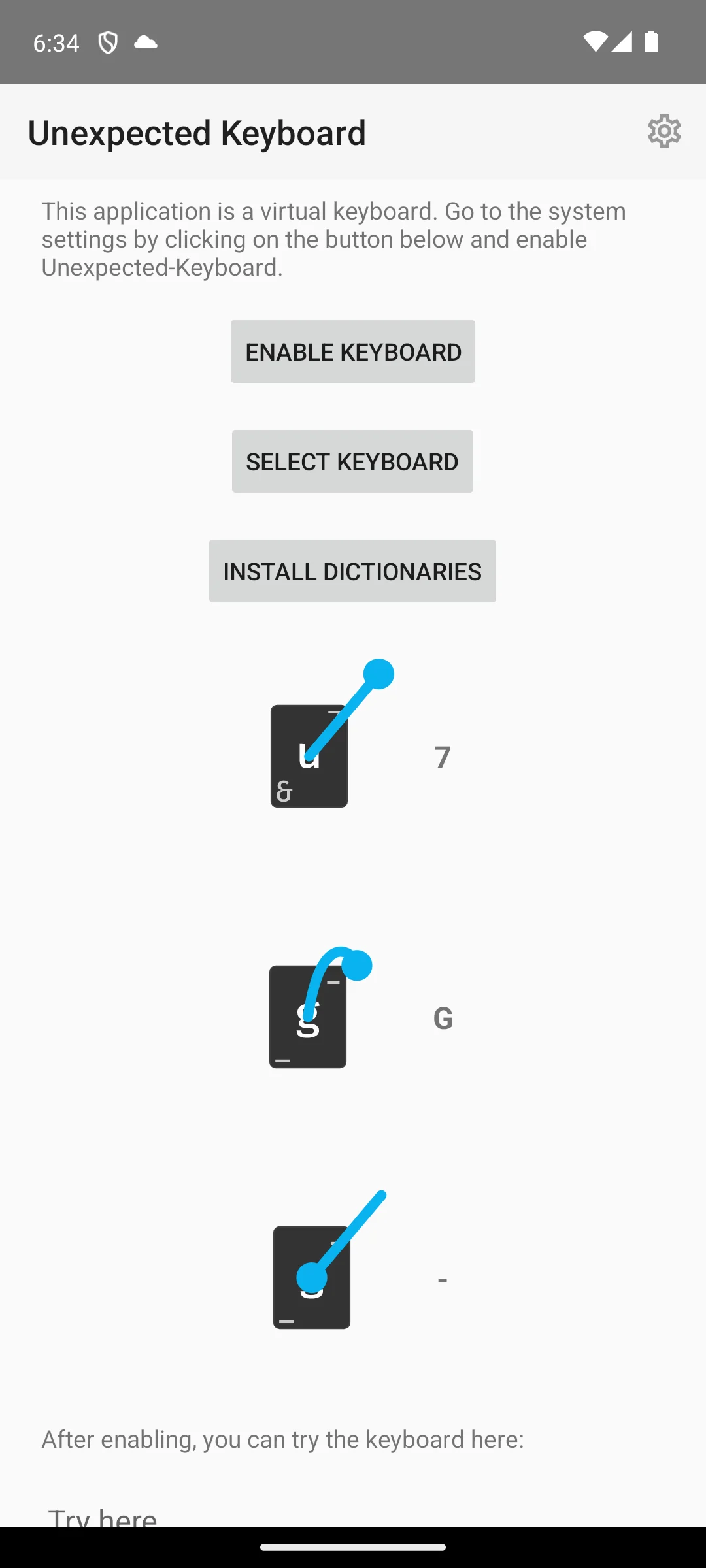
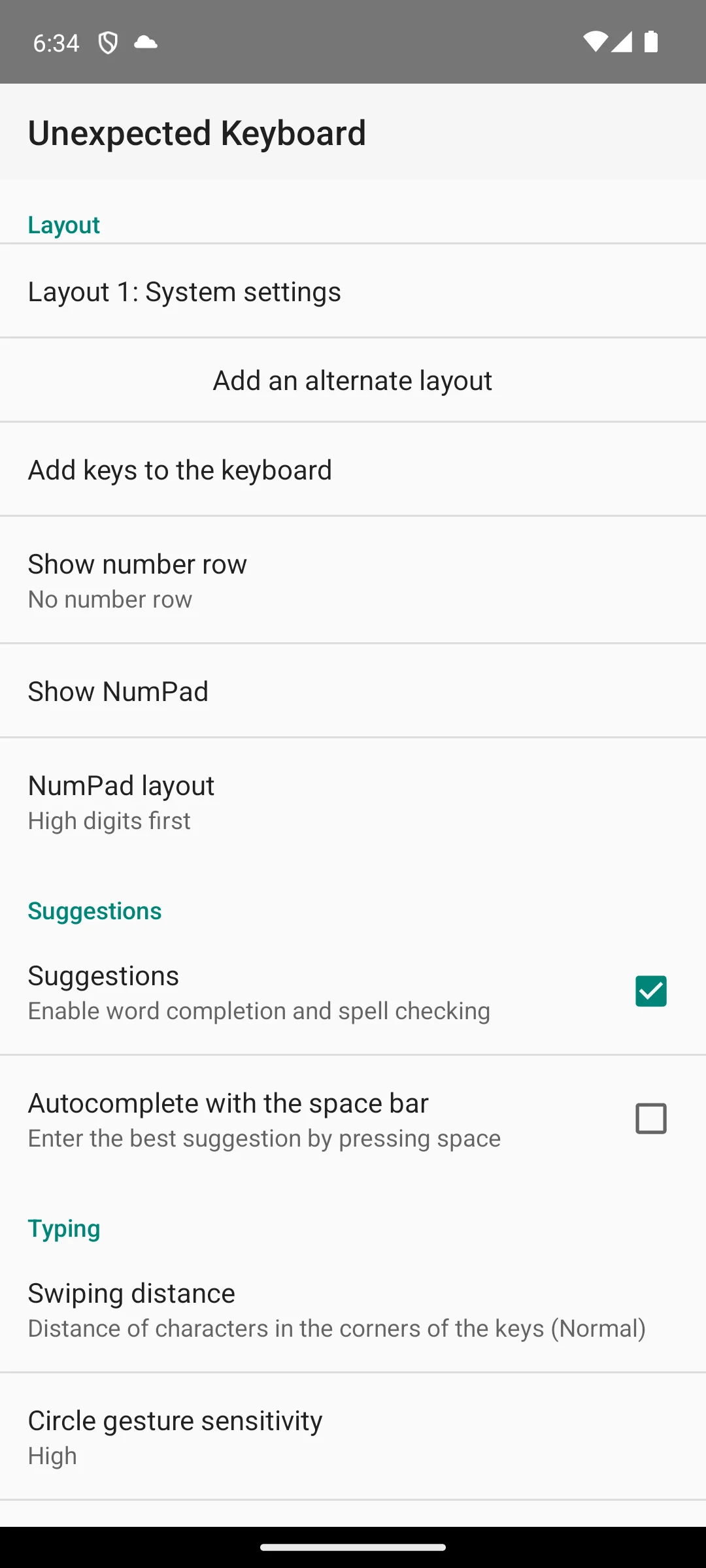
The two screenshots below are our own emulator captures of Unexpected Keyboard’s setup page, dated 18 August 2026, and they are described here only by what is on them. That page states that the app is a virtual keyboard, offers three buttons labelled Enable Keyboard, Select Keyboard and Install Dictionaries, and draws the swipe gestures onto a key, so the way one key reaches several characters is visible on the screen itself. The second capture shows the same page lower down, ending in a field for trying the keyboard once it is enabled. The ad strip was inspected before publication and there is none on either capture.
Released 10 July 2026 and in F-Droid two days later: the most recent release any project on this page publishes
On F-Droid only, and the most recent release on this page. No price, rating or ads label is published for it: F-Droid has no Contains ads field, and no price, rating, review count or install band appears on any of the three entries read for this page · Bluntest con: the permissions its entry lists for this build include reading your contacts · Version 4.0, added to F-Droid on 12 July 2026 · Released by the project itself on 10 July 2026, two days before F-Droid added it, and its repository was last written to 10 August 2026, 10 days before this check (the project's own releases page, read 20 August 2026) · Licence GNU General Public License v3.0 only, SPDX id GPL-3.0-only · Summary published on F-Droid: Customizable open-source keyboard · The entry carries a New in version 4.0 block listing 11 changes and a closing catch all · Permissions listed for that build: read your contacts, read and write the user dictionary, run at startup, control vibration, and one the app defines for itself · Built and signed by the original developer, with F-Droid’s guarantee that it corresponds to the published source; the current builds on the other two F-Droid entries here are built by F-Droid instead and carry that same guarantee · What F-Droid publishes about advertising is an Ads Anti-Feature flag, which its own documentation, read on 20 August 2026, describes as the label it applies to an app that contains advertising, and this entry carries no Anti-Feature flag of any kind · There is no Data Safety section in this catalogue either · No Google Play listing: play.google.com returned a 404 for its package on 20 August 2026, on 3 consecutive reads · F-Droid entry, read 20 August 2026
F-Droid entry · releases page · no rating or install count is published in either to quote · read 20 August 2026
HeliBoard carries the most recent release of anything on this page: the project published 4.0 on 10 July 2026 and F-Droid added it on 12 July 2026, two days later, with a change list printed above the description. That is a claim about one date and not about all of them, and the page keeps it that way: Unexpected Keyboard's repository has been written to more recently than HeliBoard's, and FlorisBoard's own release reached F-Droid faster than this one did, in 1 day against two. What no source read here publishes for HeliBoard is a rating, a review count, an install band or a price. Google Play lists nothing at all for its package, its F-Droid entry has none of those four fields to give, and the permissions that entry prints for this build include reading your contacts.
The description on its F-Droid entry, read on 20 August 2026, reads in the project’s own words: HeliBoard is a privacy-conscious open-source keyboard, based on AOSP / OpenBoard. Does not use internet permission, and thus is 100% offline.
That is the project describing its own build, not a finding, and nothing here ran the keyboard. What can be set beside it is the permissions list on the same entry, which names no network permission at all for this version, and that is the checkable half of the claim: Android's permission reference, read on 20 August 2026, defines INTERNET as the permission that allows applications to open network sockets
, so a build that does not request it has not asked for the thing an app needs to reach the network. Skip it if you want a published rating, an install band or a data handling declaration before you install anything: this entry carries none of the three. Choose HeliBoard over FlorisBoard if a recent release with a documented change list is what decides it, because FlorisBoard has published no stable release since 28 November 2025 and its F-Droid entry lists no changes for any of its builds at all.
Beta by its own summary · no stable release since 28 November 2025, though the project has not stopped
On F-Droid only, and the oldest stable release on this page. No price, rating or ads label is published for it: F-Droid has no Contains ads field, and no price, rating, review count or install band appears on any of the three entries read for this page · Bluntest con: its stable line has not moved in 8 months and 23 days · Version 0.5.2, added to F-Droid on 29 November 2025 · Released by the project on 28 November 2025, and it is still the newest STABLE release · One pre-release has followed it, 0.6.0-alpha02 on 23 January 2026, which F-Droid does not carry · The repository was last written to 25 July 2026, 26 days before this check, and it is not archived (the project's own releases page, read 20 August 2026) · Licence Apache License 2.0, SPDX id Apache-2.0 · Author Patrick Goldinger · Summary published on F-Droid: An open-source keyboard which respects your privacy. Currently in beta. · The entry carries no New in version block for any of the three builds it lists · Permissions listed for the current build: show notifications, control vibration, and one the app defines for itself · What F-Droid publishes about advertising is an Ads Anti-Feature flag, which its own documentation, read on 20 August 2026, describes as the label it applies to an app that contains advertising, and this entry carries no Anti-Feature flag of any kind · There is no Data Safety section in this catalogue either · No Google Play listing: play.google.com returned a 404 for its package on 20 August 2026, on 3 consecutive reads · F-Droid entry, read 20 August 2026
F-Droid entry · releases page · no rating or install count is published in either to quote · read 20 August 2026
FlorisBoard is the entry this page has to be most careful about, and the care cuts both ways. Its stable line has not moved in 8 months and 23 days: the project released 0.5.2 on 28 November 2025, F-Droid added it the next day, and neither has carried anything newer since. The project itself has not stopped. It published a pre-release, 0.6.0-alpha02, on 23 January 2026, and its repository was last written to 25 July 2026, 26 days before this check. Google Play lists nothing for its package, so there is no rating and no price to weigh either way.
Read this first. The summary on its F-Droid entry, read on 20 August 2026, still reads An open-source keyboard which respects your privacy. Currently in beta.
A keyboard whose own summary calls it beta, whose newest stable release is 8 months and 23 days old, and whose only newer build is an alpha the catalogue does not carry, is the plainest thing this page has to tell you. That is a statement about the stable channel, not about the project: on its own releases page the work is still going on.
Respects your privacy in that summary is the project’s claim about the project’s own work, and this catalogue carries no data handling section that could be set against it. Skip it if you want software the people who wrote it call finished: this one is labelled beta on its own entry, and the newer line is labelled alpha on the project’s. Choose FlorisBoard over HeliBoard only if a permissive licence matters to you more than a recent release, because on every date either source publishes, HeliBoard is the fresher of the two.
This page is headed 2026, so whether each entry is still current is the question it has to answer, and until this pass it answered it from catalogue dates alone. That could not work, and it is worth saying why plainly rather than working around it: neither catalogue publishes a release date for anything. Google Play prints the day a listing was last edited. F-Droid prints the day a build entered its repository. A listing can be edited without a build changing, and a build can sit for weeks before a repository takes it. Neither event is a release.
The three open source projects here publish release dates themselves, on the repository each app’s own F-Droid entry links as its Source Code, and those were read for this pass. For the fourth, Gboard, no source read for this page publishes a version number, a change list or a release date at all, so the day its listing was edited is the only date there is to give and it is labelled as that rather than dressed up as a release.
That last line is the distinction this pass exists to draw. A catalogue gap and a stopped project look identical from inside the catalogue, and they are not the same thing. The only way to tell them apart was to go to the source the project itself publishes.
The keyboard you enable is the app Android routes text input to across the entire system, in the developer documentation's own words, read on 20 August 2026. That is why the data question is the one that matters most in this category. This page cannot settle it, and the reason is worth stating plainly rather than papering over with reassurance.
The fields this page read are listed in the How we verify box above, and that list is what everything here rests on. Where this page says a field is absent, it means absent from the source named in the same sentence, and it was checked there rather than assumed.
Because those columns hold Google Play fields, and HeliBoard and FlorisBoard are on F-Droid only. Google Play returned no listing for either package on 20 August 2026, on 3 consecutive reads, and neither F-Droid entry read here carries a price, a rating or a data safety declaration. F-Droid has no Contains ads field either, although it does flag advertising: its own documentation lists Ads among the Anti-Feature labels it applies to apps it ships, and neither of these two entries carries one. Their merged cell says that in words rather than showing three cells a reader could take for a price, a clean record or a low score. Checked 20 August 2026.
Two of them. Gboard is at 4.5 stars from 18,780,197 ratings and Unexpected Keyboard at 4.3 from 3,514, both read from their Google Play listings on 20 August 2026. HeliBoard and FlorisBoard are read here from F-Droid, which publishes no rating and no review count for anything it lists. A missing rating there is a property of the catalogue and not a low score. Checked 20 August 2026.
The honest answer has two halves, and the previous version of this page gave only one of them. The newest version F-Droid lists is 0.5.2, added on 29 November 2025, and the newest stable release the project publishes is the same one, dated 28 November 2025, which is 8 months and 23 days before this check. Its F-Droid summary still describes it as currently in beta. But the project has published a pre-release since, 0.6.0-alpha02 on 23 January 2026, and its repository was written to 26 days before this check and is not archived. So the stable channel is stale and the project is not stopped, and those are different statements. Checked 20 August 2026.
No. A licence says what may be done with the code, not what a build does on a phone. Two entries here carry a data handling declaration on Google Play: Gboard’s says no data shared with third parties and that the app may collect these data types, and Unexpected Keyboard’s says no data collected. Both are declarations made by the developer rather than audit findings. F-Droid publishes no data safety section, so for HeliBoard and FlorisBoard there is no declaration to read at all, which is not the same as a clean one. What their entries do carry is a permissions list, and that records what a build may reach. Checked 20 August 2026.
Two of the four have a listing on which Contains ads is a field at all, and on 20 August 2026 neither the Gboard listing nor the Unexpected Keyboard listing carried the label. For HeliBoard and FlorisBoard the answer is weaker but not empty. F-Droid has no Contains ads field, but its own documentation, read on the same day, lists Ads among the Anti-Feature labels it applies to apps it ships, and neither entry carries an Anti-Feature flag of any kind. That records what F-Droid has flagged rather than what an app does, so it is evidence rather than proof. The Unexpected Keyboard description on F-Droid does state that the application contains no ads, but that is the developer writing about the project, not a catalogue label. Checked 20 August 2026.
It depends on which date you mean, and this page keeps three of them apart. On a release, the date a project itself shipped something: HeliBoard, with 4.0 on 10 July 2026. On a catalogue entry, the date a build reached a repository: HeliBoard again, on 12 July 2026. On a store listing being edited, which is not a release at all: Gboard, on 17 August 2026. Gboard is the only one of the four for which no source read here publishes a release date, so its listing date is all there is. Checked 20 August 2026.
On what the sources publish: Gboard and Unexpected Keyboard are the two entries with a rating, an install band and a data safety declaration to read, and HeliBoard is the freshest on the one date that records a release rather than a catalogue event, published 10 July 2026 and in F-Droid two days later. FlorisBoard is the one to be careful with, because its stable line has not moved in 8 months and 23 days and its own summary still calls it beta, though its repository is still being written to. None of that is a statement about how any of them behaves once it is on a phone. Checked 20 August 2026.
Checked 20 August 2026: every figure in the body of this page was re-read on the day of this pass and none was carried over. The social card this page declares is the one exception: it was generated on 15 August, its figures came from the table as it stood then, and this pass does not rebuild it. Gboard moved from 18,770,423 ratings to 18,780,197 and its listing date from 14 August 2026 to 17 August 2026; Unexpected Keyboard moved from 3,499 ratings to 3,514. The three F-Droid entries were fetched again and are byte for byte identical to the copies taken on 15 August, so nothing sourced to them has moved.
The main change. This page is headed 2026 and its whole premise is whether each entry is still current, yet it answered that from catalogue dates alone, which cannot answer it: a Play listing date records an edit and an F-Droid date records a build entering a repository, and the page said as much while still leaning on them. Each project's own releases page was read on 20 August 2026 and now carries that column. It produced a finding the catalogues could not: FlorisBoard's stable line has not moved in 8 months and 23 days, but its repository was written to 26 days before this check and is not archived, so the gap is in the stable channel and not in the project. The page now says both, where before it said only the first.
A previous retraction is itself withdrawn. The pass of 15 August retracted the claim that FlorisBoard's newest build was 0.6.0-alpha02, dated January 2026, on the ground that F-Droid lists 0.5.2 as newest. That release exists: the project published it on 23 January 2026, marked pre-release, which was re-derived at the source on 20 August 2026. A catalogue not carrying a build is not evidence the build was never made, and the earlier correction deleted something true. The version number and its month are restored to the body with the source that settles them; the attribution to a third party repository that the original claim carried is not restored, because nothing read for this pass covers it.
The decision table was rebuilt, twice over. Its second column repeated, word for word, the verdict line printed under each of the four headings, so it differentiated nothing and decided nothing. It now carries the newest release each project publishes and the dates around it, which is the column this page leans on. Two more columns had the same fault in a quieter form: Price read Free in both rows that filled it and Ads read No in both, so each returned a constant across the whole table. They are merged into one price and ads cell, and the width they were spending goes to the Data Safety declaration, which both Play listings publish and which differs between them. The merged cells stay: the last two rows still take one cell across the last three columns, because F-Droid publishes no price, no rating and no data safety declaration on any entry read here.
A claim about F-Droid was wrong and is corrected. This page stated in eight places, its own changelog included, that F-Droid publishes no ads label for any app it carries. The price and rating half of that is right and stands. The ads half is not: F-Droid's own documentation, read on 20 August 2026, lists Ads among the Anti-Feature labels it applies to the apps it ships. The label exists, it is an exception flag rather than a Yes or No field, and neither entry here carries one. The old wording turned that into no information at all, when a catalogue that reviews for advertising and did not flag these two is weak evidence in their favour. The claim is also scoped now to the three entries read for this page rather than stated over every app F-Droid carries.
A superlative about permissions is withdrawn. The HeliBoard section claimed its entry was the only one of the three F-Droid entries read here whose build asks for no network permission. That is wrong, and this page's own FlorisBoard bullet said so on the same screen: the permissions FlorisBoard's entry lists for its current build are show notifications, control vibration and one it defines for itself, with no network permission either. Two of the three ask for none and Unexpected Keyboard is the one that does. The sentence now says that, the set is derived from the entries fetched on 20 August 2026 rather than typed, and a permissions block that stops matching stops the build.
Withdrawn under the standing rule of verified, not tested. The How we verify box that shipped on 18 August opened with a tier stating that the app had been put on our emulator and opened, and described what that shows; a paragraph in the Unexpected Keyboard section repeated the same framing and dated it. Both are gone, and the box that replaces them names the fields read from each of the three sources and states that no verdict, figure or comparison rests on our own use of these keyboards. The two screenshots are unchanged, both files were re-checked and both load, and the paragraph that introduces them now describes only what is on the screens and the date the captures carry. Also still withdrawn, from the pass before this one and re-checked rather than assumed: the caption phrase “captured in-app by us on Android 14”, which credited galleries to this site in a form the same rule forbids.
Standing from the pass of 15 August. Entries removed then and not restored: FUTO Keyboard, Acti and the section on Gboard Rambler, together with the list of keyboards with no 2026 news that named Microsoft SwiftKey and Typewise, and the note excluding an AI-branded theme keyboard sold as 2026 Keyboard. Each was re-considered on this pass rather than inherited, and nothing read today supports bringing any of them back. The swipe benchmark percentages retracted then stay retracted: no source read on either pass publishes them.
 SwiftKey vs Gboard: Which Keyboard Wins on Your Android Phone?Personalization
 Best Keyboard Apps for Android: 10 Checked on Play and F-DroidPersonalization
 Best Launcher Apps for AndroidPersonalization