
Updated September 2026 · the listing this guide described is gone from the store, so the app that answers to the name today is read afresh, alongside two free alternatives
A free VPN sounds like a no brainer until you realise most of them pay for the servers by selling your data or burying you in ads. Star VPN is one of the more popular free names on Android. What follows is a read of the listing that answers to that name today, its permissions and the developer's own documentation. Here is how to get it running, the parts that genuinely help, the speed tricks worth knowing, and the catches you should know before you trust it with anything sensitive.
A free tunnel for low stakes browsing
4.1 stars from 9,632 reviews · 500,000+ installs · free to install · in-app purchases $0.99 to $384.99 per item · updated 26 August 2026 · by StarVPN Inc. · Contains ads: No · checked 3 September 2026
Google Play listing · 4.1 (9,632) · read 3 September 2026
This is the listing that answers to the name on the store today, read 3 September 2026: StarVPN - Fast VPN Proxy by StarVPN Inc. It is free to install, its header row carries no Contains ads label, and the money shows up instead as in-app purchases running $0.99 to $384.99 per item. The number that matters most on a page about anonymity is not the rating: it is the data safety section, which states the app may share data types with third parties and may collect data types, with data encrypted in transit and deletion available on request. That is a declaration by the developer, not an audit, and no free VPN on this page has published one.
Installing takes a moment, and that low friction is part of the appeal. Search the Play Store for Star VPN and you will notice something straight away: there is more than one app using that name. The one most people land on is listed as Star VPN, and there are close siblings like StarVPN Fast VPN Proxy from other developers. They all do roughly the same thing, The listing this guide originally described, credited to a different developer and last updated 9 October 2025, returns nothing on the store today, so that identification is withdrawn. The one that answers to the name now is StarVPN - Fast VPN Proxy by StarVPN Inc., read 3 September 2026: updated on the store 26 August 2026, free to install, with in-app purchases of $0.99 to $384.99 per item and no Contains ads label on its header row. If you are unsure which one you grabbed, check the developer name on the store listing and read a few recent reviews before you install. A VPN is one of the few apps where the publisher behind it matters a great deal, because that company sees your traffic.
Once you tap Install and open it, the app drops you straight onto a simple home screen with a big connect button and a list of country locations. There is no long sign up, no card details, and no onboarding survey to wade through. That low friction is genuinely handy when you just want protection on a public network and you do not want to create yet another account. We do want to flag one thing though: the absence of an account also means there is no easy way to ask the provider to delete data tied to you later, because there is nothing to log into. That cuts both ways.
The one screen that catches people out is the very first connection. Android shows you a system level prompt that says the app wants to set up a VPN connection and that it can monitor network traffic. This prompt is normal and every VPN on Android triggers it, because routing your traffic is the whole point of the tool. Tap OK, and a small key icon appears in your status bar to show the tunnel is live. To switch countries later you just disconnect, choose another location from the list, and reconnect, which takes all of a moment.
One setup choice is worth making early. If the app has an always on or auto connect option in its settings, decide deliberately whether you want it. Always on means the VPN reconnects every time your phone wakes, which is good for consistent coverage but eats into any data allowance and drains a little more battery. You can also tell Android itself to block connections without the VPN, under Settings, Network, VPN, the gear icon next to the app. That setting is part of Android, not Star VPN, and it is a useful safety net whichever VPN you run.
Star VPN keeps things deliberately simple, and for casual use that is not a bad thing. The core job is hiding your real IP address and encrypting the connection between your phone and the VPN server, so the network you are on, whether that is a coffee shop or an airport, cannot easily see which sites you visit. That is the basic promise of a VPN: once you connect, an IP lookup shows the city of the server you picked rather than your home IP.
The server list is the feature you will touch most. Free users get a handful of countries to pick from, which is enough to reach region locked content or simply put distance between you and a network you do not trust. The interface shows a rough ping for each location, so you can lean toward the faster ones rather than guessing. There is a one tap connect for when you just want protection fast, and the app remembers your last server so reconnecting is quick. It is a no frills toolkit, but the parts a casual user actually needs are present and easy to find.
One feature worth checking for specifically is a kill switch. A kill switch cuts your internet the instant the VPN drops, so your real IP and traffic never leak out in the gap before it reconnects. On free apps this is often missing or hidden. If a connection blip means your traffic briefly falls back to the open network, that matters more than people think, especially on public Wi Fi. This is one of the clearest places where free tools lag behind paid ones, and it is the feature most worth having before trusting any VPN with something sensitive.
It is also worth being clear about what the app does not include. There is no split tunnelling, no ad or tracker blocking and no multi hop routing. Those are extras you find on dedicated privacy apps, not on a free tier. A no logs promise in a store description is reassuring on paper, but it is not the same as an independent audit, and the data safety section on this listing, read 3 September 2026, says the app may share data types with third parties. The honest summary is that the feature set covers the basics of changing your apparent location and encrypting the hop to the server, and not much beyond that.
Every VPN adds some overhead, and a free one with crowded servers feels it more. The single biggest win is choosing the right location. Pick the server geographically closest to you unless you specifically need another country, because a shorter hop almost always means lower lag and quicker page loads. If one server feels sluggish during a busy evening, switching to a different city in the same region usually clears it. Free servers fill up at peak times, roughly evenings and weekends in any given region, so a quiet looking location at 3pm can crawl by 9pm.
A few other habits are worth adopting. Connecting over Wi Fi rather than a weak mobile signal gives a steadier base, because the VPN cannot do anything about a poor underlying connection; it can only sit on top of it. Reconnecting after a long idle stretch clears the occasional stall, since some free servers quietly drop sessions that have been inactive. If a page refuses to load right after you connect, give it a few seconds for the tunnel to settle before assuming the server is bad. A five second wait often sorts out what looks like a dead connection.
It is also worth running a quick speed test on a couple of servers when you first install, then noting which were fastest for you. Server performance depends heavily on where you physically are and which routes your traffic takes, so a location that is quick for someone abroad may be slow for you. And if you only need the VPN for one task, like email on hotel Wi Fi, connect for that and disconnect afterwards rather than leaving it running.
Be realistic about the job, though. A free VPN is fine for browsing, email, reading the news, and light streaming, but for large downloads, high resolution video, or video calls you may hit the ceiling, and that is where the network simply cannot keep up. This is not a flaw you can configure away; it is the nature of sharing a free server with a lot of other people. If you find yourself fighting the speed every day, that is a signal you have outgrown the free tier rather than a setting you got wrong, and the alternatives further down are where to look next.
This is the part to read slowly, because free VPNs are where the trade offs hide. To work at all, any VPN needs permission to create a network tunnel, so that request is normal and unavoidable. What matters is everything beyond that. Open the app's listing on Google Play, scroll to the data safety section, and read what it says it collects and shares. If a free VPN asks for permissions that have nothing to do with networking, like your contacts or your precise location for advertising, that is a reason to pause. On this listing, read 3 September 2026, that section is the whole story: it says the app may share data types with third parties and may collect data types, with data encrypted in transit and deletion available on request. The header row carries no Contains ads label, and the revenue shows up instead as in-app purchases of $0.99 to $384.99 per item, so what a free user meets is the upgrade prompt rather than the ad break.
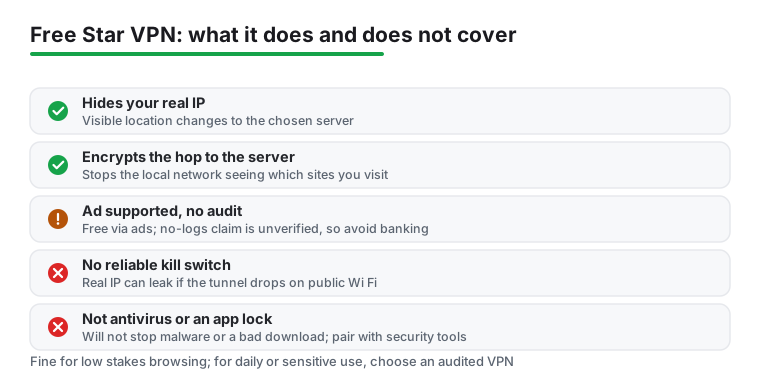
The bigger question with any free VPN is what happens to your traffic data, and this is where honesty matters more than marketing. A VPN sees every site you visit while you are connected, so the trust you place in the provider is enormous. Free providers have to make revenue somewhere, and some log activity or share data with advertisers, so banking, work logins and anything truly sensitive do not belong on a free tier whose handling nobody outside the company has verified. A store listing that promises a no logs policy is a good sign, but the providers worth the most trust back that claim with an independent audit you can read, and a small free app usually has not done that. Read the privacy policy before you commit, and treat a free VPN as a convenience for low stakes browsing rather than a vault for your private life.
There are limits to be honest about beyond privacy too. Free servers are slower and busier, the country choices are narrower, and you may get logged out or pushed toward an upgrade mid session at the worst moment. A VPN also is not antivirus, so it will not stop a malicious download or warn you about a dodgy app, and it cannot lock your apps behind a PIN. People sometimes install a VPN and feel fully protected, which is the wrong takeaway. For the security side a VPN was never meant to cover, pairing it with a proper security app like the one in our guide to installing AVG free on Android fills a real gap. The two tools do different jobs, and you want both.
If the ads wear thin or you want firmer privacy guarantees, you have better options, and some of them are also free. Proton VPN documents a free tier with no data cap and no speed limit, backed by a no logs policy with published independent audits, and its listing carries no Contains ads label, read 3 September 2026. The free tier limits how many countries you can reach and does not include every extra, but for anyone who cares about what happens to their traffic it is the strongest free pick here. The catch with Proton's free plan is fewer server locations than the paid tier, so it is about trust and honesty rather than raw choice.
Windscribe is another solid free choice. Windscribe documents a free plan of 10GB a month once you confirm an email address, across servers in roughly a dozen countries, and it includes a kill switch, the safety feature that cuts your connection if the VPN drops so your real IP never leaks. That data allowance is enough for regular browsing and email but will not stretch to heavy streaming, so it suits a lighter user. A real kill switch on a free plan already puts it ahead of most free apps, including StarVPN.
For the strongest protection, a reputable paid VPN removes the data caps and most of the guesswork, and it is the route to take if you plan to lean on a VPN daily or for anything important. You are paying for audited privacy, faster servers, more locations, and features like split tunnelling and a dependable kill switch. We compare the standout choices, free and paid, in our roundup of the best VPN apps for Android, which is the right next stop if Star VPN does not quite fit. Anonymity is rarely about one app anyway. If you also download files, our notes on privacy and anonymity for Android torrent apps explain why a VPN matters there too, and you can explore the wider security and privacy hub for app locks, antivirus, and the other tools that round out a safer phone.
A free tier from a company that publishes audits
4.7 stars from 1,271,901 reviews · 100,000,000+ installs · free to install · in-app purchases $9.99 to $119.88 per item · by Proton AG · Contains ads: No · checked 3 September 2026
Google Play listing · 4.7 (1,271,901) · read 3 September 2026
The strongest free tier named in this guide, and the numbers on its listing say why people trust it: 4.7 stars from 1,271,901 reviews across 100,000,000+ installs, read 3 September 2026, with no Contains ads label. Proton documents a free plan with no data cap and no speed limit, and publishes independent audits of its no logs policy, which is the thing a store description alone can never establish. The free plan reaches fewer countries than the paid one.
A monthly data allowance and a kill switch for nothing
4.7 stars from 307,656 reviews · 10,000,000+ installs · free to install · in-app purchases $3.99 to $94.99 per item · by Windscribe · Contains ads: No · checked 3 September 2026
Google Play listing · 4.7 (307,656) · read 3 September 2026
The middle option: 4.7 stars from 307,656 reviews across 10,000,000+ installs on a listing read 3 September 2026, with no Contains ads label. Windscribe documents a free plan of 10GB a month once you confirm an email address, across servers in roughly a dozen countries, and it includes the kill switch that cuts the connection if the tunnel drops so the real IP never leaks. That feature on a free plan is the reason it is here.
It is free to install, read 3 September 2026, and its listing carries no Contains ads label. The money is in the in-app purchases, which run $0.99 to $384.99 per item. The real catch is not the price: its data safety section says the app may share data types with third parties, which is the thing to weigh before routing anything you care about through it.
A VPN hides your IP address from the network you are on and encrypts the hop to its server, and its data safety section says data is encrypted in transit. What no store listing can establish is what the provider does with traffic data at its end. Proton VPN is the only app on this page whose no logs policy is backed by published independent audits. Checked 3 September 2026.
Free servers carry the most users, so speeds dip at busy times, usually evenings and weekends. Choose the server closest to you, then try another city in the same region, and give the tunnel a few seconds to settle before deciding a server is dead. For large downloads or video calls, a free tier is the wrong tool.
No, and no VPN is. It protects the connection and hides the IP address, but it does not scan for malware, stop a bad download or lock your apps. Treat it as one layer alongside an antivirus app and sensible habits.
Windscribe documents one on its free plan, which is unusual: the feature cuts the connection the instant the tunnel drops, so the real IP never leaks in the gap. Its listing reads 4.7 stars from 307,656 reviews across 10,000,000+ installs, 3 September 2026.
Checked 3 September 2026: the guide named an app that can no longer be found on the store. The identification it rested on, Star VPN - Secure VPN Proxy by AVATARA LTD, last updated 9 October 2025, returns nothing today, so it is withdrawn along with its figures, and the page now covers StarVPN - Fast VPN Proxy by StarVPN Inc., the listing that answers to the name. Reading that listing forces three corrections: it carries no Contains ads label, so the line saying the app leans on advertising, which means you will see ads, has gone; its data safety section says the app may share data types with third parties, which is now stated plainly; and its money is in-app purchases of $0.99 to $384.99 per item. Two claims about our own use are withdrawn: Getting started was quick, and people keep asking us whether it is worth installing. The two alternatives now carry their own dated cards, and a table sets the three side by side.