
Updated September 2026 · AmpliTube UA's absence from Google Play was re-checked, and the three apps you can install instead now carry their own dated listing figures
The AmpliTube app that used to turn up on the Play Store for Android was called AmpliTube UA, made by IK Multimedia US LLC. It is no longer listed there, re-checked 5 September 2026. The thing nobody tells you up front is that it is a companion app, built to run alongside IK's iRig UA hardware interface. Here is how it sets up, what the gear set really includes, and where it stops short of the AmpliTube you may have used on a computer.
Installing it was the easy part. Back when AmpliTube UA was on Google Play, you grabbed it from the store, opened it, and landed on a default rig with an amp, a cab, and a couple of stomps already wired up. You can tap around, swap gear, and hear how a tone sits. But here is the honest bit: without an iRig UA plugged in, you are in what IK calls preview mode. That means the app plays a short dry guitar sample through whatever rig you build so you can audition tones. It is not listening to your guitar yet.
To actually play through it, you need the iRig UA interface. It connects over USB OTG, which is Android's host mode, so your phone has to support OTG; the minimum Android version its listing stated cannot be re-read now that the listing is gone. The whole point of that hardware is that IK does the audio conversion on the interface itself rather than relying on your phone, which is how they get the latency down to a couple of milliseconds regardless of which handset you own. Your guitar goes into the iRig UA, the iRig UA goes into your phone over the bundled OTG cable, and only then does the app start processing what you play in real time.
One tip that holds true no matter what: use wired headphones, not Bluetooth. Bluetooth adds delay that no amp sim can undo, so a cheap pair of wired earbuds will feel far more responsive than expensive wireless ones here. There is no headphone-jack or built-in-mic workaround that gives you a real low-latency guitar path. The interface is the path.
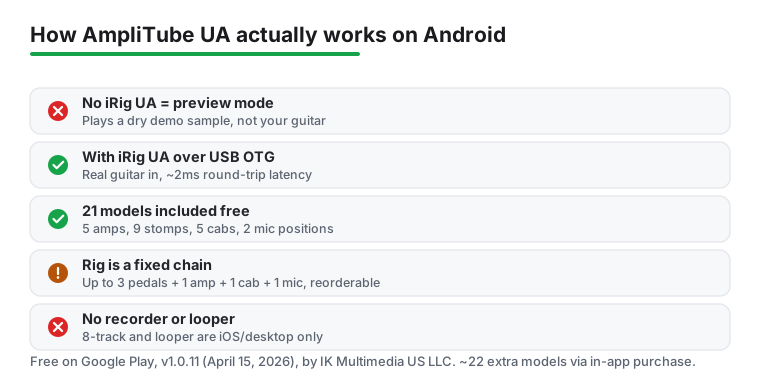
AmpliTube UA ships with 21 pieces of gear: five amps, nine stompbox effects, five matching cabinets, and two microphone positions. You build a rig from up to three pedals, one amp, one cab, and one mic, and you can rearrange the order of those pedals to taste. It is a fixed structure, not a blank canvas, but within those limits you can get a long way. Want a clean amp into a delay into a touch of overdrive? You can wire exactly that and hear the tone shift as you swap parts.
There is also a chromatic tuner built in, which is handy before a session. That is genuinely the feature set, and it is worth being straight about, because the bigger AmpliTube you may remember does more. The expandable eight-track recorder, the four-track looper, the parallel dual signal path where you split into two rigs and blend them, those live on AmpliTube for iPhone and iPad and on AmpliTube 5 for desktop. They are not in the Android UA app. If you have read about those features elsewhere, that is why they are missing here. Android UA is the lean companion, not the studio.
If that sounds like a letdown, it depends on what you came for. As a way to carry a small, decent-sounding rig and practise through headphones with the iRig UA, it does the job. As a recording suite, it is not trying to be one.
A few small habits turn a muddy first attempt into a tone worth keeping, and they all work within the UA gear set. First, do not stack gain on gain. With only five amps and nine stomps to play with, it is tempting to crank the amp and pile on an overdrive and a boost, but that just turns everything to fizz. Pick one source of dirt and let the amp carry it.
Second, spend time on the cab and mic. You only get two mic positions, but moving between them changes the character more than you would expect, closer for bite, further back for warmth. That single choice can do more than swapping the amp.
Third, save a rig the moment it sounds right. UA lets you store full chains, so you can jump from a clean tone to a heavier one without rebuilding from scratch. A handful of go-to presets ends the fiddling, which means more playing. If you also want to shape the tone of backing tracks in your headphones, a separate equalizer app running alongside can help balance the overall mix.
The permission requests are reasonable. It asks for microphone access, which is how Android routes audio input, and storage access for saving and exporting your presets. There is no grab for contacts or location, which is what you want from an audio app.
The real catch was the hardware. The app was free to download and the 21 models were included, with roughly 22 more available through in-app purchases if you wanted the full set of Fender, Orange, Ampeg, Soldano and other modelled gear. But the bigger thing to know was that live playing depended on the iRig UA interface. Without it you were stuck in preview mode auditioning tones over a sample, not running your own guitar. Since the app can no longer be installed from Google Play, do not buy the interface on the strength of this page.
Performance leans on your phone and its OTG support. Older or low-memory handsets, or ones with flaky OTG, may give you crackle or refuse the interface entirely. If your phone is a few years old, check that it does OTG host mode before you count on this.
AmpliTube UA is not the only way to get guitar tones out of an Android phone, and where it fits really comes down to whether you own an iRig UA. If you do not, there are standalone amp-sim apps that run off the phone alone without dedicated hardware, and for a lot of players who just want a quick practice tone, those will get you playing faster. Two of them are read from their own listings below: Deplike, listed on Play as iRig Guitar Amp and FX although its developer is not IK Multimedia, and Tonebridge, whose own description rules out the iRig UA. IK Multimedia itself is still on Android, with different products: the IK apps a Play search surfaced on 5 September 2026 are TONEX Control, the companion to its TONEX hardware, and iRig Recorder 3, a recorder rather than an amp sim.
If what you actually want is the full AmpliTube experience with the multitrack recorder, the looper, and parallel routing, you are better served on iOS or desktop, where IK puts those features. That is not a knock on the Android app, it is just a different product. If your goal is layering many tracks rather than shaping guitar tone, a dedicated recorder makes more sense, and you can browse free options in the wider music and audio apps hub. And if your phone is more for listening than playing, our guide to Spotify Premium may be a better use of your time.
For someone who already owned an iRig UA, AmpliTube UA earned its place as a portable rig with believable amp tones, and it was always the companion app rather than the studio. That is a record of how it was, not a recommendation, because you can no longer install it from Google Play.
A rig with no iRig UA: amps and pedals on the phone itself
4.5 stars from 19,575 reviews · 1,000,000+ installs · free to install · in-app purchases $1.99 to $99.99 per item · listed under the name iRig Guitar Amp and FX (Deplike) · updated on the store 20 August 2026 · by Deplike Yazılım Müh. San.ve Tic. Ltd. Şti · Contains ads: No · checked 5 September 2026
Google Play listing · 4.5 (19,575) · read 5 September 2026
The standalone amp sim to install if you do not own an iRig UA. Its listing, read 5 September 2026, is free to install with in-app purchases of $1.99 to $99.99 per item and no Contains ads label, at 4.5 stars from 19,575 reviews on 1,000,000+ installs, the best score on this page, and it was updated on the store on 20 August 2026. One thing to know before you search for it: the listing name begins with iRig, but the developer shown on Play is Deplike, not IK Multimedia. The blunt con is the paid spread: its own description tags two amp models, Deplike Deluxe and Deplike DST, as free, and the in-app purchases run to $99.99 per item.
The developer's own listing, read 5 September 2026, describes it as "a mobile application that turns your Android device into an electric and bass guitar amplifier kit", and its data safety card says no data is shared with third parties.
Free song-preset tones, with no in-app purchases
3.9 stars from 18,729 reviews · 1,000,000+ installs · free · no in-app purchases · listed as Tonebridge Guitar Effects · last updated on the store 10 October 2025 · by Ultimate Guitar USA LLC · Contains ads: No · checked 5 September 2026
Google Play listing · 3.9 (18,729) · read 5 September 2026
The free pick, with a catch that matters on this page. Its listing, read 5 September 2026, is free with no in-app purchases and no Contains ads label, at 3.9 stars from 18,729 reviews on 1,000,000+ installs, below Deplike's 4.5 and above TONEX Control's 3.8. It is built around song presets rather than an amp you dial in yourself. Two blunt cons come from the listing itself: it was last updated on the store on 10 October 2025, and its own description says it does not support USB devices such as the iRig UA, so the interface this page is about will not work with it.
Ultimate Guitar's own listing, read 5 September 2026, states the limit in its own words: "Tonebridge doesn't support USB connection devices like Behringer UCG102, Guitar Link, iRig UA, HD, HD 2 or iRig Pro." Its data safety card says the app may share data types with third parties.
Only if you own TONEX ONE+ or TONEX Plug hardware
3.8 stars from 58 reviews · 10,000+ installs · free · no in-app purchases · on the store since November 2025 · updated on the store 30 April 2026 · by IK Multimedia US, LLC · Contains ads: No · checked 5 September 2026
Google Play listing · 3.8 (58) · read 5 September 2026
IK Multimedia's Android app today, and the closest thing on Play to what AmpliTube UA was: a companion to IK hardware rather than a standalone amp sim. Its listing, read 5 September 2026, is free with no in-app purchases and no Contains ads label, at 3.8 stars from 58 reviews on 10,000+ installs, on the store since November 2025 and updated on 30 April 2026. The blunt con is the thin crowd and the hardware wall: 58 reviews, and IK's own description calls it the official free companion app for TONEX ONE+ and TONEX Plug, so it is a controller for that hardware, not a rig for a bare phone.
IK's own listing, read 5 September 2026, opens with "Take full control of your tone from your mobile device with TONEX Control, the official free companion app for TONEX ONE+ and TONEX Plug." Its data safety card says no data is collected and no data is shared with third parties.
It was, but you cannot get it any more. AmpliTube UA was free to download and included 21 pieces of gear: five amps, nine stomps, five cabs, and two mic positions, with about 22 more models sold as in-app purchases. As of 5 September 2026 the app is still not listed on Google Play, so the price is moot until IK Multimedia says otherwise.
For real playing, effectively yes. AmpliTube UA is built around IK Multimedia's iRig UA interface, which connects over USB OTG and handles the audio so your guitar comes through with very low latency. Without it the app runs in preview mode, where you can build rigs and hear them on a dry demo sample but cannot process your own guitar live.
That delay is latency. With the iRig UA in the chain, the interface does the conversion and the round-trip path is only a couple of milliseconds, so it feels tight. To keep it that way, use wired headphones rather than Bluetooth, since Bluetooth adds delay the app cannot undo. If you are not using the iRig UA, you are in preview mode and not actually monitoring your guitar in real time.
No. AmpliTube UA on Android has no multitrack recorder and no looper, so you cannot lay down and overdub songs in the app. The eight-track recorder and the looper are features of AmpliTube on iPhone and iPad and AmpliTube 5 on desktop. If recording is your goal, use one of those versions or a dedicated recording app.
Three apps were read from their own Google Play listings on 5 September 2026. Deplike, listed as iRig Guitar Amp and FX, is a standalone amp sim at 4.5 stars from 19,575 reviews on 1,000,000+ installs, free to install with in-app purchases of $1.99 to $99.99 per item and no Contains ads label. Tonebridge is free with no in-app purchases at 3.9 stars from 18,729 reviews, but its own description says it does not support USB devices such as the iRig UA. TONEX Control is IK Multimedia's own app at 3.8 stars from 58 reviews, and it is a companion to TONEX ONE+ and TONEX Plug hardware rather than a rig for a bare phone.
No. The developer shown on that listing, read 5 September 2026, is Deplike Yazılım Müh. San.ve Tic. Ltd. Şti, and the app is Deplike's own amp sim; only its store name begins with iRig. It sits at 4.5 stars from 19,575 reviews on 1,000,000+ installs, is free to install with in-app purchases of $1.99 to $99.99 per item, and carries no Contains ads label. The IK Multimedia apps a Play search surfaced on 5 September 2026 are TONEX Control and iRig Recorder 3.
Checked 5 September 2026: the page recorded an app that is gone from Google Play and named no app you can install, with no table and no dated line. A Play search on 5 September 2026 under AmpliTube and under IK Multimedia again returned no AmpliTube listing, so the app stays on the page as a warning and a record only; the August 2026 status box is rewritten with today's re-check, and its claim in all five regions we checked is withdrawn, because only the US storefront was read today. One figure is withdrawn: the Android 4.2 minimum this page gave for AmpliTube UA, since no listing exists to re-read it. Four lines that spoke for our own use are withdrawn: I want to be straight about it; On a couple of rigs that single choice did more than swapping the amp; I made a handful of go-to presets and then stopped fiddling, which honestly meant I played more; and On my mid range test device it ran cleanly. Three apps you can install today were read from their own listings and added with fact lines: Deplike, listed as iRig Guitar Amp and FX (Deplike) by a developer that is not IK Multimedia, at 4.5 stars from 19,575 reviews; Tonebridge at 3.9 stars from 18,729 reviews, whose own description rules out the iRig UA; and IK Multimedia's TONEX Control at 3.8 stars from 58 reviews. Two FAQ questions move to the second person, and two FAQ answers were added from the listings.