What this category covers
Finance apps for Android fall into a few clear groups, and knowing which one you actually need saves a lot of wasted setup time. Budgeting apps help you plan spending and stick to limits across categories like groceries, rent, and fun money. Expense trackers focus on logging what you spent, often by scanning receipts or importing transactions, so you can see patterns later. Invoicing and small-business apps create and send invoices, track who has paid, and log mileage or billable hours. And net-worth or account aggregators pull balances from your bank and cards into one dashboard. Many people end up using two: one to plan, one to record.
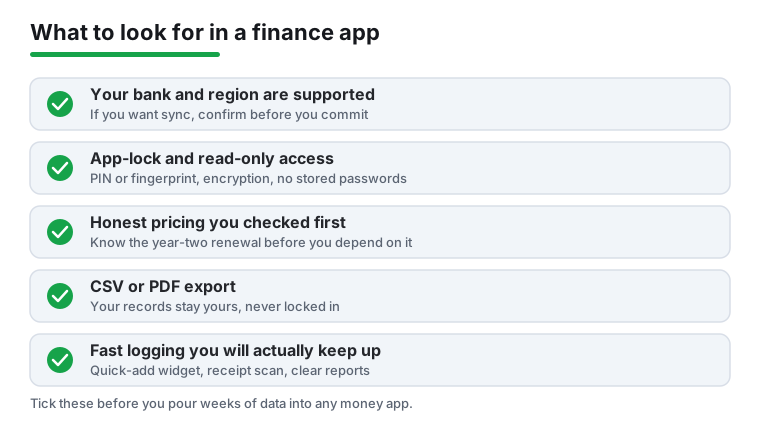
What to look for
- How transactions get in. Manual entry keeps your data private but takes discipline. Automatic bank sync is effortless but relies on a third-party connector and asks for read access to your accounts. Decide which trade-off you are comfortable with before you commit.
- Bank and region support. If you want sync, check that your specific bank is supported in your country. A great app is useless if it cannot connect to where your money actually lives. Many connectors cover the US and UK well but are thin elsewhere.
- Security basics. Look for app-lock with PIN, fingerprint, or face unlock, plus encryption in transit and at rest. For sync apps, the safest setups use read-only access through a regulated aggregator and never store your banking password directly.
- Honest pricing. Many finance apps are free to start then charge a yearly subscription for sync, multiple budgets, or reports. Read the paywall before you pour weeks of data in. A one-time purchase or a genuinely useful free tier is worth a lot.
- Export and ownership. Your financial history is yours. Favor apps that let you export to CSV, PDF, or Excel so you are never trapped. This matters most for invoicing and tax records.
- Speed of logging. The best tracker is the one you keep using. A quick-add widget, a fast receipt scan, or a one-tap recurring entry beats a beautiful app you give up on by week three.
- Reports that make sense. Clear monthly summaries, category breakdowns, and trends help you act. Skip apps that bury the numbers under clutter.
Common mistakes to avoid
- Granting bank access on impulse. Before linking accounts, confirm the connector is reputable and the access is read-only. If anything asks for full login control or feels off, stop.
- Chasing features you will not use. A solo freelancer rarely needs payroll. A simple budgeter rarely needs investment tracking. Match the app to your real habits.
- Ignoring the renewal price. Intro offers expire. Check what year two costs before you depend on the app.
- Trusting auto-categorization blindly. Sync apps guess categories and often get them wrong. Review the first few weeks or your reports will mislead you.
How we pick
Every app here was installed and used hands-on with real entries and real exports, judged on how it actually helps you manage money day to day. No paid placements, no sponsored slots.