
Updated September 2026 · every browser on this page now carries its own dated listing figures, and the first person claims are gone
This guide covers what Opera's battery saver and ad blocker actually change, how to set them up, how to measure the difference on your own phone, and which lighter browsers are worth a look instead.
A browser that blocks and throttles by default
4.8 stars from 5,486,824 reviews · 500,000,000+ installs · free to install · in-app purchases $5.99 to $29.99 per item · by Opera · Contains ads: Yes · checked 3 September 2026
Google Play listing · 4.8 (5,486,824) · read 3 September 2026
Opera is the pick if you want the two settings that matter switched on in one app: the ad blocker and the battery saver. It is free to install, and its own listing carries the Contains ads label, so the app that blocks advertising on the web also runs advertising of its own inside the app. The blunt con: it is the busiest browser here, with a news feed, promotions and a sidebar of extras you may never open.
Opera states the mechanism itself on its listing: Opera’s Play listing says its "built-in Ad Blocker ensures pages load faster and your battery lasts longer", which is the claim this page checks rather than repeats.
Old phones and tight data plans
4.6 stars from 10,023,926 reviews · 500,000,000+ installs · free to install · no in-app purchases listed · by Opera · Contains ads: Yes · checked 3 September 2026
Google Play listing · 4.6 (10,023,926) · read 3 September 2026
Opera Mini is the one to install when the phone is old or the data plan is small: it compresses pages on Opera’s servers, so less arrives over the air and less has to be rendered. It is free with nothing sold inside, and like the main app its listing carries the Contains ads label. The blunt con: that same compression is why some modern sites render imperfectly.
Blocking trackers with one tap to erase
4.6 stars from 269,302 reviews · 10,000,000+ installs · free to install · no in-app purchases listed · by Mozilla · Contains ads: No · checked 3 September 2026
Google Play listing · 4.6 (269,302) · read 3 September 2026
Firefox Focus is the pick when you want the lightest privacy setup rather than the most features: it blocks trackers by default and wipes the session with one tap. Its listing sells nothing and carries no Contains ads label, which is the cleanest position of the four here. The blunt con: it keeps no tabs and no sync, so it is a companion browser rather than a replacement.
Blocking ads and trackers hard
4.8 stars from 3,751,237 reviews · 100,000,000+ installs · free to install · in-app purchases $9.99 to $149.99 per item · by Brave Software · Contains ads: Yes · checked 3 September 2026
Google Play listing · 4.8 (3,751,237) · read 3 September 2026
Brave is the pick if blocking is the point: it strips ads and trackers by default on the same Chromium engine Chrome and Opera use, so pages arrive lighter without an engine change. It is free to install, and its listing carries both the Contains ads label and in-app purchases up to $149.99 per item. The blunt con: the rewards and wallet features add a layer many readers will never want.
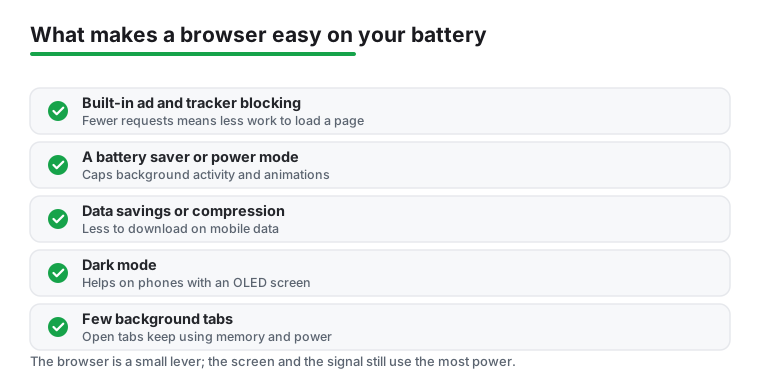
Before getting into Opera itself, it helps to know why one browser sips power while another gulps it. Most of the drain comes from three things: heavy ads and trackers loading in the background, video that autoplays whether you want it or not, and the screen staying brighter on pages full of white space. A browser that blocks the junk and dims the load has less work to do, so the processor spins down and the battery lasts longer.
Getting started is refreshingly simple. Open the Google Play Store, search for Opera Browser, and install the standard version. There is also Opera Mini, which is even lighter and worth a look if you are on a very old phone or a tight data plan, but the main Opera app gives you the full battery saver and ad blocker together.
On first launch it asks whether you want to import bookmarks and set Opera as your default browser. Saying yes to default is what makes links from other apps open here. The two settings that matter live in the menu at the bottom right, under Settings, and no Opera account is needed for any of the battery features. Signing in only matters if you want to sync tabs across devices later.
The headline feature is the battery saver, which you can pin to the toolbar or switch on from settings. When it kicks in, Opera reduces background activity, pauses some animations, and trims how aggressively pages refresh. There is a small leaf or battery icon that lets you flip it on with one tap, and you can set it to turn on automatically when your charge drops to a level you choose.
In honest terms, this is not magic. You will not double your battery life. What it does is reduce the work: fewer background requests and fewer animations mean a cooler phone, and lower heat is what protects the battery over the long run. Opera states the mechanism on its own listing rather than a figure, and this page quotes it in the Opera section instead of estimating a saving. If you commute, read a lot of articles, or keep many tabs open, this is the feature you will feel.
Opera bundles an ad blocker right into the browser, so there is nothing extra to install. Switching it on in settings leaves fewer requests to make, which means less data and less battery spent rendering clutter. For anyone on a capped plan, this doubles as a data saver, which lines up with why a lot of people go looking for a lighter browser in the first place.
Several smaller features matter for the same reason. The night mode and dark theme are easy on the eyes and, on phones with OLED screens, a true dark background uses less power. There is a free built in VPN for basic privacy on public Wi-Fi, a quick access speed dial for your favorite sites, and a tidy reader-style layout on supported pages. None of these are gimmicks. They are the kind of small conveniences you stop noticing because you use them every day.
It would be dishonest to call any browser perfect. Opera asks for the permissions you would expect from a browser, such as storage for downloads and location if you let sites request it, and you can decline most of these without breaking core browsing. Keep location off and only grant it per site when a map needs it. The built in VPN routes traffic through Opera's servers, which is fine for casual use but is not a replacement for a dedicated privacy service if that is your priority.
The other honest downside is that Opera is a busier app than the minimalists. There is a news feed on the start page, occasional promotions, and a sidebar of extras you may never touch. If you want something stripped to the bone, this will feel like a lot. The news feed can be hidden in settings, and after that the clutter mostly disappears. For most people the extra features are a fair trade for the battery and data wins.
When we wrote the early version of this review, browser choice felt like it mattered more. Phones were less power efficient, and a heavy browser could clearly run a battery down. The picture in 2026 is calmer, and it is worth being honest about that.
Two things shifted. First, almost every popular Android browser except Firefox is now built on the same Chromium engine, so Chrome, Brave, Edge, Vivaldi, and Opera all sip power at roughly the same rate when you strip away their extra features. Independent 2026 testing found Chromium to be about 15 percent more power efficient than Firefox, but the Chromium browsers were nearly identical to each other. Opera's edge comes from what it adds on top, the ad blocker and battery saver, not from a magically lighter engine.
Second, the operating system got stricter on its own. Android 16 tightened the rules on background activity, throttling apps that try to stay busy when you are not looking. It sorts apps into priority groups, sometimes called standby buckets, and an app you rarely open gets less freedom to wake the processor or use the network. Older battery features built into Android, Doze and App Standby, already paused background work when your phone sat still with the screen off. The result is that a browser left in the background drains far less than it used to, no matter which one you pick. The ad blocker still helps while you are actively reading, which is where Opera keeps its advantage.
You do not have to trust any review, including ours. Your phone already keeps a record. Open Settings, tap Battery, then Battery usage, and you get a list of every app ranked by how much charge it has used since the last full charge.
Two numbers matter for each app. Screen time is how long the app was open and in front of you. Background is how long it kept working while you were doing something else. For a browser, most of the drain should sit under screen time, because that is the cost of the display being on while you read. If you see a lot of background drain from a browser you barely opened, that is a sign worth chasing, and you can tap the app and set its background use to restricted.
The cleanest test is patient. Pick your browser, use it normally for a day, and at night check the percentage next to it in that list. The next day, switch browsers and use the phone the same way. Comparing those two daily numbers tells you far more about your phone, your sites, and your habits than any lab benchmark run on a different device. Two Chromium browsers usually land close enough together that the difference is noise, which is exactly the point of the next section.
Here is the part most browser roundups skip. On a modern phone the browser is rarely the biggest drain. The screen is. A bright display on a long article will cost you more battery than the difference between any two browsers, so the highest impact move is turning brightness down and letting it adjust automatically.
Dark mode helps, but only on the right screen. If your phone has an OLED or AMOLED display, which most mid range and flagship phones now do, true black pixels switch off entirely and draw no power. Measured savings vary a lot, from a few percent indoors to roughly 40 percent outdoors at high brightness, according to research collected by independent battery testers. On an older LCD phone dark mode barely moves the needle, because the backlight stays on regardless. So switch on the browser's dark theme if your screen is OLED, and do not expect miracles if it is not.
None of this makes Opera a bad pick. Its ad blocker genuinely cuts the work your processor does on cluttered sites, and that keeps the phone cooler, which is real. Just keep the order of importance straight. Dim the screen first, use dark mode on OLED second, restrict greedy background apps third, and treat the browser swap as a small final tune rather than the fix. If you want the system wide version of all this, our best battery saver apps for Android guide goes further, and the best browser apps for Android roundup covers the lighter options side by side.
Partly, and for one reason. Its ad blocker stops heavy ads and trackers from loading, so the processor renders less and the phone stays cooler. Opera says as much on its own listing, that the built-in Ad Blocker makes pages load faster and the battery last longer. What it will not do is double your battery life: the screen is the bigger drain on a modern phone. Checked 3 September 2026.
Opera Mini is lighter. It compresses pages on Opera's servers, so less data arrives and less has to be rendered, which suits an old phone or a small plan. The trade is that some modern sites render imperfectly. The main Opera app is the one with the full battery saver and ad blocker together. Both listings carry the Contains ads label. Checked 3 September 2026.
No. The battery saver, the ad blocker and the built-in VPN all work without signing in. An account only matters for syncing tabs and bookmarks between devices. Checked 3 September 2026.
Sometimes a site asks you to switch it off before it will show its content. Opera lets you disable the blocker for one site and keep it on everywhere else, so the fix is per site rather than global. Checked 3 September 2026.
Less than it used to. Chrome, Brave, Edge, Vivaldi and Opera all run on the same Chromium engine, so the engine is no longer the difference. What still matters is what a browser blocks, and what Android does in the background. Dim the screen first, use dark mode on an OLED screen second, and treat the browser swap as a small final tune. Checked 3 September 2026.
Checked 3 September 2026: this review, first published under a 2023 slug, carried no store link, no dated figure and several first person claims about using the apps. All four browsers it recommends now carry their own dated fact line, a decision table and a store link, and the claims are withdrawn: "we saw a meaningful difference compared to a stock browser", "A few other touches won us over", "another favorite of ours", "In our own runs the gap between two Chromium browsers was small enough to be noise" and "We browsed for two weeks with it on". The honest correction the figures force: Opera and Brave both carry the Contains ads label on their own listings, which a page about blocking advertising has to say out loud.
 Signs of Android Malware and How to Remove ItSecurity & Privacy