
What this category covers
Navigation and auto apps are the tools you reach for the moment you start moving. In practice they fall into a few clear groups, and most people end up using one from each. Turn-by-turn navigators (Google Maps, Waze) get you from A to B and warn you about traffic. Offline and outdoor mapping apps (Organic Maps, OsmAnd) keep working when you lose signal on a back road or a trail. Compass and GPS utilities tell you exactly where you are and which way you face. Car launchers and dashboard apps redesign your screen for driving, with big tap targets and quick access to music and directions. Phone and vehicle trackers help you find a misplaced device, keep an eye on family, or remember where you parked.
It helps to think less about categories and more about the job you are hiring an app to do. For a daily commute you want live traffic and clear lane guidance so you pick the right lane before the exit, not on top of it. For a long road trip you want offline regions saved in advance, plus fuel or charging stops along the route. For trail and outdoor use you want offline topographic maps, readable GPS coordinates, and a compass you can calibrate. For comfort in the car you care about ergonomics: whether the app runs on your head unit or only on the phone screen, and how well voice control works so your hands stay on the wheel. And for finding things, you want to locate a parked car, a lost phone, or a family member without a fight to set it up. Once you name the job, the right group of apps usually picks itself.
What to look for
The right choice depends on how and where you drive, but a few things matter in almost every navigation or auto app:
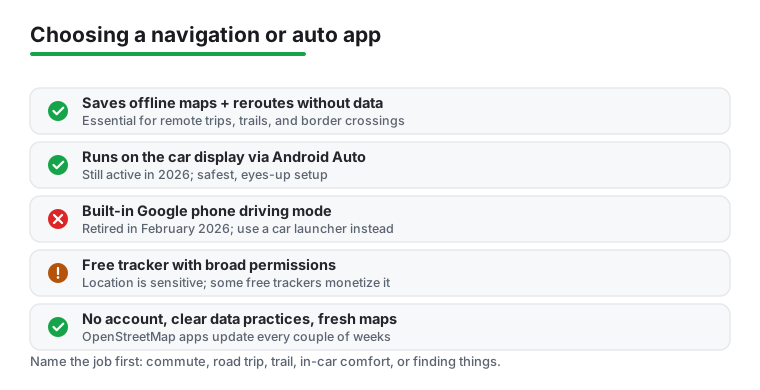
- Offline maps that actually download. If you travel where coverage drops, confirm the app lets you save regions in advance and reroute without data. Many apps claim offline support but still phone home for search or traffic.
- Honest battery and data use. GPS plus a bright always-on screen drains a phone fast. Look for a battery-saver or dimmed driving view, and check whether the app streams map tiles constantly or caches them.
- Lane guidance and clear voice prompts. For city driving, lane arrows and well-timed spoken directions prevent missed exits far better than a glance at the screen.
- Sensible permissions. A navigator needs location. It does not need your contacts, microphone, or call log. Trackers are the exception, so read what a tracker asks for and why before you trust it with family.
- Car-display support. If your car has a screen, Android Auto on that display is the safest setup, since it keeps your eyes up and your hands on the wheel. The car-display version of Android Auto is alive and well in 2026. What is gone is Google's phone-screen driving mode, which was retired in 2025, so on a phone-only setup do not wait for a built-in Google driving mode. Use a third-party car launcher with oversized buttons instead.
- Map data source and freshness. Some apps use OpenStreetMap, which volunteers update constantly and apps like Organic Maps and OsmAnd refresh every couple of weeks. Others use proprietary data on their own schedule. Test a route you know well: outdated one-way streets or missing roundabouts are a sign the data is stale.
- Account requirements. Check whether the app forces you to log in and quietly syncs your trips to the cloud. Plenty of good navigators work with no account at all, which is worth knowing if you would rather not hand over your travel history.
Privacy and cost
It pays to know how a navigation app actually makes money, because that tells you how it treats your data. The common models are free with ads, ad-free open source funded by donations and volunteers, a companion app that comes with hardware you bought, and subscription. Each one points your incentives in a different direction.
Location is the most sensitive thing any of these apps touch. It is a record of where you live, work, worship, and sleep. Trackers and ad-supported navigators have the strongest reason to retain that data and, in some cases, sell it, because location is what they monetize. That does not make every free app shady, but it does mean you should look closer when an app is free and asks for constant background location.
A few habits keep you on the safer side. Prefer apps that are clear about what they collect, that work fully offline, and that do not require an account. For trackers, insist on consent from everyone being tracked rather than quietly watching a family member. Weigh a one-time purchase against a subscription: paying once for an app with no ads can be cheaper and cleaner over time than a free app that earns its keep from your data. Remember that a free tracker often monetizes location, so the price you do not pay in cash you may pay in privacy. If privacy is your priority, the OpenStreetMap-based options like Organic Maps and OsmAnd are the clearest example of the no-ads, no-tracking approach.
Common mistakes to avoid
- Relying on online-only navigation for remote trips. Download your route region before you leave; do not assume you will have signal in the mountains or across a border.
- Trusting a phone compass without calibrating it. Magnetic sensors drift near metal and speakers. Do the figure-eight calibration and cross-check against a known direction before relying on it.
- Installing a tracker loaded with ads and broad permissions. Free trackers often monetize your location data. Prefer ones that are clear about what they collect and ideally let you keep data private.
- Fiddling with the app while driving. Set your destination and audio before you move. A good car launcher and voice control exist precisely so you can keep your hands off the screen.
- Ignoring storage. Offline maps for a whole country can run to several gigabytes. Check free space before a long download.
- Waiting for the phone-screen driving mode that no longer exists. Google retired its phone driving mode in February 2025. Do not sit waiting for a mode that is gone. Set up Android Auto if your car has a screen, or install a car launcher if it does not.
- Treating a hardware companion app as a standalone navigator. Some apps, such as Garmin Drive, are built to pair with a Garmin device and manage its settings, traffic, and footage. On their own they are not a phone GPS the way Google Maps or Waze are, so do not expect one to guide you from the phone alone.
How we pick
Every app in this category is one we installed and used on real drives, walks, and parking-lot fumbles, not chosen from a spec sheet. We check signal lock, rerouting, offline behavior, permissions, and battery drain. There is no paid placement here. We also re-check our picks as Google retires features, the way it pulled the phone driving mode in 2025, so a recommendation never quietly points you at something that no longer works. If an app annoyed us or quietly hoovered up data, it did not make the list.