What this category covers
Entertainment apps are the ones you open to relax, not to get something done. On Android that mostly breaks into a few groups: video streaming services for TV shows and movies (subscription catalogues and free ad-supported channels), media players that handle files you already own or stream from your own server, and games, from quick puzzle and arcade titles to bigger console-style releases. They share a common goal but ask very different things of your phone, your data plan, and your wallet, so it helps to know what you are actually picking between.
What to look for
The right entertainment app depends on what you want from it, but a few things matter across the board.
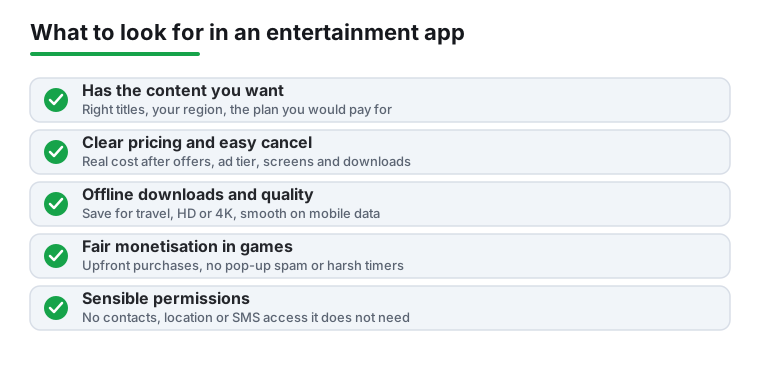
- Real catalogue or content, not promises. For streaming, check that the shows and movies you care about are actually included on the plan you would pay for, not locked behind a higher tier or a separate rental. Catalogues change region to region, so confirm it works where you are.
- Honest pricing and cancellation. Look for the monthly cost after any intro offer, whether there is an ad-supported tier, and how many screens or downloads you get. Free apps usually pay their bills with ads or your data, so weigh that too.
- Offline downloads. If you watch on a commute or a flight, confirm titles can be saved for offline viewing and how long they stay valid. Plenty of apps advertise downloads but limit them heavily.
- Playback quality and device support. Check for the resolutions you want (HD, 4K, HDR), Chromecast or external display support, and smooth playback over both Wi-Fi and mobile data. A great catalogue is no fun if it buffers constantly.
- For games: file size, ads, and how it makes money. A good mobile game is upfront about in-app purchases and does not gate basic fun behind constant pop-ups or energy timers. Watch the download and install size if storage is tight, and check whether it runs offline.
- Subtitles, audio tracks, and accessibility. Multiple subtitle languages, audio description, and adjustable text make a real difference and are easy to overlook until you need them.
Common mistakes to avoid
- Paying for overlapping catalogues. It is easy to stack three or four streaming subscriptions that cover the same content. Pick deliberately and rotate rather than keeping them all running.
- Trusting unofficial streaming or modded game apps. Apps from outside the Play Store that promise free movies or unlocked games are a common source of malware and account theft. Stick to legitimate sources.
- Ignoring permissions. A simple game asking for your contacts, location, or SMS is a red flag. Entertainment apps rarely need access beyond storage and network.
- Letting auto-renew run on apps you stopped using. Free trials quietly become paid. Set a reminder when you start one.
How we pick
Every app here has been installed and used hands-on, judged on real viewing or play sessions rather than store ratings. We take no paid placement, and an app only stays on the list if we would keep using it ourselves.