
Best Sleep Tracker Apps for Android (2026)
Good sleep is hard to fix when you cannot see what is going wrong, and that is exactly where a decent tracker earns its place on your phone. We spent a few months falling asleep with these apps running on a Pixel and a Galaxy, comparing what they claimed against how we actually felt the next morning. Below are the sleep tracker apps we keep coming back to, whether you wear a watch or just tuck the phone under your pillow. For more ways to look after yourself, our Health and Fitness hub has the rest of our picks, including our roundup of the best fitness apps for Android to pair with your nightly rest.
1. Sleep as Android
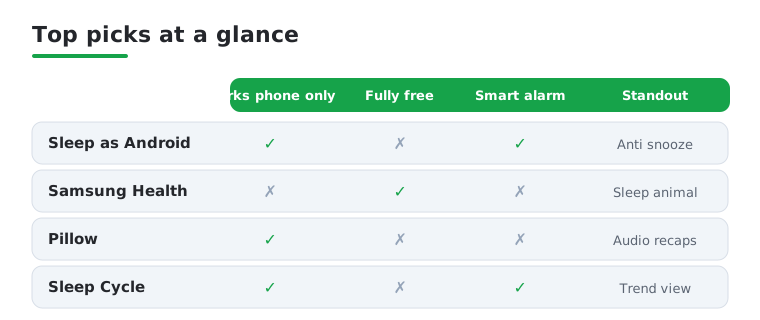
This is the one we recommend first to most people. It tracks movement and snoring through the phone, but the real magic is the smart alarm that wakes you in a light sleep window so you feel less groggy. The sleep sounds and gentle Captcha to stop you snoozing are genuinely useful. Free for two weeks, then a small one off unlock. It pairs nicely with Wear OS watches too.
2. Samsung Health
If you carry a Galaxy phone or wear a Galaxy Watch, you already have one of the better sleep trackers sitting right there. It scores your night, breaks down sleep stages, and gives you a quirky sleep animal that actually made us pay attention to our patterns. Completely free. We found the watch based tracking far more accurate than phone only, so wear the watch to bed if you can.
3. Pillow
Pillow feels polished and calm, which matters for something you open half asleep. It does automatic tracking, heart rate analysis with a compatible wearable, and a tidy morning summary with audio clips of any snoring or sleep talking. The free version covers the basics well, with a premium tier for deeper insights. We liked it on nights we slept without a watch.
4. Sleep Cycle
Sleep Cycle has been around for years and it shows in how reliable the wake up feels. It listens for your breathing and movement, then nudges you awake at the right moment with pleasant tones. The trends view, showing how weekends or late coffee wreck your nights, is what we checked most. Free to try, with a yearly subscription for full history. A solid pick if smart alarms matter.
5. Google Fit
For people who want sleep data without another standalone app, Google Fit quietly collects it from your Wear OS watch or connected devices and folds it into one health picture alongside steps and heart rate. It is completely free and refreshingly simple. The tracking is basic compared to dedicated apps, so we lean on it as a central dashboard rather than a morning alarm.
6. Fitbit
Fitbit remains one of the most trusted names for sleep, and the Android app is clean and easy to read. With a Fitbit or Pixel Watch you get sleep stages, a nightly Sleep Score, and the excellent Sleep Profile that assigns you a monthly animal type. The app is free, though the richest analysis sits behind Premium. The stage tracking lined up well with how rested we felt.
7. Garmin Connect
If you already run with a Garmin watch, Garmin Connect doubles as a detailed sleep tracker at no extra cost. It reports sleep stages, overnight heart rate variability, breathing, and a Body Battery score that ties rest to next day energy. It feels data heavy, but for athletes wanting recovery insight it is hard to beat. Golfers can slot it beside the best golf GPS apps for Android we tested.
8. SnoreLab
SnoreLab does one job brilliantly: it records and measures your snoring through the night so you can finally hear what your partner complains about. You wake up to a Snore Score and audio samples, and you can log whether a nasal strip or sleeping on your side actually helped. Free for basic nights, with a full version for unlimited recording. We found it eye opening and weirdly addictive.
9. Sleepa
Sometimes the problem is not measuring sleep but getting to sleep, and Sleepa is built for exactly that. It offers a huge library of rain, white noise, and nature sounds you can mix into your own custom blend, plus a timer that fades out once you drift off. Free with ads and an optional premium upgrade. We kept the thunderstorm mix running on restless nights and noticed we settled faster.
10. Rise Science
Rise takes a science first angle, focusing on your sleep debt and body clock rather than just charting last night. It tells you when your energy peaks and dips during the day and when to wind down, which reframed how we thought about feeling tired. The coaching is genuinely practical. It runs on a subscription after a trial, so it suits people ready to fix their schedule.
11. Calm
Calm is better known for meditation, but its Sleep Stories have become a nightly habit for many Android users, including us. Soothing voices, some famous, read you into sleep while soundscapes play underneath. There are wind down meditations and breathing exercises too. The app is free to download with a subscription for the full catalogue. It will not chart sleep stages, but it quiets a busy mind.
12. Headspace
Headspace earns its spot for the way it handles the run up to sleep. Its Sleepcasts, wind down sessions, and sleep music are friendly and unfussy, and the app never feels clinical. We reached for it on nights our thoughts would not switch off. It is subscription based after a trial. Treat it as the calming routine before bed, paired with a tracker above.
Choosing a sleep app is less about finding the most advanced one and more about finding the one you will actually keep open. The list above covers our favourites, but the right pick depends on how you sleep, what hardware you already own, and what you want to get out of it. Here is a calm, practical walk through the questions worth asking before you commit a night to any of them.
How phone based sleep tracking actually works
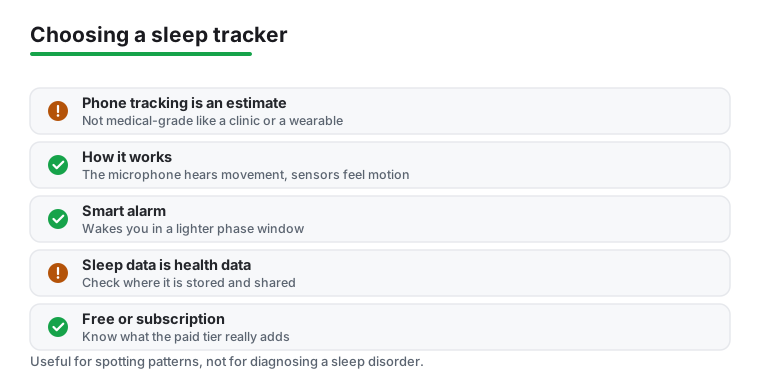
It helps to understand what your phone is doing on the mattress, because that explains both why it works and where it falls short. A phone has no way to read your brain waves, so it makes an educated guess from two sensors it already has.
- The microphone listens through the night for sounds that suggest movement and breathing. It picks up rustling sheets, snoring, coughing, and sleep talking, and uses the pattern and volume of those sounds to estimate when you are restless and when you are settled.
- The accelerometer senses motion. When the phone is on the mattress beside you, small vibrations from you turning over travel through the bed, and the app reads those movements as a sign you are in lighter sleep. Long stretches of stillness are read as deeper sleep.
By stitching these signals together over the night, the app builds a rough timeline of restless and calm periods and presents it as a chart of sleep stages. It is a clever use of ordinary hardware, and for spotting patterns over weeks it is genuinely useful.
An honest word on accuracy
This is the part most app descriptions skip, so we will be plain about it. Phone based trackers estimate sleep, they do not measure it. A real sleep study in a clinic uses sensors on your scalp, around your eyes, and on your chest to record brain activity, eye movement, and heart rhythm directly. That is the medical standard, and a phone under your pillow comes nowhere near it.
A dedicated wearable on your wrist sits somewhere in between. Because it stays against your skin, it can read heart rate and movement far more reliably than a phone on the mattress, which is why we kept noting that watch based tracking felt more trustworthy. Even so, no consumer device is medical grade. Treat the numbers as a helpful trend line, not a diagnosis. If you suspect a real problem such as insomnia or sleep apnea, an app is a prompt to see a doctor, never a replacement for one.
Smart alarms, the feature people stay for
If there is one feature that turns a curious download into a daily habit, it is the smart alarm. Instead of jolting you awake at a fixed time, the app watches for a window when you seem to be in lighter sleep, usually in the half hour before your set alarm, and wakes you then. The idea is that surfacing from light sleep leaves you feeling less groggy than being dragged out of a deep stage.
In practice it is not magic, but several of us did notice gentler mornings when it timed things well. If grogginess is your main complaint, prioritise an app that does this. Sleep as Android and Sleep Cycle both build their experience around it, and the difference on a Monday morning is real enough to matter.
Sleep data is sensitive, so check where it lives
It is easy to forget, but a sleep tracker is collecting health information about you, including audio recordings of your bedroom in some cases. That is among the most personal data on your phone, so it deserves a moment of thought before you grant microphone access.
- Read the privacy section before you sign up and look for whether your data stays on the device or is uploaded to a company server.
- If the app records audio of snoring or sleep talking, check whether those clips are stored locally and whether you can delete them easily.
- Be cautious with apps that ask to connect to a wider account or share data with third parties for anything beyond the feature you actually want.
None of this means you should avoid these apps. It means you should pick one whose handling of your data you are comfortable with, and turn off any sharing you do not need.
Free versus subscription
Almost every app here follows the same pattern: a free tier that covers the basics, with deeper history, coaching, and extra sounds locked behind a payment. A few stand apart.
- Completely free: Samsung Health and Google Fit cost nothing and never nag you to upgrade, which makes them an easy starting point if you already own the right hardware.
- One off unlock: Sleep as Android charges a single small fee after its trial, so you pay once and own it, with no recurring bill.
- Subscription: Sleep Cycle, Calm, Headspace, and Rise lean on monthly or yearly plans. These can be worth it for the coaching and content, but only if you keep using them.
Our honest advice is to run the free trials first and only pay for the one whose morning summary you actually open without being reminded. A subscription you forget about is the most expensive sleep app of all.
One myth worth clearing up
You will sometimes see apps or settings that claim to save battery while tracking overnight. Be realistic here: keeping the screen off and the app running quietly is the only thing that genuinely helps, and the simplest fix is to keep the phone plugged in on the nightstand while it tracks. The fancier battery saver toggles are mostly placebo, and a phone on charge does not need them anyway.
Putting it together
If you want a quick map, here is how we would choose. Own a Galaxy or a Fitbit? Start with the tracker that came with it before paying for anything. Wake up groggy? Pick an app with a strong smart alarm. Struggle to fall asleep in the first place? A sounds or stories app may help more than any chart. Want to fix your schedule rather than just watch it? A coaching app is the one to try. Below is a side by side look at our top all rounders to help you decide.
Frequently asked questions
Do sleep tracker apps work without a smartwatch?
Yes, many do. Apps like Sleep as Android and Sleep Cycle use your phone microphone and movement sensors to estimate your sleep when you place the phone on the mattress or nightstand. In our testing this is accurate enough to spot trends and time a smart alarm, though a watch on your wrist gives far more reliable heart rate and sleep stage data.
Will tracking my sleep drain my phone battery overnight?
It can, since the app stays active for hours. The simplest fix we found is to keep the phone plugged in on the bedside table while it tracks, which most of these apps actually recommend. If you track using a watch instead, the phone battery is barely touched because the wearable does the heavy lifting and syncs in the morning.
Are these sleep apps free to use?
Most offer a useful free version and reserve deeper insights for a paid tier. Samsung Health and Google Fit are fully free. Sleep as Android has a one off unlock after a trial, while Sleep Cycle, Calm, and Rise lean on subscriptions. Our advice is to use the free trials first and only pay for the one whose nightly summary you actually open.
Can a sleep tracker app really improve how I sleep?
The app itself does not improve your sleep, but the awareness it gives you usually does. Seeing how late screens, caffeine, or an irregular bedtime show up in your data makes it much easier to change those habits. Pairing a tracker with the gentle wind down routines in apps like Calm or Headspace gave us the best results over a few weeks.
How accurate are phone based sleep trackers compared to a sleep clinic?
Not very, and that is fine for most people. A clinical sleep study measures brain waves, eye movement, and heart rhythm with sensors placed on your body, while a phone only infers sleep from sound and motion. The phone version is good for spotting trends and timing a gentle alarm, but it is an estimate. If you think you have a genuine sleep disorder, see a doctor rather than relying on an app.
Is it safe to let a sleep app record audio in my bedroom?
It can be, as long as you know where the recordings go. Apps that capture snoring or sleep talking should let you review and delete those clips, and ideally keep them on your device rather than uploading them. Before you grant microphone access, read the privacy policy, check whether audio is stored locally, and switch off any data sharing you do not actually need.