
Fritter: A Private Twitter Client We Like on Android
The official X app wants a login before it shows you a single post, and it tracks almost everything you tap. If you mostly read tweets rather than post them, that feels like a lot to hand over. For years the app we reached for instead was Fritter, a free, open source Twitter and X reader for Android with no ads, no account, and no tracking. One thing to know up front in 2026: Fritter itself is no longer maintained and has been pulled from F-Droid and the Play Store. Its work lives on in Squawker, a community fork that is still getting updates, and that is the app we now install. Below is how we set it up, the features we actually use, and the honest limits worth knowing before you lean on any of these readers.
Why we reach for a private Twitter client
The official app is built to keep you scrolling and to learn as much about you as it can while you do. It logs the posts you linger on, the profiles you visit, and the searches you run, then feeds all of that into ads and an algorithmic timeline. For anyone who simply wants to check a few accounts without becoming a data point, that is a lot of machinery aimed at a small task. You open the app to read three people and end up handing over a behavioural profile.
A private client flips the model. Fritter started this approach years ago: open source code anyone could inspect, no email, no phone number, no password. You opened it, added the accounts you cared about, and read. After the cluttered official app it felt calm, and for a long stretch that calm was the whole point.
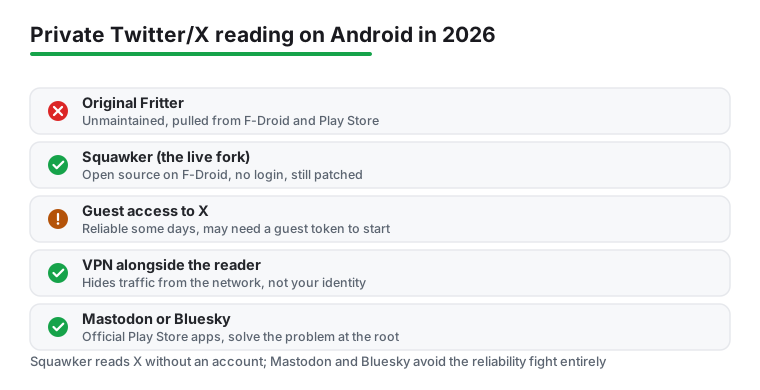
Here is the part that changed, and it matters for the rest of this page. The original developer stopped working on Fritter as X kept tightening access to its public posts, and the app was eventually removed from the stores. The maintained successor is Squawker, built by a different developer on top of the same idea and the same general layout. So when we talk about the day to day experience below, we are describing Squawker, which is what you can actually install today. The privacy reasoning is identical to Fritter's: read the accounts you want, hand over nothing about yourself, keep your reading off someone else's server. The difference is that Squawker is the one still getting patches when the platform shifts under it, and on a service like X that breaks things often, an app that is still being patched is the one worth your time.
If you remember Fritter fondly, Squawker will feel familiar within a minute. If you are new to all of this, you can mostly ignore the name change and treat Squawker as the current version of the same idea. We will flag where the two differ when it matters, but for reading public posts without an account, they are the same kind of tool.
Setting up Squawker on your Android phone
Getting going takes a few minutes. Squawker lives on F-Droid, the open source app store, and you can also grab the APK directly from its project page on GitHub if you would rather sidestep an app store. We installed it from F-Droid because updates then arrive in the same place as the rest of our open source apps, which matters more here than usual given how often this kind of reader needs a fresh build. It needs Android 7.0 or newer, which covers nearly any phone still in use.
If you have never used F-Droid, install that first from f-droid.org, open it, let it refresh its package list, then search for Squawker and install. The package name is org.ca.squawker, which is worth checking against, because search results for anything Twitter related are full of copycats and web tools that want your data. Stick to F-Droid or the official GitHub releases and you avoid most of that.
Once Squawker is open you land on a clean home screen with no onboarding survey and no login wall. The first thing to do is add a few accounts or topics. Tap the search icon, type a username or a keyword, and the app shows you matching profiles and posts. When you find an account worth following, you subscribe to it inside the app, and it gets added to your feed locally on the device. Because there is no central account, those subscriptions live only on your phone. There is no cloud sync, which is the price of not having an account at all, so if you switch phones you rebuild your list. We keep a short note of our regular accounts somewhere else for exactly that reason.
You can also group accounts into separate feeds, which is the feature we set up on day one. We keep news in one group and people we actually know in another, so a busy news cycle does not bury a friend's post. Saved searches work the same way: pick a keyword or hashtag you track, save it, and it becomes its own swipeable tab. One more day one setting is the default tab, so the feed you check most opens first and refreshes when you pull down rather than churning in the background and eating battery.
One step you may run into, and the honest reason this section is longer than you would expect, is access. Squawker reads X through the same kind of unofficial guest access that Nitter once used, and X has made guest access much harder to get. In practice the app tries to handle this for you, but on some networks or some days you may need to supply a guest account token, which the project documents on its GitHub wiki. That is more fiddly than installing a normal app, and if that sounds like too much, the alternatives near the end of this page sidestep the whole problem. We mention it now rather than burying it because it is the single biggest reason a fresh install might not just work.
The features we actually use
Day to day, Squawker covers the reading side of Twitter and X without the noise. You get a chronological timeline, so posts appear in the order they were sent rather than reshuffled by an algorithm that wants to provoke a reaction. You can view any public profile, scroll its posts and replies, and open threads in full so a conversation reads top to bottom instead of in fragments. Subscribing to accounts and grouping them into separate feeds is the structure we use most, because the official app makes it oddly hard to keep different kinds of accounts apart.
The touches we lean on are the quiet ones. There is a dark mode that is easy on the eyes at night, and you can save posts to come back to later, which turns the app into a rough read it later list for Twitter and X. Images and videos open cleanly. You can download a clip if you want to keep it, and a single tap drops any post into the Android share sheet, so sending a link to a friend or into a notes app is one gesture rather than the usual fight with a copy menu. None of this is flashy, and that is the point: it gets out of the way.
What you do not get is the social machinery. There is no algorithmic For You feed pushing strangers at you, no trending sidebar engineered to pull you in, and no notifications begging you to come back. For a reader that is a feature, not a gap. You decide what you see by choosing who to follow, and nothing else gets a vote. If you also read other platforms, the same appetite for a calmer, ad free experience is what drives people toward dedicated Reddit apps with better themes, and Squawker scratches that same itch for Twitter and X.
It is worth saying plainly what the app is not. It is a reader. Posting, replying, liking, and direct messages are not what it is built for, and if you expect a full replacement for the official app you will be disappointed. We treat it as a window onto public posts, nothing more, and that framing is what makes it pleasant rather than frustrating.
Privacy and what it actually protects
Here is the honest version, because privacy claims are easy to oversell. Squawker keeps your reading private by not making you log in and by not building a profile of what you view. That removes the personalised tracking the official app is known for: there is no logged in identity for X to attach your scrolling to through the app, and your subscriptions and saved posts stay on the device rather than on someone else's server. For a read mostly user, that closes the biggest privacy gap on its own, and it does it by design rather than by a setting you have to remember to toggle.
What it does not do is make you invisible on the network. Your phone still makes connections to fetch posts, and whoever can see your traffic, your internet provider, the owner of a public network, can see that you are reaching X related services even if they cannot read the specific posts inside an encrypted connection. If hiding that is part of your goal, a VPN is the tool for it, and the two work fine together: the reader hides your identity from the service, the VPN hides your traffic from the network. Neither replaces the other, and anyone promising total anonymity from one app alone is selling something.
The other thing to understand is that this whole category depends on public data staying reachable without an account, and that ground has shifted hard. When X removed the easy guest access that tools like Nitter relied on, a lot of readers simply stopped working, and Nitter itself wound down through 2025. Squawker survives by adapting to those changes, which is exactly why we recommend it over the frozen original. But it is reading a service it does not control and does not have permission from, so some accounts or features can be patchy depending on what the platform allows in any given week. That is not a flaw in the app so much as the nature of the arrangement, and it is the honest trade you accept for not handing over a login.
Permissions and downsides worth knowing
Permissions are where this kind of app earns trust. On modern Android, Squawker needs internet access, which is obvious for anything that fetches posts, and storage access only at the moment you choose to save an image or video. That is close to the whole list. We saw no request for contacts, no location, and no microphone, none of which a reader has any business wanting. Because the project is open source and the code is on GitHub, that restraint is something you or anyone else can verify rather than take on faith. Compare that with the long permission list and background activity of the official app and the difference is stark.
No app is without trade-offs, though, and these are real ones. The biggest is reliability. Because Squawker leans on public access that X keeps changing, feeds can break, sometimes for a day, sometimes until a new build catches up, and occasionally you may need to feed it a guest account token to get going at all. If you want something that simply works every single time you open it, this is not that, and it is fairer to know now than to be surprised later. Keeping the app updated from F-Droid is the main thing that smooths this out, since newer versions are usually what fix a broken feed.
The second trade-off is scope. This is a reader, full stop. Posting, replying, and direct messages are not its job, so active posters will still keep the official app for the times they actually want to send something. Many people we know run both: Squawker for the calm daily reading, the official app only when they need to post. The third is polish. The look is plainer and the app is functional rather than slick. For us the privacy trade is worth all three, but you should go in clear-eyed: you are choosing control and quiet over reliability and gloss.
One more practical note. Because Fritter is gone and Squawker is maintained by volunteers, there is always some chance a single fork stops being updated too. The healthy sign is that the project keeps shipping releases, and as of mid 2026 it still does. If it ever stalls the way Fritter did, the alternatives below are where we would go next, and the smart habits stay the same regardless of which app survives.
Alternatives if Squawker is not your fit
If the reliability hassle wears on you, or if you would rather not depend on unofficial access to a service that keeps trying to shut it down, you have genuinely good options, and they may suit you better than any Twitter reader.
The honest recommendation for a lot of people is to stop reading X at all and move to a network that actually wants to be read. Mastodon and Bluesky both have official, free Android apps on Google Play, both are decentralised and ad free in their core apps, and neither is built to track and monetise you the way X is. They are different places with different crowds, not a like for like copy of your old Twitter feed, so the move takes some effort to rebuild who you follow. But it solves the privacy problem at the root rather than working around a platform that is actively hostile to private readers. We have moved a good chunk of our own social reading there and have not looked back. If you only follow a handful of accounts, check whether they have already crossed over; many have.
If you specifically need to keep reading X, Squawker is the one we still reach for, because the open source, no account combination is hard to beat and the project is still maintained. Web based viewers exist too, but most want you back on a tracking heavy site or quietly harvest data of their own, so we steer clear of them for anything you care about keeping private.
Whatever you settle on, the smart moves are the same. Favour open source apps you can inspect, hand over as few permissions as you can, keep the app updated so a broken feed gets fixed quickly, and run a VPN if the network side matters to you. If you are tidying up the rest of your feeds, our wider social apps hub covers the other platforms, and you can give your photo sharing the same private treatment with these Instagram companion apps for Android.
Frequently asked questions
Is Fritter still available in 2026?
Not in a maintained form. The original Fritter is no longer being updated and has been removed from F-Droid and the Play Store after X kept tightening access to its public posts. The maintained successor is Squawker, a community fork that uses the same approach and layout. If you want a private Twitter and X reader today, install Squawker rather than hunting for old Fritter builds.
Is Squawker free and safe to use?
Yes, Squawker is free and open source, with no ads and no account required, and the code is on GitHub for anyone to inspect. The app itself does not track what you read. The main thing to understand is that it relies on unofficial public access to X, so the odd feed can break, and on some networks you may need to supply a guest account token to get it working. Keeping it updated from F-Droid is what fixes most of those breaks.
Do I need a Twitter or X account to use Squawker?
No, and that is the appeal. Squawker shows you public profiles, timelines, and searches without any login, email, or phone number. Your subscriptions live only on your device, so there is no account history tied to your name and no cloud sync, which means you rebuild your list if you switch phones.
Can I post tweets from Squawker?
No. Like Fritter before it, Squawker is a reader, so posting, replying, and direct messages are not its job. Many people keep Squawker for private daily reading and open the official X app only when they actually want to send something.
Where do I download Squawker for Android?
The most reliable place is F-Droid, the open source app store, where the package name is org.ca.squawker. Builds are also posted on the project's GitHub releases page. Avoid random third party sites and web viewers claiming to be the same thing, and keep the app updated from F-Droid, since newer versions are what fix feeds when X changes how its public posts can be reached.